

Joomla's Media Manager accepts WebP and AVIF images in current versions (5.x and 6.x). That's where most articles about it stop. In practice, uploading AVIF files is the easy part. Whether Joomla can process them depends on how PHP was built, and serving modern formats to every visitor, with a fallback for the rest, takes a little template work. This post covers both, from what we do on client sites.
What Joomla supports out of the box
| Where | WebP | AVIF |
|---|---|---|
| Media Manager upload (default allowed extensions) | yes | yes |
MIME check on upload (image/webp, image/avif) | yes | yes |
| Crop / resize / rotate in the Media Manager editor | yes, if GD has WebP | only if GD has AVIF |
Joomla\CMS\Image\Image (thumbnails, your own code) | yes | only if imageavif() exists |
| Automatic conversion of JPEG/PNG on upload | no, Joomla stores what you upload | |
The defaults live in the Media component options: "Legal Image Extensions" is bmp,gif,jpg,jpeg,png,webp,avif, and the legal MIME types include image/webp and image/avif. If AVIF uploads fail on an older site, those two fields were probably saved before AVIF was added. Compare them with the defaults.
The catch: GD without AVIF
PHP's GD extension only supports AVIF when it was compiled against libavif. Many hosting builds and local stacks don't have it. Our own local MAMP PHP 8.3 is one of them. Check:
# terminal – the PHP the web server uses may differ from the CLI one; check both
php -r 'print_r(array_intersect_key(gd_info(), array_flip(["GD Version", "WebP Support", "AVIF Support"])));'
When "AVIF Support" is empty, the Media Action – Resize plugin, which shrinks large uploads to a maximum width and height, skips AVIF files without an error: it checks function_exists('imageavif') and returns. A 6000 px AVIF goes into images/ untouched, and nobody notices until the page weight does. On such servers, convert and resize before upload, or ask the host for a PHP build with libavif. Imagick with an AVIF-capable ImageMagick is an alternative for your own code.
Converting existing images
Joomla won't convert your existing library, and it shouldn't do it on upload either. That would cost CPU on every request that triggers it. We convert on the command line, keep the originals, and put the modern versions next to them:
# terminal – WebP and AVIF next to each JPEG/PNG under images/ (needs cwebp and avifenc)
cd /var/www/example.com/images
find . -type f \( -iname '*.jpg' -o -iname '*.jpeg' -o -iname '*.png' \) -print0 |
while IFS= read -r -d '' f; do
    [ -f "$f.webp" ] || cwebp -quiet -q 80 "$f" -o "$f.webp"
    [ -f "$f.avif" ] || avifenc --min 20 --max 30 -s 6 "$f" "$f.avif" >/dev/null
done
Naming the files photo.jpg.webp and photo.jpg.avif, rather than photo.webp, keeps the mapping trivial. Content keeps pointing at photo.jpg, and the server or the template picks the best file.
Serving them: two options
Option A: content negotiation in the web server
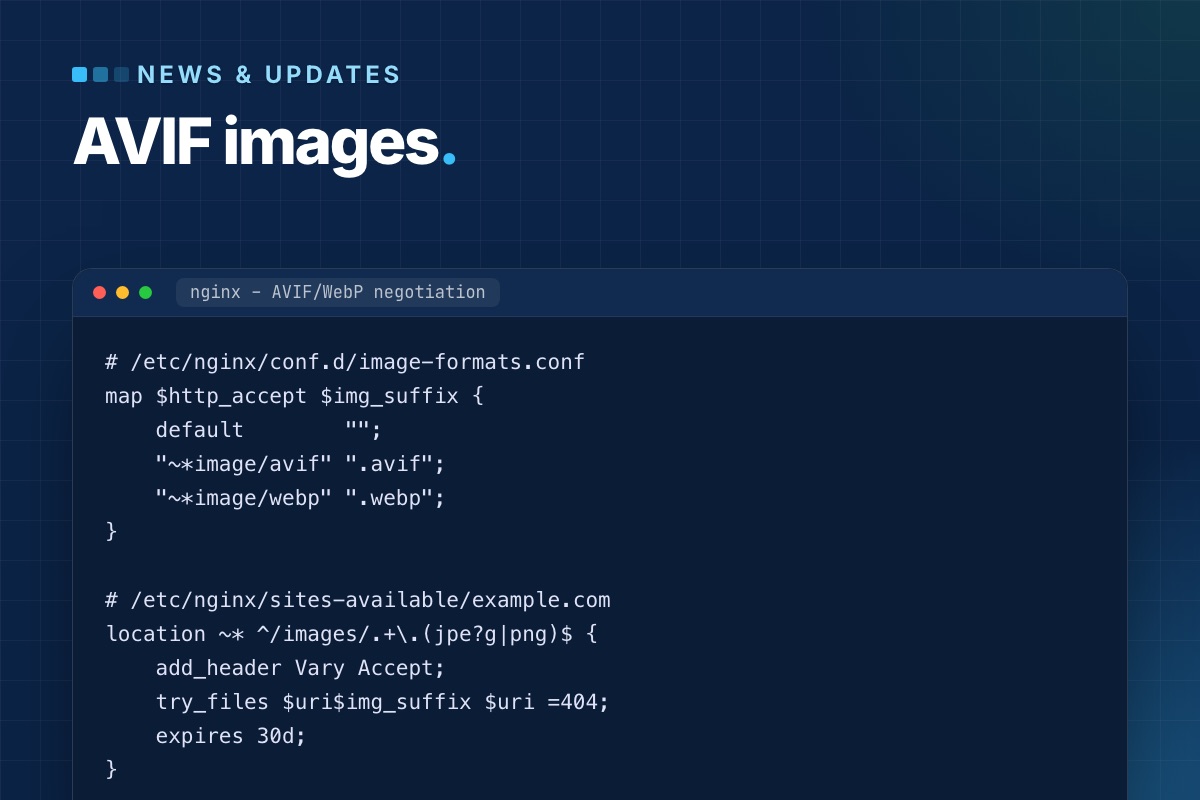
No template change. The browser says what it accepts, and nginx serves the best existing file under the original URL:
# /etc/nginx/conf.d/image-formats.conf
map $http_accept $img_suffix {
    default        "";
    "~*image/avif" ".avif";
    "~*image/webp" ".webp";
}

# /etc/nginx/sites-available/example.com
location ~* ^/images/.+\.(jpe?g|png)$ {
    add_header Vary Accept;
    try_files $uri$img_suffix $uri =404;
    expires 30d;
}
Vary: Accept is essential. Without it, a CDN or proxy caches the AVIF version and serves it to a browser that can't read it. Some CDNs ignore Vary on images, so check yours, or use option B.
Option B: <picture> in a layout override
The HTML lists every format, and the browser picks the first it supports. It works behind any CDN. For article images, override the layout that renders them:
// templates/yourtemplate/html/layouts/joomla/content/intro_image.php (excerpt)
use Joomla\CMS\HTML\HTMLHelper;

$img  = HTMLHelper::_('cleanImageURL', $images->image_intro);
$path = JPATH_ROOT . '/' . ltrim(parse_url($img->url, PHP_URL_PATH), '/');
?>
<figure class="<?php echo $this->escape($figureClass); ?> item-image">
    <picture>
        <?php foreach (['avif' => 'image/avif', 'webp' => 'image/webp'] as $ext => $type) : ?>
            <?php if (is_file($path . '.' . $ext)) : ?>
                <source srcset="/<?php /echo /$this->escape($img->url /. '.' /. /$ext); /?>" type="<?php echo $type; ?>">
            <?php endif; ?>
        <?php endforeach; ?>
        <?php echo LayoutHelper::render('joomla.html.image', $layoutAttr); ?>
    </picture>
</figure>
cleanImageURL matters. Joomla stores image fields as images/photo.jpg#joomlaImage://local-images/photo.jpg?width=1200&height=800, and the part after # must go before you build a file path. The <img> inside <picture> keeps its width, height and alt from Joomla's own image layout, so nothing else changes.
What it's worth
For photos, AVIF at similar visual quality is usually well under half the size of the JPEG, and WebP somewhere in between. On a blog list or a shop category page with a dozen images, that's the biggest single cut in page weight you can make without touching the design. Two things it doesn't fix:
- Oversized images. A 4000 px photo in a 600 px column is still too big in AVIF. Resize to the largest size the layout displays (×2 for high-density screens) first.
- A late LCP image. If the main image is lazy-loaded, a smaller file still starts late. See Joomla performance from the code up for the layout fix.
Checklist
- Media options:
webpandavifin the legal extensions and MIME types. gd_info()shows AVIF support, or editors know to resize before upload.- Existing images converted with the originals kept, named
file.jpg.avif/file.jpg.webp. - Served via
try_files+Vary: Accept, or via<picture>overrides. - The conversion runs again for new uploads (cron, or a step in your editors' workflow).
Heavy images slowing your Joomla site? We convert the library, set up serving and the overrides, and measure the result before and after.
SEO & speed optimization →