
News & updates

- Details
- Category: News & updates
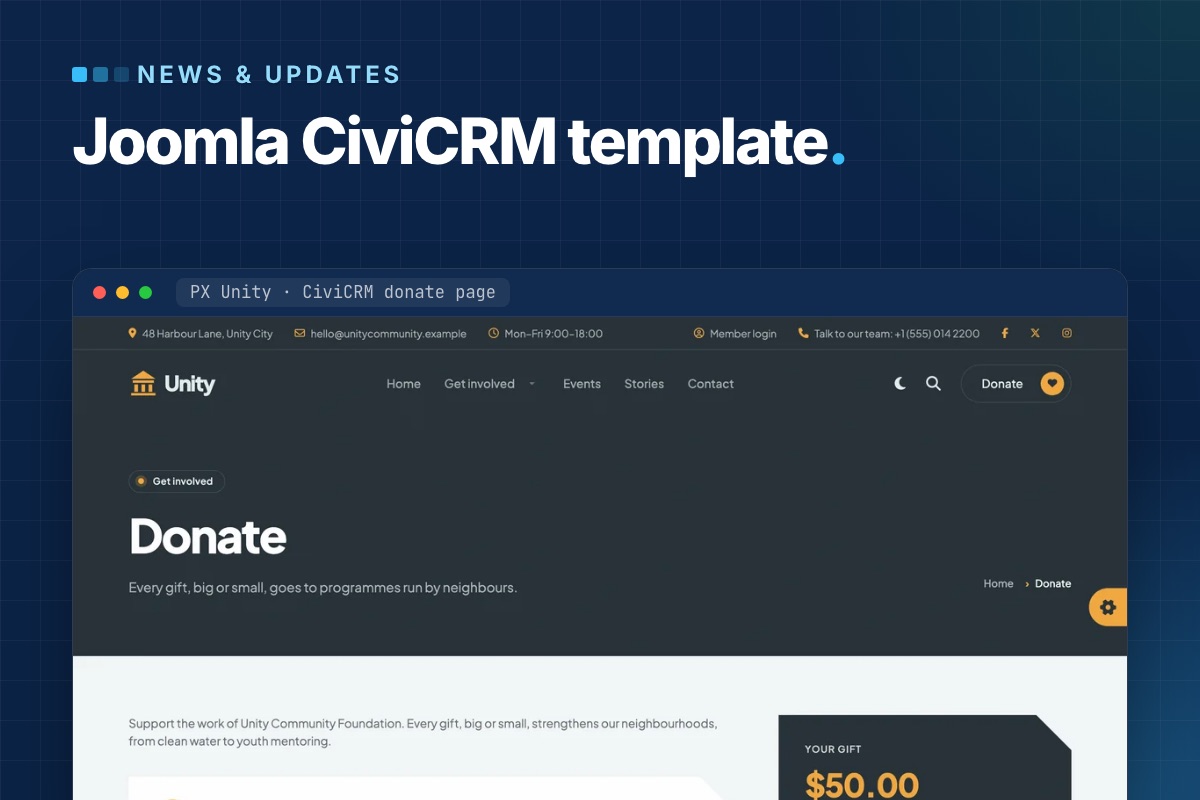
PX Unity is out: a Joomla CiviCRM template for nonprofits, councils and city halls. It styles CiviCRM's donation, membership, event and petition pages like the rest of the site, and its home page blocks read live numbers from CiviCRM – amount raised, places left, membership prices, signatures. The quickstart installs Joomla, CiviCRM, the template and the demo content in one go.
Why a template for CiviCRM sites
Out of the box, CiviCRM's forms come with CiviCRM's own styles. On a typical Joomla template the donate page ends up looking like a different website from the pages around it, and the numbers on the home page – amount raised, places left – are typed in by hand and go stale.
PX Unity handles both: the CiviCRM pages get the site's design, and the blocks that show CiviCRM numbers read them from CiviCRM itself.
CiviCRM pages in the site's design
PX Unity styles the CiviCRM pages visitors see: contribution pages (donations and memberships), event lists, event information and registration, petitions and profiles. They get the same page header and breadcrumbs as every other page, rounded fields, a summary card next to the form and buttons in your brand color.
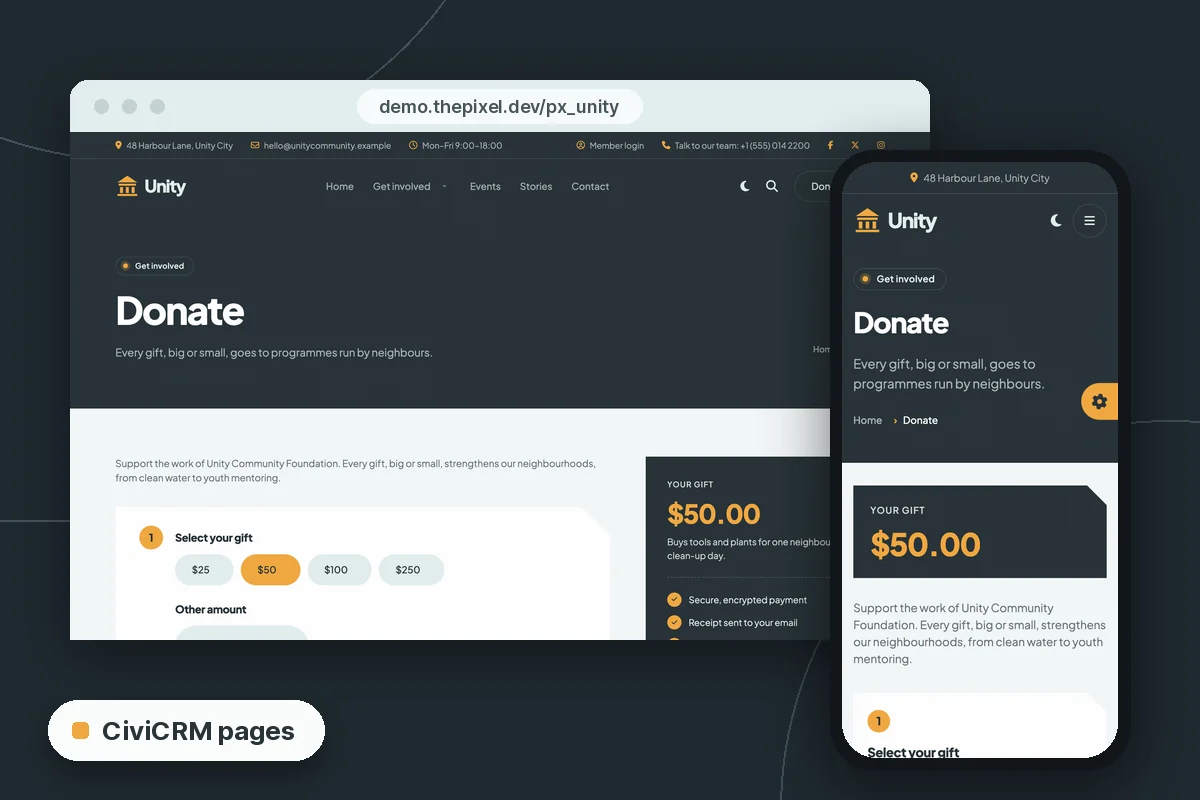
Try it on the demo donate page or the demo events list.
Home page blocks with live CiviCRM numbers
Four PX Content blocks (plus the donation hero) take a CiviCRM ID in their settings and read the rest from CiviCRM. You find the IDs in CiviCRM itself, for example the id= in a contribution page link under Contributions » Manage Contribution Pages.
| Block | Setting | Shows |
|---|---|---|
| Hero, style 2 | Contribution page ID | The donation amounts of that page; the form opens it |
| Campaign | Campaign ID, contribution page ID (optional) | Amount raised, goal, donors and days left |
| Events | Number of upcoming events, or event IDs | Date, place, places left; a waitlist button when an event is full |
| Pricing | Membership type IDs, signup contribution page ID | Plan names and prices |
| Petition | Petition (survey) ID | Signatures and goal; the form signs the petition |
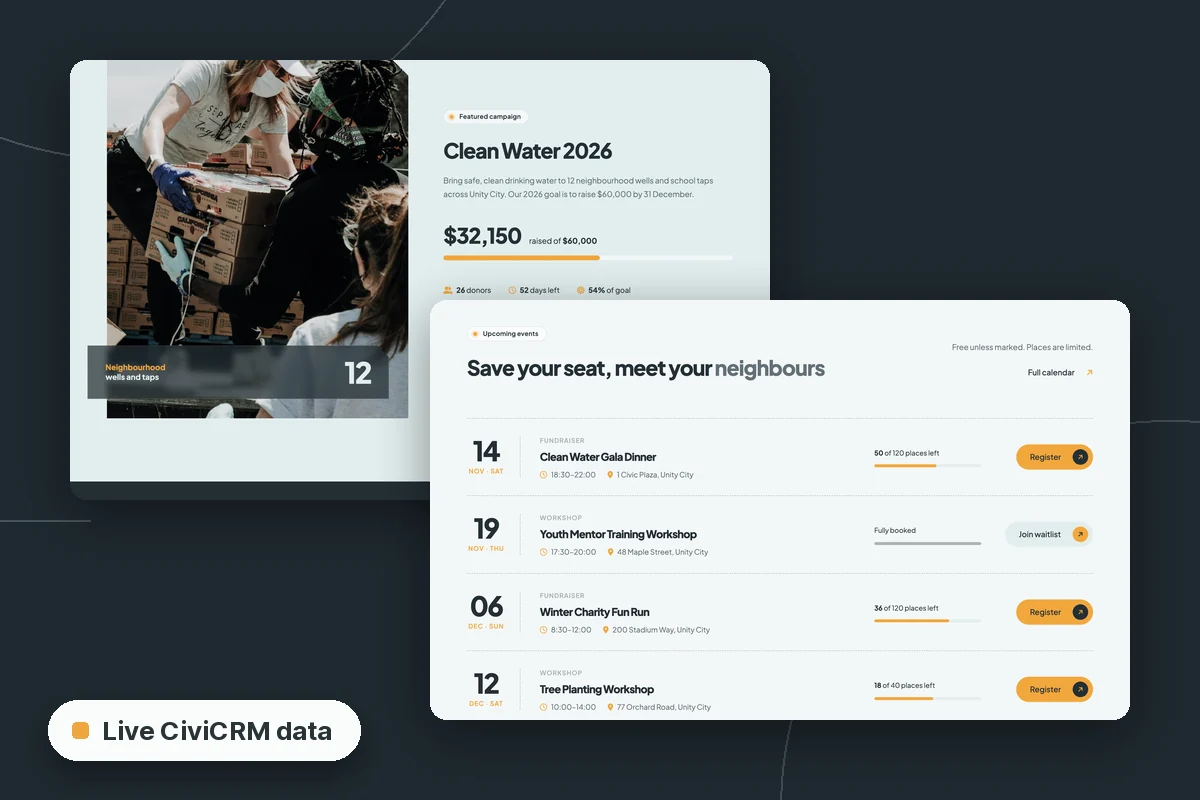
Numbers are cached for a short time, so a new donation can take a few minutes to show. Without CiviCRM – or with an empty or unknown ID – each block shows the texts typed in its other fields, so the template works on sites that don't run CiviCRM at all.
Two home pages: city hall and community foundation
The demo is Unity City, with two home pages built from the same blocks, colors and fonts:
- City hall – services, alerts, departments and public documents first. The documents list (a Category Blog layout) shows budgets, plans and council minutes with a date and a download button from the article's Link A.
- Community foundation – donations, volunteering, events and membership, with its own menu, top bar and a "Donate" header button.
Every section is a PX Content block – 18 blocks in 26 styles made for PX Unity. Editors click Edit content, double-click a heading or paragraph and change it in place. Light and dark mode come with a toggle in the header; in the template settings you choose light, dark, the visitor's system setting, or no toggle.
The quickstart sets up CiviCRM for you
The quickstart is a full Joomla install with CiviCRM 6.19.2, the template, its extensions and the demo contacts, contribution pages, events, membership types and a petition. A few details that save time on a CiviCRM install:
- CiviCRM reads its database, paths, site address and keys from Joomla's
configuration.php. There is nothing to edit after the install, and the site keeps working when you move it to another folder or domain. - The CiviCRM keys are made from the Joomla secret, which is unique to your site.
- On your first visit to the administrator, the site finishes the CiviCRM set-up (menus, caches, database triggers) and turns that step off.
- Demo contacts use example.org addresses and the demo mailings are not queued, so the new site sends nothing. For real mailings and reminders, set up the CiviCRM scheduled jobs – see CiviCRM scheduled jobs not running on Joomla.
Requirements: PHP 8.1.2+ for Joomla 5.4 or PHP 8.3+ for Joomla 6, MySQL 8.0.13+ or MariaDB 10.4+, and about 350 MB of disk space (CiviCRM is most of it).
Joomla 5.4 or Joomla 6?
There are two quickstarts with the same template, CiviCRM version and demo content: Joomla 5.4.10 and Joomla 6.2.0. The PX Unity page marks the Joomla 5.4 one as recommended, and the Joomla 6 one needs PHP 8.3+. As of November 2026, CiviCRM's Joomla package is still labeled "Joomla 5+" – what that means for a Joomla 6 site is tracked in Is CiviCRM compatible with Joomla 6?, updated with each CiviCRM release.
Already running CiviCRM on Joomla?
Install the T4 Framework plugin, the PX Unity template and the PX Content module, in that order, through System » Install » Extensions. Your CiviCRM pages pick up the styles; the home page blocks need the IDs of your own campaigns, events and membership types. A manual install doesn't bring the demo pages and modules, so you build the pages from the blocks – the PX Unity documentation walks through it.
If the site is still on Joomla 3 or 4, move it first: Upgrade a Joomla site with CiviCRM to Joomla 6 covers the route, and the CiviCRM on Joomla 6 guide collects the rest.
Get PX Unity
PX Unity is part of the Pro membership ($99/year), with every ThePixel.dev template and extension. Open the PX Unity page for the downloads, and click through the live demo first. With Pro + Launch ($199/year) our developers install it with your logo, colors and fonts, plus two hours of changes, in two business days.
Moving a CiviCRM site to Joomla 6 – and want the new design too? Tell us your Joomla and CiviCRM versions. We reply with a plan and a fixed quote – no CiviCRM core edits.
CiviCRM Joomla 6 upgrade →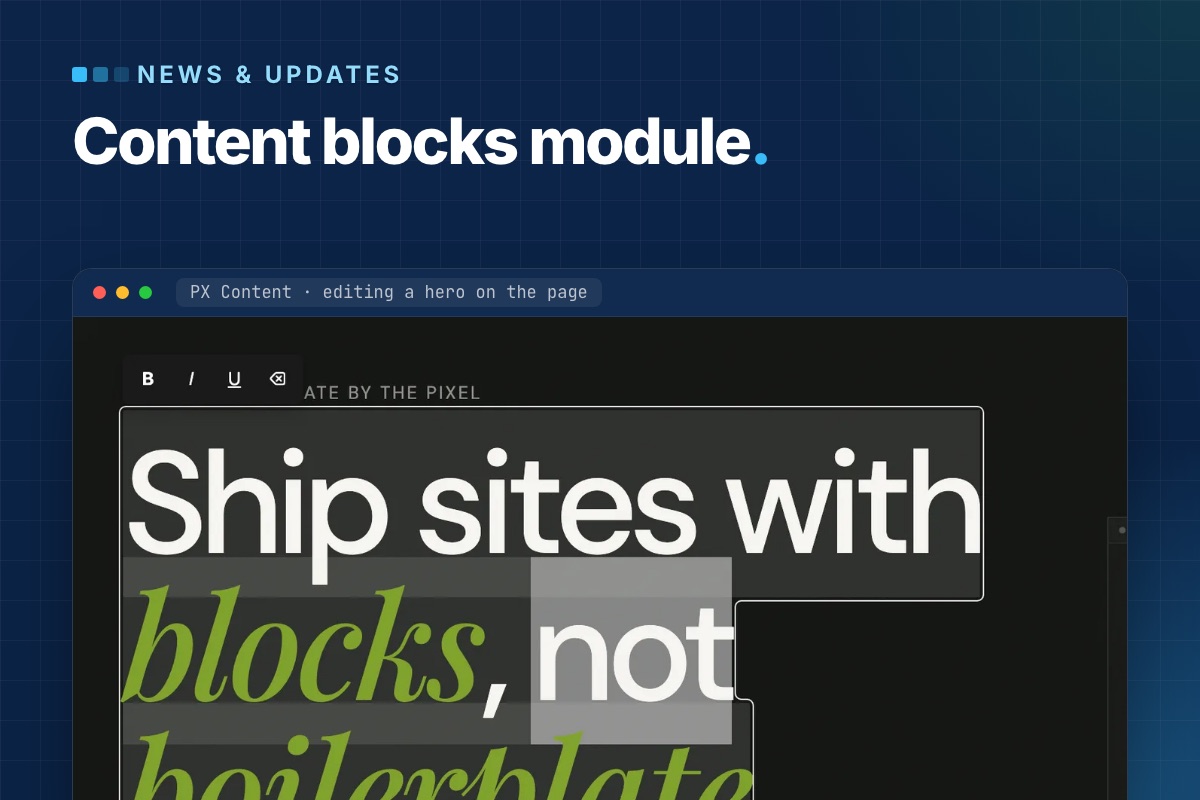
- Details
- Category: News & updates
PX Content 1.0.0 is out: a free Joomla module that builds page sections from ready-made content blocks and lets editors change them right on the page. It ships a library of ready-made blocks, each in one or more styles, works with any template, and a template can add or override blocks without touching the module. Download it with a free ThePixel.dev account.
The problem it solves
A typical Joomla landing page is a stack of sections: hero, features, logos, numbers, testimonials, pricing, FAQ, call to action. They usually end up as Custom modules full of hand-written HTML, or as overrides with the copy baked in. Both are hard for editors: a new headline means finding the right module in the admin and editing markup they did not write.
PX Content splits the two. The section layout lives in a block template; the content lives in the module as structured fields. Editors only ever see the fields – in a short admin form, or directly on the page.
A library of ready-made blocks
Each PX Content module shows one block. Pick it from a visual library with a preview per style. The first release covers the sections most sites need, and more blocks and styles will follow:
| Block | Looks |
|---|---|
| Hero | background image with overlay; copy, visual and stats |
| Features Intro | why us, service cards, about with metrics, process steps |
| Clients | logo grid, name marquee, capability marquee |
| Gallery | project grid, case studies |
| Accordion | FAQ in two columns, centered FAQ |
| Stats, Team, Testimonials, Pricing, Timeline, Call To Action, Contact Info | numbers, member cards, quote slider, plans, steps, closing band, contact channels |
Every block opens with sample content, so a new module renders something sensible before you type a word. The whole configuration is also available as Advanced JSON for copying a section between modules or sites.
Editing on the page
Log in on the front end and click Edit content. Double-click a heading, paragraph or button label and type; Enter saves a one-line field, Ctrl/⌘+Enter a multi-line one, Esc cancels. Links get a small URL popup, images open the Joomla Media Manager, and every block has a Settings panel for spacing, alignment and button styles.
Because this writes to the database from the front end, the save endpoint is deliberately narrow:
- it needs a logged-in user with
core.editon that specific module – the normal Joomla module permission, so you decide who gets it; - every request carries the Joomla CSRF token;
- only fields declared in the block's XML for the active style can be written, and each value is sanitized for its field type (rich text through Joomla's
InputFilter); - it can be switched off per module (Advanced → Frontend Inline Edit).
After a save the module cache is cleared, so visitors see the change right away. A page cache or CDN in front of the site still needs its own purge.
A block is a folder
Blocks are plain files. The module scans its own blocks/ folder and the active template's, so a template can ship new blocks or replace a stock style:
# templates/your_template/blocks/
hero/
  config.xml          # block title, description, shared fields
  tmpl/style-1.php    # front-end markup
  tmpl/style-1.xml    # fields + sample content for this style
  preview/style-1.jpg # thumbnail in the block library
  css/style.css       # decoration on top of the module's base layout
Fields are standard Joomla form XML. Mark a field with setting="1" and it also appears in the on-page Settings panel:
<!-- templates/your_template/blocks/hero/tmpl/style-1.xml -->
<fieldset name="global" label="Global">
  <field name="align" type="list" default="start" label="Content align" setting="1">
    <option value="start">Left</option>
    <option value="center">Center</option>
  </field>
</fieldset>
Styling: base layout in the module, brand in the template
The module's block CSS is a usable base – grid, spacing and type sizes – so blocks read correctly on Cassiopeia or any other template. Colours and decoration come from the template. All blocks read shared custom properties defined once in media/css/px-content.css, so a template restyles every block from its own :root:
/* templates/your_template/css/template.css */
:root {
  --px-color-primary: #c9ff56;
  --px-space-lg: 80px;   /* "Large" section spacing on desktop */
  --px-fs-lg: 1.25rem;   /* intros and quotes */
}
Stylesheets load in a fixed order – shared tokens, module block CSS, template block CSS, then an optional local/ override – and later files win, so overrides never need !important.
Where it is used
PX Content powers every section of PX Base, our free Joomla 6 starter template, and the content blocks of PX University. Those templates add their own styles and decoration through the template block folder described above; the module itself stays the same.
Get it
- Product page and download: PX Content (free account).
- Documentation: install, blocks, front-end editing and template blocks.
- Updates arrive through System → Update → Extensions.
Need a block that is not in the library, or a full set designed for your brand? Our team builds them as part of template customization and custom extensions.
- Details
- Category: News & updates
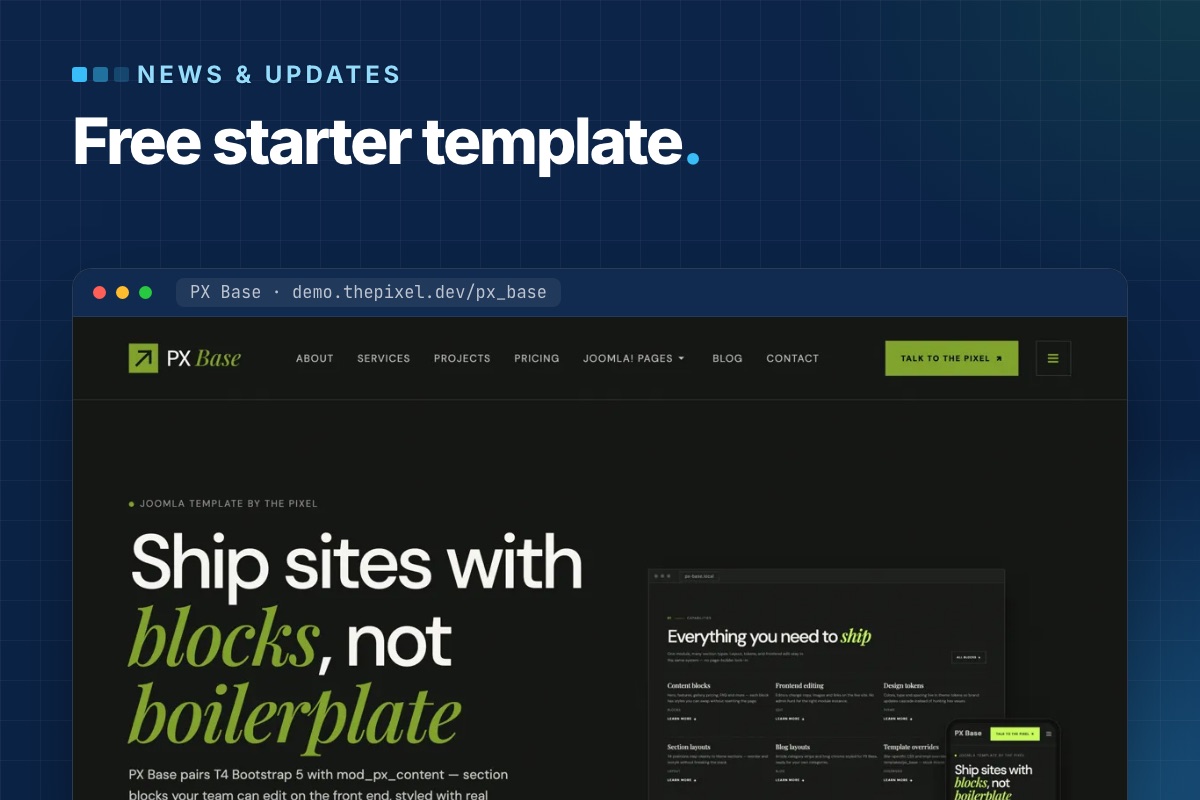
PX Base is out: a free starter template for Joomla 6. Every section of its pages is a PX Content block that you pick, style and edit right on the page, and the quickstart installs a complete seven-page site in one step. Download it with a free ThePixel.dev account and use it on as many sites as you like.
Why we built a starter template
Most of our client sites start the same way: a hero, a row of features, some logos, a pricing table, testimonials, an FAQ and a call to action. Building those sections again for every project – or pasting demo HTML into overrides – is slow, and it leaves editors with markup they cannot change.
PX Base keeps the structure in blocks and the look in the template. Editors change texts and images; the section layout stays put.
Twelve block types, twenty styles
Each section is a PX Content module that shows one block. PX Base ships with 12 block types in 20 styles:
| Block | Styles | On the demo |
|---|---|---|
| Hero | 2 | Home hero, page headers |
| Features Intro | 4 | Capabilities, “Why PX Base”, the four-step workflow |
| Clients | 3 | Logo strip, scrolling capability strip |
| Gallery | 2 | Project showcase |
| Accordion | 2 | FAQ on Home and Contact |
| Pricing, Testimonials, Team, Stats, Timeline, Contact Info, Call To Action | 1 each | Plans, quotes slider, team, numbers, closing band |
The full settings of a block are also available as Advanced JSON, so you can copy a section to another module or another site.
Edit on the page
Log in on the front end and click Edit content. Double-click a heading or paragraph to change it in place and save with Ctrl/⌘+Enter; images open the Media Manager. Each block gets a Settings panel for spacing, alignment and button styles, plus a link to the full module.
It works for users who may edit modules, so you decide who gets it with normal Joomla permissions. Editing can be turned off per module (Frontend Inline Edit on the Advanced tab).
Seven pages in the quickstart
The quickstart is Joomla 6.2 with PX Base, PX Content, T4 Framework and the demo content: Home, About, Services, Projects, Pricing, Blog and Contact, with menus and images. The Joomla views – login, registration, password reset, articles, categories, tags, search, contact and the 404 page – use the same design, each with its own page header.
It installs like any Joomla package in the browser. On a server with shell access you can also run the installer from the command line:
# unzip px_base_quickstart_v1.0.0.zip in the site folder, create an empty database, then:
php installation/joomla.php install --site-name="My site" \
  --admin-user="Admin" --admin-username=admin --admin-email="$ADMIN_EMAIL" \
  --admin-password='a-long-password' \
  --db-type=mysqli --db-host=localhost --db-name=mysite --db-user=mysite --db-pass='…' \
  --db-prefix=abc_ --db-encryption=0 -n
The installer creates your admin account and removes the installation folder. Demo users are not part of the package.
T4 Framework under the hood
PX Base is a T4 template on Bootstrap 5. Logo, fonts, colours, megamenu and layouts live on one settings screen with a live preview, and your own CSS goes in Tools » Edit Custom CSS, so it survives updates. Three template styles cover the site:
- PX Base - Home (layout
home): a hero inslideshow, thensection-1tosection-11. Home, About, Services, Projects and Pricing use it. - PX Base - Default (layout
default): page header, content and sidebars, for Blog, Contact and the Joomla views. - PX Base - No sidebar (layout
no-sidebar).
Updates through Joomla
The template manifest has an update server, so new versions of PX Base show up in System » Update » Extensions like any other extension, with a changelog – no download key needed.
Get PX Base
Sign up for a free account, then download the quickstart or the template package from the PX Base page. Try the live demo first, and read the documentation for the full setup.
Want it set up with your branding and pages? Template customization is what we do every week – or pick Pro + Launch and our developers set up your site in two business days.

- Details
- Category: News & updates
Joomla won Favourite Open Source CMS at the 2025 20i FOSS Awards, the community-voted awards run by the UK hosting company 20i for free and open-source software. It's a popularity vote, not a benchmark, and that's what makes it interesting. The people who voted are the people who build and run sites with it.
What the vote rewarded
In mid-2025 Joomla 5 was the current version, and the things users noticed were mostly under the hood:
- Upgrades that were boring for once. After the long Joomla 3 → 4 rewrite, 4.4 → 5 was an update with a compatibility plugin, not a migration. For agencies with dozens of sites, that's the feature.
- Core features that used to need extensions: schema.org structured data, multi-factor authentication with passkeys, a task scheduler, a REST API, custom fields, workflows.
- Security and accessibility as defaults, with a dedicated security team and an admin interface built for WCAG.
- Multilingual in core, which is still unusual among the big open-source CMSs.
A year later: did it hold up?
Since the award, Joomla 6.0 shipped in October 2025, followed by 6.1 and 6.2. From our side, as developers who upgraded our own site and client sites:
- The 5.4 → 6 upgrade followed the same pattern as 4.4 → 5: a compatibility plugin, a clear deprecation log, and few surprises in core. The surprises came from extensions, as they always do. Our notes are in the migration runbook.
- Joomla 6 added automated core updates, child templates by example (Cassiopeia Extended), versioning that covers fields and tags, a third-party-free CAPTCHA (6.1) and security flags for extension updates (6.2). Details in what's new in Joomla 6.
- Work on Joomla 7 has started in the open, and its direction is clear: removing the compatibility layers kept since Joomla 4. Our take is in why Joomla 7 matters.
Why an award matters to developers at all
Clients ask whether Joomla is "still alive" more often than they ask about features. A community award doesn't answer technical questions. It does answer that one, which is often the question that decides whether a project is built on Joomla at all. A predictable release cycle, two-year majors with documented deprecations and long security support, answers the rest.
Congratulations to everyone who contributes code, tests, translations and documentation. The win is theirs.
Building on Joomla? We've done it for twenty years: new sites, migrations, custom extensions and long-term maintenance.
Our Joomla services →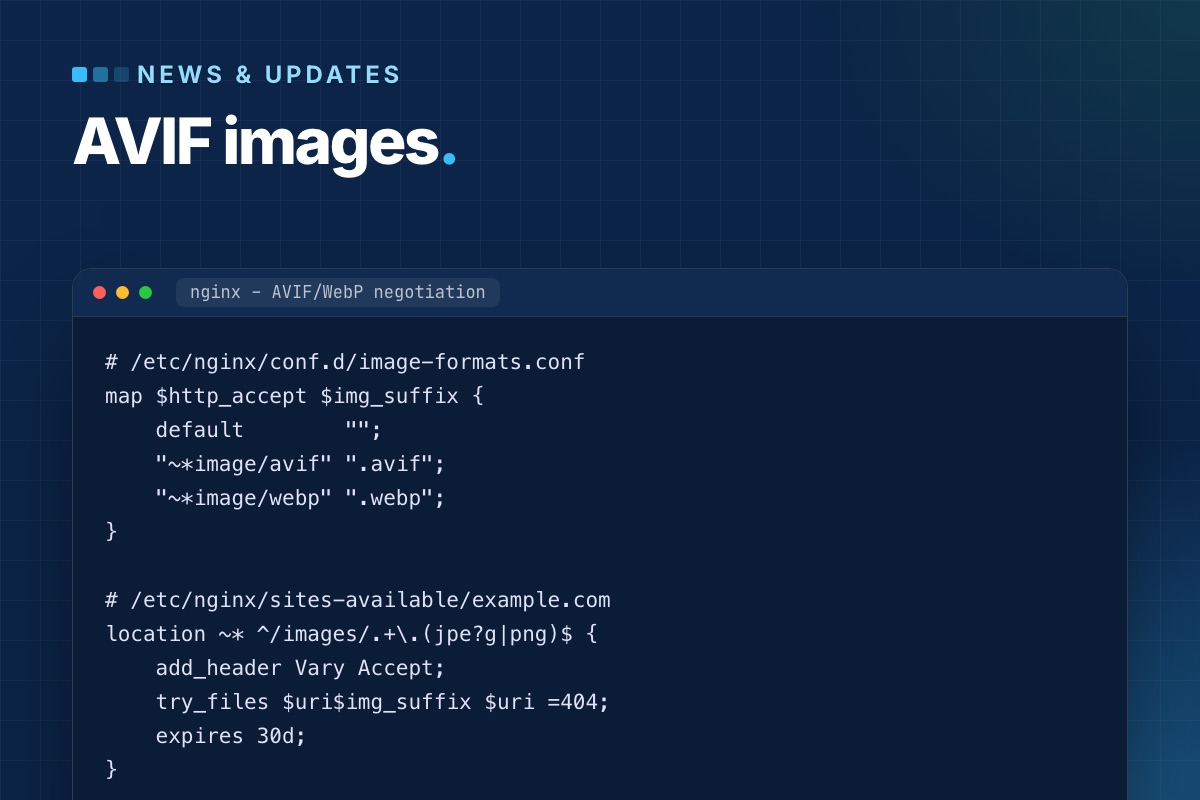

- Details
- Category: News & updates
Joomla's Media Manager accepts WebP and AVIF images in current versions (5.x and 6.x). That's where most articles about it stop. In practice, uploading AVIF files is the easy part. Whether Joomla can process them depends on how PHP was built, and serving modern formats to every visitor, with a fallback for the rest, takes a little template work. This post covers both, from what we do on client sites.
What Joomla supports out of the box
| Where | WebP | AVIF |
|---|---|---|
| Media Manager upload (default allowed extensions) | yes | yes |
MIME check on upload (image/webp, image/avif) | yes | yes |
| Crop / resize / rotate in the Media Manager editor | yes, if GD has WebP | only if GD has AVIF |
Joomla\CMS\Image\Image (thumbnails, your own code) | yes | only if imageavif() exists |
| Automatic conversion of JPEG/PNG on upload | no, Joomla stores what you upload | |
The defaults live in the Media component options: "Legal Image Extensions" is bmp,gif,jpg,jpeg,png,webp,avif, and the legal MIME types include image/webp and image/avif. If AVIF uploads fail on an older site, those two fields were probably saved before AVIF was added. Compare them with the defaults.
The catch: GD without AVIF
PHP's GD extension only supports AVIF when it was compiled against libavif. Many hosting builds and local stacks don't have it. Our own local MAMP PHP 8.3 is one of them. Check:
# terminal – the PHP the web server uses may differ from the CLI one; check both
php -r 'print_r(array_intersect_key(gd_info(), array_flip(["GD Version", "WebP Support", "AVIF Support"])));'
When "AVIF Support" is empty, the Media Action – Resize plugin, which shrinks large uploads to a maximum width and height, skips AVIF files without an error: it checks function_exists('imageavif') and returns. A 6000 px AVIF goes into images/ untouched, and nobody notices until the page weight does. On such servers, convert and resize before upload, or ask the host for a PHP build with libavif. Imagick with an AVIF-capable ImageMagick is an alternative for your own code.
Converting existing images
Joomla won't convert your existing library, and it shouldn't do it on upload either. That would cost CPU on every request that triggers it. We convert on the command line, keep the originals, and put the modern versions next to them:
# terminal – WebP and AVIF next to each JPEG/PNG under images/ (needs cwebp and avifenc)
cd /var/www/example.com/images
find . -type f \( -iname '*.jpg' -o -iname '*.jpeg' -o -iname '*.png' \) -print0 |
while IFS= read -r -d '' f; do
    [ -f "$f.webp" ] || cwebp -quiet -q 80 "$f" -o "$f.webp"
    [ -f "$f.avif" ] || avifenc --min 20 --max 30 -s 6 "$f" "$f.avif" >/dev/null
done
Naming the files photo.jpg.webp and photo.jpg.avif, rather than photo.webp, keeps the mapping trivial. Content keeps pointing at photo.jpg, and the server or the template picks the best file.
Serving them: two options
Option A: content negotiation in the web server
No template change. The browser says what it accepts, and nginx serves the best existing file under the original URL:
# /etc/nginx/conf.d/image-formats.conf
map $http_accept $img_suffix {
    default        "";
    "~*image/avif" ".avif";
    "~*image/webp" ".webp";
}

# /etc/nginx/sites-available/example.com
location ~* ^/images/.+\.(jpe?g|png)$ {
    add_header Vary Accept;
    try_files $uri$img_suffix $uri =404;
    expires 30d;
}
Vary: Accept is essential. Without it, a CDN or proxy caches the AVIF version and serves it to a browser that can't read it. Some CDNs ignore Vary on images, so check yours, or use option B.
Option B: <picture> in a layout override
The HTML lists every format, and the browser picks the first it supports. It works behind any CDN. For article images, override the layout that renders them:
// templates/yourtemplate/html/layouts/joomla/content/intro_image.php (excerpt)
use Joomla\CMS\HTML\HTMLHelper;

$img  = HTMLHelper::_('cleanImageURL', $images->image_intro);
$path = JPATH_ROOT . '/' . ltrim(parse_url($img->url, PHP_URL_PATH), '/');
?>
<figure class="<?php echo $this->escape($figureClass); ?> item-image">
    <picture>
        <?php foreach (['avif' => 'image/avif', 'webp' => 'image/webp'] as $ext => $type) : ?>
            <?php if (is_file($path . '.' . $ext)) : ?>
                <source srcset="/<?php /echo /$this->escape($img->url /. '.' /. /$ext); /?>" type="<?php echo $type; ?>">
            <?php endif; ?>
        <?php endforeach; ?>
        <?php echo LayoutHelper::render('joomla.html.image', $layoutAttr); ?>
    </picture>
</figure>
cleanImageURL matters. Joomla stores image fields as images/photo.jpg#joomlaImage://local-images/photo.jpg?width=1200&height=800, and the part after # must go before you build a file path. The <img> inside <picture> keeps its width, height and alt from Joomla's own image layout, so nothing else changes.
What it's worth
For photos, AVIF at similar visual quality is usually well under half the size of the JPEG, and WebP somewhere in between. On a blog list or a shop category page with a dozen images, that's the biggest single cut in page weight you can make without touching the design. Two things it doesn't fix:
- Oversized images. A 4000 px photo in a 600 px column is still too big in AVIF. Resize to the largest size the layout displays (×2 for high-density screens) first.
- A late LCP image. If the main image is lazy-loaded, a smaller file still starts late. See Joomla performance from the code up for the layout fix.
Checklist
- Media options:
webpandavifin the legal extensions and MIME types. gd_info()shows AVIF support, or editors know to resize before upload.- Existing images converted with the originals kept, named
file.jpg.avif/file.jpg.webp. - Served via
try_files+Vary: Accept, or via<picture>overrides. - The conversion runs again for new uploads (cron, or a step in your editors' workflow).
Heavy images slowing your Joomla site? We convert the library, set up serving and the overrides, and measure the result before and after.
SEO & speed optimization →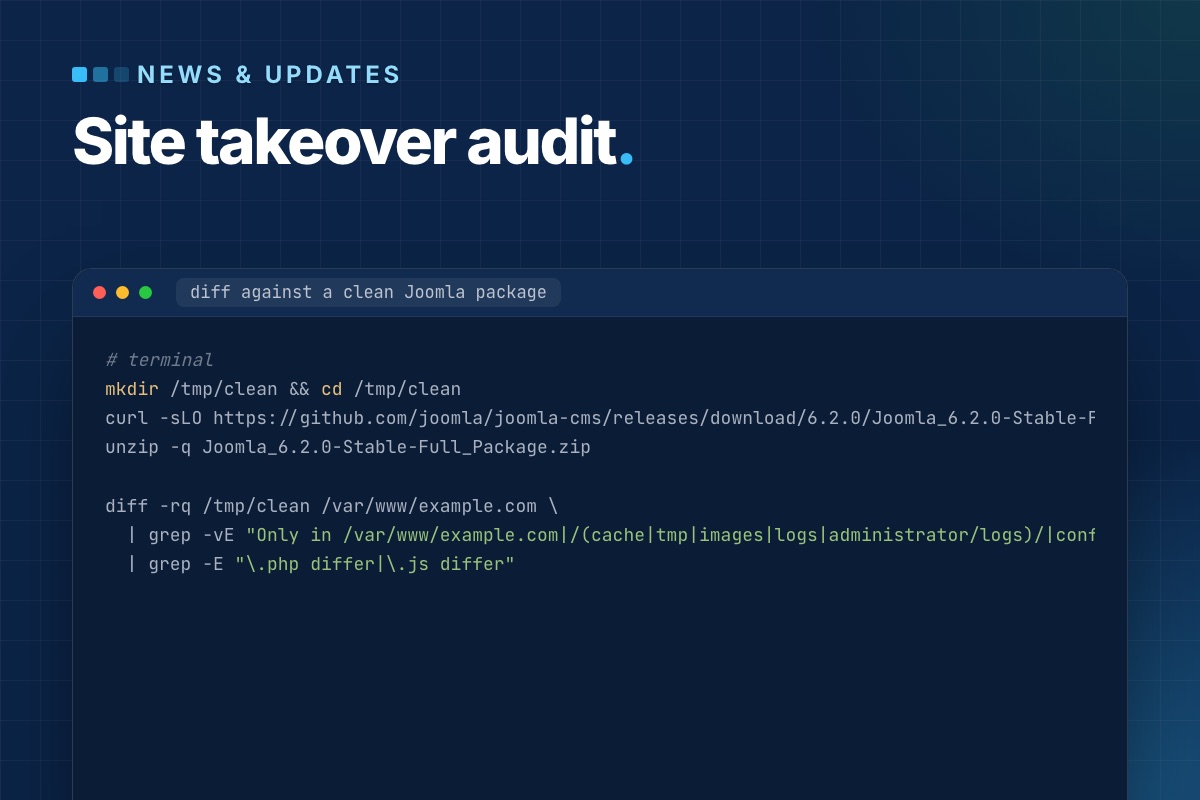

- Details
- Category: News & updates
Most Joomla sites we work on were built by someone else. Before we quote anything or change a line, we spend a few hours on one question: what is actually running here? Sites rarely match their documentation, when there is any. There are core files edited in place, overrides nobody remembers, cron jobs on a server nobody has logged into for years.
This is the audit we run when we take over a Joomla site. It's written so you can run it yourself, or use it to judge whoever runs it for you.
1. Access and a copy
Before anything else, make sure you can restore what you're about to touch:
- Hosting panel, SSH or SFTP, database access, DNS, the domain registrar, any CDN.
- A Super User account of your own. Don't share the previous developer's.
- A full backup you made, restored once on a staging host. A backup you have never restored is a hope, not a backup.
# terminal – a quick full copy if there is no backup tool yet
tar --exclude='./cache/*' --exclude='./administrator/cache/*' --exclude='./tmp/*' -czf ~/site-files-$(date +%F).tgz -C /var/www/example.com .
mysqldump --single-transaction --no-tablespaces -u USER -p DBNAME | gzip > ~/site-db-$(date +%F).sql.gz
2. Versions
# terminal
grep -E "MAJOR_VERSION|MINOR_VERSION|PATCH_VERSION" libraries/src/Version.php
php -v                       # CLI
# web PHP: System → System Information (they often differ)
mysql -V
Write down Joomla, PHP (web and CLI), the database server, and the web server. Anything end-of-life goes straight to the top of the report: Joomla 3 or 4, PHP below 8.2, MySQL 5.x.
3. Core files: modified or not?
This is the check that changes quotes most often. A previous developer "fixed" something by editing a core file. The next Joomla update silently overwrites the fix, or, worse, the edit is a backdoor. Compare the site against a clean package of the same version:
# terminal
mkdir /tmp/clean && cd /tmp/clean
curl -sLO https://github.com/joomla/joomla-cms/releases/download/6.2.0/Joomla_6.2.0-Stable-Full_Package.zip
unzip -q Joomla_6.2.0-Stable-Full_Package.zip

diff -rq /tmp/clean /var/www/example.com \
  | grep -vE "Only in /var/www/example.com|/(cache|tmp|images|logs|administrator/logs)/|configuration.php" \
  | grep -E "\.php differ|\.js differ"
Every line in that output needs an explanation. In order of how often we find them: a patched core file, an outdated file left by an incomplete update, and occasionally an injected backdoor.
Then look for PHP files where none belong:
# terminal
find images media tmp cache -type f -name '*.php' ! -name 'index.php' 2>/dev/null
4. Extensions: what is installed and what is used
# terminal – third-party extensions, versions and status
mysql -e "SELECT type, element, folder, enabled,
                 JSON_UNQUOTE(JSON_EXTRACT(manifest_cache, '$.version')) AS version,
                 JSON_UNQUOTE(JSON_EXTRACT(manifest_cache, '$.author'))  AS author
          FROM jos_extensions
          WHERE JSON_UNQUOTE(JSON_EXTRACT(manifest_cache, '$.author')) NOT LIKE 'Joomla%'
          ORDER BY enabled DESC, type, element;" mydb
For each one: is there a current version, is the vendor still around, is it actually used (a component with an empty table usually isn't), and does it have an update site, so updates can reach the site at all? Disabled extensions still have reachable files. They go on the remove list.
5. Template and overrides
Overrides are where a site's real behaviour lives, and the first thing to break on updates:
# terminal – every override in the site template(s)
find templates/*/html -type f -name '*.php' | sort

# which override is older than the core layout it replaces? (Joomla flags these in System → Templates too)
for f in $(find templates/yourtemplate/html -name '*.php'); do
    rel=${f#templates/yourtemplate/html/}
    for core in components/${rel%%/*}/tmpl/${rel#*/} modules/${rel%%/*}/tmpl/${rel#*/} layouts/${rel#layouts/}; do
        [ -f "$core" ] && [ "$core" -nt "$f" ] && echo "older than core: $f"
    done
done
File dates are only a hint: after a fresh deploy every file has the same date, and then Joomla's own "Changes found" notice in System → Templates is the reliable check. Also check for a child template. If the site edits a vendor template directly, the next template update wipes the changes. Moving them into a child template is often the first fix we make.
6. Scheduled work and cron
Things that happen without anyone clicking: newsletter queues, imports, feeds, backups, cleanup tasks.
# terminal
crontab -l; sudo crontab -l -u www-data 2>/dev/null
php cli/joomla.php scheduler:list
Check whether the Lazy Scheduler is on (Scheduled Tasks → Options). If it is, tasks run during visitors' page loads. Check which PHP binary each cron line uses, and whether the jobs actually succeed. A backup cron that has been failing for a year is a classic.
7. Users and access
# terminal – Super Users and when they last logged in
mysql -e "SELECT u.username, u.email, u.block, u.lastvisitDate
          FROM jos_users u JOIN jos_user_usergroup_map m ON m.user_id = u.id
          WHERE m.group_id = 8 ORDER BY u.lastvisitDate DESC;" mydb
Former agencies, freelancers and staff with Super User rights are on almost every site we audit. So are accounts without MFA, and API tokens for integrations nobody remembers. Each goes in the report with a recommendation: block, downgrade, or keep.
8. Configuration that hurts quietly
| Setting | What we look for |
|---|---|
| Error Reporting | "Maximum" or "Development" on live leaks paths and SQL |
| Debug System | must be off on live |
| Session handler and lifetime | database handler with a long lifetime: a huge #__session table |
| PHP mail() instead of authenticated SMTP: contact forms end up in spam | |
| Caching | off entirely, or Progressive with a cache folder in the gigabytes |
| Live site / force SSL | mixed http/https URLs in content and canonical tags |
| Log folder | inside the web root and readable |
9. The front end, briefly
Not a full SEO audit, just the things that reveal neglect: PHP notices in the HTML, mixed content, 404s for assets in the browser console, jQuery and three slider libraries loaded on every page, and a robots.txt still blocking /images/ from an old Joomla default.
The report
We sort findings into three groups and quote only the first one up front:
- Risk now: end-of-life versions, modified core files, unknown Super Users, failing backups.
- Cost later: abandoned extensions, overrides older than core, a vendor template edited in place.
- Improvements: performance, SEO, editor experience.
A site audited this way rarely holds big surprises in the project that follows. The surprises came out in week one, while they were still cheap.
Inherited a Joomla site? We run this audit on a copy of it and send you a written report: what's running, what's at risk, and what we'd fix first.
Maintenance & support →