

You can build a landing page from Joomla content blocks without a page builder. Joomla 6 ships three ways to do it, and a free block module adds a fourth where the editor changes the text on the page itself. We ran three of them on a Joomla 6.2 site with Cassiopeia and read the fourth, the Articles module, from the core source. Below is what each one takes, where it breaks and what it loads.
The four ways at a glance
| Way | The editor changes text in | The markup lives in | Use it for |
|---|---|---|---|
| Custom module + layout override | The module form | A template file | A few fixed sections with simple text |
{loadmoduleid} in an article | The module form | The module or its override | A section in the middle of an article |
| Articles + custom fields + a list module | The article form | A module layout override | Repeating items: team, services, FAQ |
| Block module (PX Content) | The page itself | A block template | Whole landing pages a client keeps editing |
A section is a layout plus the content in it. The four ways differ in how far apart they keep the two. The further apart, the less an editor can break.
A Custom module with a layout override
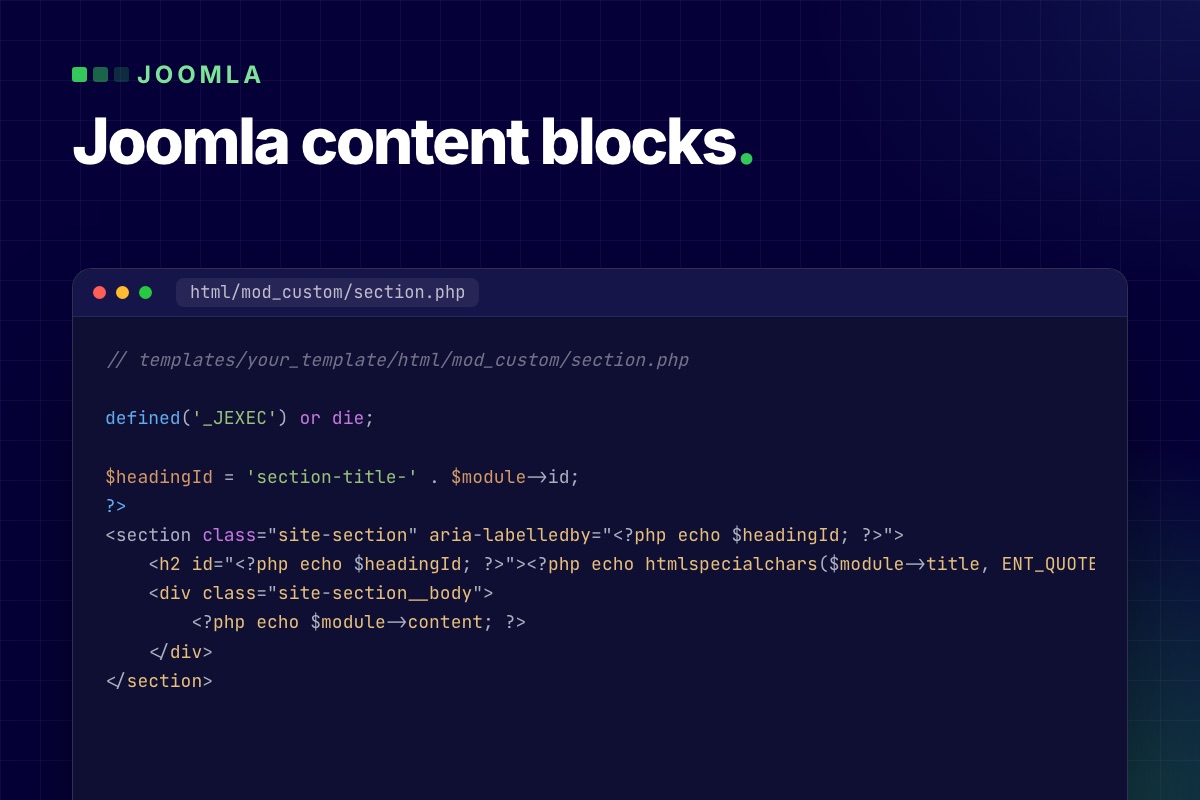
Cassiopeia already does this. Its banner is a Custom module with the layout banner, a short file in templates/cassiopeia/html/mod_custom/banner.php that wraps whatever the editor typed in the overlay markup. You can use the same pattern for your own sections. This is the override we tested. Save it with <?php on its own first line, above the comment:
// templates/your_template/html/mod_custom/section.php

defined('_JEXEC') or die;

$headingId = 'section-title-' . $module->id;
?>
<section class="site-section" aria-labelledby="<?php echo $headingId; ?>">
    <h2 id="<?php echo $headingId; ?>"><?php echo htmlspecialchars($module->title, ENT_QUOTES, 'UTF-8'); ?></h2>
    <div class="site-section__body">
        <?php echo $module->content; ?>
    </div>
</section>
Then create the module under Content → Site Modules → New → Custom and set three things:
- Title: hide it in the module form. The layout prints it as the section heading.
- Advanced → Layout: pick section. Joomla lists the files in the template's
html/mod_custom/folder, except those with an underscore in the name, somy_section.phpwould not show up. - Advanced → Module Style: none, so the template's card wrapper does not go around your section.
On our test site the module in position top-a came out as one clean <section> with the heading and the paragraph, nothing else. The editor types a paragraph. The section, the heading level and the classes stay in the file. Put the override in your own template or a child template, not in Cassiopeia itself.
Where it breaks
- Anything with structure. A row of three cards is still HTML in the editor. The first time a client deletes a card or pastes from Word, the wrapper divs and their classes go with it.
- Inline CSS and scripts. Module text goes through Joomla's text filters (Global Configuration → Text Filters). On a default install only Super Users are set to No Filtering. Managers, Administrators, Editors and the other editing groups get the Default Forbidden List, which removes
<style>,<script>,<iframe>and<link>among others when they save. A section that a Super User built with a<style>block loses its styling the day an Administrator edits it. Keep the CSS in the template. - Finding the module. The editor has to know which of 30 modules holds the headline. Joomla's Frontend Editing (Global Configuration → Site, set to Modules by default) helps: it adds an edit link to each module in a template position, for users who have the Frontend Editing permission on modules. A module loaded into an article, as in the next section, gets no such link.
A module inside an article with {loadmoduleid}
The Content - Load Modules plugin puts a module in the middle of an article. It understands three tags (the # lines are notes, not part of the tag):
# every module published in position "faq"
{loadposition faq}

# one module by type and title
{loadmodule mod_custom,Opening hours}

# one module by its ID
{loadmoduleid 149}
Use the ID. A title changes the day somebody renames the module, and the tag then loads nothing. The module has to be published, assigned to the page under Menu Assignment and visible to the visitor's access level, but it does not need a position.
We loaded the section module from the previous step into an article and it rendered, with one flaw. The editor wraps the tag in a paragraph, so the page source was <p><section>…</section></p>. A <section> is not allowed inside a <p>, so the browser closes the paragraph early and you get an empty paragraph above and below the section. Switch the editor to its code view and change that one wrapper from <p> to <div>.
Tags also work inside a module. A Custom module has a Prepare Content option, which runs content plugins on the module text, so a module can load another module or use any other content plugin tag.
Articles and custom fields behind a list module
Team members, services, FAQ entries: when a section repeats the same item, make each item an article and let a module print the list. The editor then works in the article form, which is the part of Joomla they already know, and permissions follow the category.
- One category per section type, for example Team.
- Custom fields for that category under Content → Fields: role, photo, profile link. Assign the fields to the category so they only show up there.
- An Articles module (the
mod_articlesmodule that Joomla 6 ships) filtered to the category, with your own layout inhtml/mod_articles/that prints the cards.
One switch decides whether this works. The Articles module has an option Trigger Plugin Events, and it is off by default. The field values reach your layout as $item->jcfields, and the Fields plugin only fills that when the module triggers the content events. Leave the option off and your override gets articles with no fields. We read this from the module's helper and the Fields plugin in Joomla 6.2; it is the first thing to check when a card comes out empty.
For rows inside one article, such as the questions of one FAQ, the core Subform field type gives the editor repeatable rows. The trade-off of this whole approach: a developer writes one override per section type, and the page is still a stack of modules.
A block module: fields in, section out
A block module takes the idea of the layout override to the end. The layout is a block template that the editor never sees. The content is a set of fields: a heading, an intro, a list of rows. PX Content is our free module built this way. One module shows one block, you pick the block and its style from a library (12 blocks in 20 styles in version 1.0.1), and each block opens with sample content.
The part a client notices is the editing. A logged-in user with edit permission on that module clicks Edit content on the page, double-clicks a heading or a paragraph and types. The editor cannot break the layout markup: only the fields the block declares can be saved, and rich text goes through Joomla's input filter. The release post covers the block list, the save rules and how a template adds its own blocks.
What it loads
We put one FAQ block (Accordion, four questions) on the Cassiopeia test site, with no ThePixel template involved, and looked at the page source:
| Page | Block CSS | Block JavaScript |
|---|---|---|
| Cassiopeia + one Accordion block | 2 files, 10.7 KB (3.1 KB gzipped) | None. The FAQ is native <details> |
| PX Base demo home, 12 blocks of 8 types | 18 files, 81.8 KB (21.3 KB gzipped) | 3 files, 159.7 KB (45.1 KB gzipped) |
Each block type loads its stylesheet once, however many blocks of that type are on the page, plus one shared file of 7.9 KB. A template can add its own stylesheet per block type, and PX Base does. The 18 files are 8 from the module, 8 from the template, the shared file and Swiper's stylesheet (18.5 KB). Almost all of the JavaScript on the demo home is the Swiper slider (154.6 KB, 43.1 KB gzipped), which is loaded only when a Testimonials block is on the page. Leave that block out and the page would carry 3.5 KB of block script, and Swiper's stylesheet would go too. The cost on that page is the number of requests: 18 CSS files, most of them small. Sizes are the files on disk; the gzipped figure is gzip at its default level.
What you give up
- A fixed set of blocks. A layout that is not in the library means a new block: a folder with a config file and a PHP and XML pair per style, not a drag in a canvas.
- One block per module. A page is a stack of modules in template positions, so the template needs enough positions, and the page order is the module order.
- No free placement. Editors change content and a few settings such as spacing and alignment. They cannot move a column.
When a page builder is the right tool
Use a page builder when people who do not write code have to invent new layouts: a marketing team that ships a different campaign page every week, or a site where every page is a one-off. None of the four ways above gives a non-developer a blank canvas.
We did not install or measure any page builder for this post, so here is what to check instead of a verdict:
- Where is a page stored? If the layout and the text sit in the builder's own table or format, find out what is left of the content when the builder is uninstalled.
- What loads on pages that do not use it? Open a plain article in the browser's network tab and look for the builder's CSS and JavaScript.
- Does it run on your Joomla version without the backward compatibility plugin, and how fast did it support the last major release?
- Who can edit? Check that it follows Joomla's permissions, so an Author cannot change the home page.
Which one to pick
- One or two static sections on a site you maintain yourself: a Custom module with a layout override.
- A box in the middle of a long article:
{loadmoduleid}, wrapped in a<div>. - Lists that grow (team, services, case studies): articles with custom fields and an Articles module.
- A landing page of standard sections that a client edits: a block module.
- New layouts every week from non-developers: a page builder, after the four checks above.
They mix well. Our own free template works that way: PX Base builds its home page from blocks and leaves the blog to plain Joomla articles.
Limits of this test
- What we ran. The Custom module layout override,
{loadmoduleid}and one PX Content block on Joomla 6.2.0 with Cassiopeia; the 12-block page on a local PX Base demo (Joomla 6.1.1, PX Content 1.0.0, same asset loading as 1.0.1). - What we read from source. The text filter list, the Frontend Editing default and the whole Articles module approach, including its plugin events. We did not build that one.
- Not measured. Load time. File sizes say what a block adds, not how fast your page is.
- Older Joomla. PX Content runs on Joomla 4.4 and 5.x too, but we only tested the core steps on 6.2.
Get PX Content
PX Content is free with a ThePixel.dev account and works with any template. Download it from the PX Content page and follow the documentation for the first block. Need a block that is not in the library, or a set designed for your brand? We build them as part of template customization.