
Security

The host moved the site to a newer PHP, and now Joomla shows a blank page, an HTTP 500 or a page full of warnings. In the sites we take over, the cause is almost always one of three things: an extension nobody updated in years, a template framework older than the PHP version, or cron jobs that still run a different PHP. This is the order we work in: get the site back without reopening a security hole, read the actual error, then fix it on a copy.
1. Get the site back – without going back to an unpatched PHP
Switching the domain back to the old PHP is the fastest fix, and often the right one for a day or two. It depends on what changed:
| What changed | Can you switch back? |
|---|---|
| Patch release in the same branch (8.3.35 → 8.3.36) | No. Patch releases rarely break code, and the old build is the vulnerable one. Find the extension instead. |
| New branch, old branch still supported (8.2 → 8.4) | Yes, if the old branch is on its latest patch release. PHP 8.2 gets security fixes until 31 Dec 2026. |
| New branch, old branch end of life (8.1 → 8.3) | Only for hours, not weeks. PHP 8.1 gets no fixes from php.net anymore. |
If the switch came with the October 2026 PHP2Shell patch, read how to check the PHP2Shell patch before you ask for a rollback.
2. Read the first fatal error
A blank page tells you nothing. The PHP error log does. Where it is depends on the host:
# terminal – the last fatal errors (paths vary by host)
grep "PHP Fatal error" public_html/error_log | tail -5         # cPanel: error_log next to index.php
grep "PHP Fatal error" /var/log/nginx/error.log | tail -5      # nginx + PHP-FPM: "FastCGI sent in stderr"
ls -lt administrator/logs/ | head                            # Joomla's own logs (Global Configuration → Logging)
Keep display_errors off on the live site. Visitors don't need the stack trace, and on PHP 8.2+ a deprecation notice printed into an AJAX response is enough to break a form or a cart. If you need errors on screen, do it on a copy.
The messages we see most after a PHP upgrade, and what they mean:
| Message | Since | What it means |
|---|---|---|
Call to undefined function each() / create_function() | PHP 8.0 | Removed functions. The extension was written for PHP 5/7 and never updated – update or replace it. |
count(): Argument #1 ($value) must be of type Countable|array, null given | PHP 8.0 | Was a warning, now a fatal TypeError. Usually a missing ?? [] in old code. |
Creation of dynamic property Foo::$bar is deprecated | PHP 8.2 | Only a deprecation, but thousands of lines of it fill logs and break JSON responses when displayed. |
Implicitly marking parameter $x as nullable is deprecated | PHP 8.4 | function f(Foo $x = null) must become ?Foo $x = null. |
Class "JFactory" not found | Joomla 6 | Not PHP at all: the old class aliases are off. See Joomla 6 for extension developers. |
The file path in the error names the culprit: plugins/system/…, components/com_…, or templates/… for an old template framework. Note it, together with the time, before you change anything.
3. Check which PHP runs where
The website, the command line and your cron jobs can each use a different PHP. Hosting panels set the version per domain, so a subdomain or staging copy can differ too.
- Web: System → System Information → PHP Version, and on the PHP Information tab the "Server API" row (FPM/FastCGI, Apache 2.0 Handler, LiteSpeed) and "Loaded Configuration File".
- Admin down too? A two-line file with a random name tells you the same. Delete it right after.
<?php // public_html/v-8c1f.php – delete after use
echo PHP_VERSION, ' ', PHP_SAPI, ' ', php_ini_loaded_file();
# terminal – the CLI and cron side
php -v # the php on your PATH, not necessarily the site's
ls -d /opt/cpanel/ea-php*/root/usr/bin/php # cPanel: one binary per installed version
ls /usr/bin/php8* # Debian / Ubuntu / CloudPanel
crontab -l | grep -i php # which binary your jobs actually callIf the cron line says just php, it uses whatever the shell finds first, which is often the server default and not the domain's version. Pin the binary:
# crontab – Joomla scheduler with the same PHP as the site
*/5 * * * * /opt/cpanel/ea-php84/root/usr/bin/php /home/user/public_html/cli/joomla.php scheduler:run --all
"The site works but imports stopped" is nearly always this. The same applies to CiviCRM: see CiviCRM scheduled jobs not running.
4. Find all the incompatible code, not just the first error
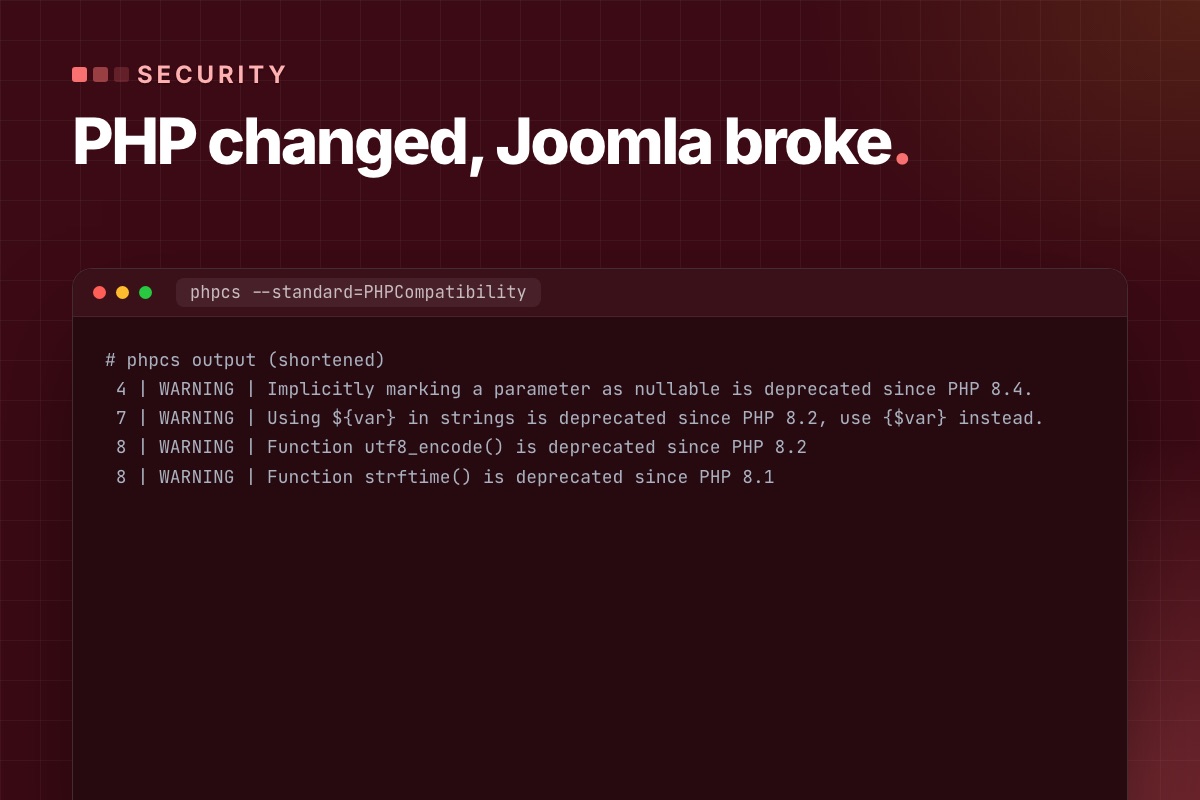
Fixing errors one page load at a time on the live site takes days. On a staging copy with the target PHP, scan the third-party code in one go. PHPCompatibility (a PHP_CodeSniffer standard) reports what is removed or deprecated up to the version you name. Install it outside the site:
# terminal – PHPCompatibility 10 (alpha; 9.3.5 predates PHP 8.1)
mkdir ~/phpcompat && cd ~/phpcompat && echo '{}' > composer.json
composer config allow-plugins.dealerdirect/phpcodesniffer-composer-installer true
composer require --dev "phpcompatibility/php-compatibility:^10.0.0@alpha"
vendor/bin/phpcs -p -s --standard=PHPCompatibility --runtime-set testVersion 8.4 \
  --extensions=php /path/to/site/plugins/system/oldplugin /path/to/site/components/com_old
On a test file it reports, for example:
# phpcs output (shortened)
 4 | WARNING | Implicitly marking a parameter as nullable is deprecated since PHP 8.4.
 7 | WARNING | Using ${var} in strings is deprecated since PHP 8.2, use {$var} instead.
 8 | WARNING | Function utf8_encode() is deprecated since PHP 8.2
 8 | WARNING | Function strftime() is deprecated since PHP 8.1
Scan the extensions, the template and your own code, not Joomla core or libraries/vendor. Two things a static scan can't see:
- Dynamic properties. The scanner doesn't know which properties a class declares at runtime. They show up in the PHP log when you click through the site.
- Joomla's own deprecations. Turn on Global Configuration → Logging → Log Deprecated API. Joomla writes to
administrator/logs/deprecated.php, with the calling file.
5. Fix in this order
- Vendor updates first. Most commercial extensions fixed PHP 8.x years ago. Check the changelog for the PHP version, not just "Joomla 5 compatible".
- Replace what is abandoned. An extension last released for Joomla 3 will break again on the next PHP. Compare a replacement, a fork you maintain, or a small custom extension.
- Fix your own code properly, in git, as overrides or your own plugins, never by editing vendor files you can't track.
// plugins/system/example/src/Extension/Example.php – PHP 8.2 / 8.4 fixes
// before
public function onAfterRoute(Event $event = null)
{
	$this->started = time();                 // dynamic property: deprecated in 8.2
}

// after
public ?int $started = null;               // declared
public function onAfterRoute(?Event $event = null)   // explicit nullable: 8.4
{
	$this->started = time();
}
For a third-party class you can't refactor today, #[\AllowDynamicProperties] on the class silences the 8.2 deprecation. It's a stopgap, not a fix – record it so the next update doesn't surprise you.
6. Test more than the homepage, then switch
The homepage loading proves very little. Before the live switch, run a short list on staging with real outgoing mail and live payments turned off:
- Admin login, save an article, upload an image.
- Every form: contact, registration, password reset, and the email that arrives.
- Shop or CRM: a sandbox payment, the order email, a CiviCRM contribution or event registration.
- Scheduled tasks and cron: run them by hand with the pinned binary and read the output.
Switch live in a quiet hour, after a backup you have restored at least once. Don't copy the staging database over live – orders and users created since the copy would be lost. Then watch the log for the first hour:
# terminal – new fatals after the switch
tail -f /var/log/nginx/error.log | grep --line-buffered "PHP Fatal"
When a PHP-only fix isn't worth it
If the site runs Joomla 4.4 or older, PHP isn't the real problem: Joomla 4 is end of life and recommends PHP 8.2, which itself loses support on 31 December. Patching old extensions for a newer PHP on an unsupported Joomla buys a few months. Compare it with moving to Joomla 5.4 or 6, and plan the PHP step with it: PHP 8.2 end of life: a Joomla upgrade plan.
Site broken after a PHP change, or about to switch? Send us the URL and the error. We find the failing extension, fix it on a copy and switch with you – with a fixed quote before we start.
Joomla PHP upgrade & patching →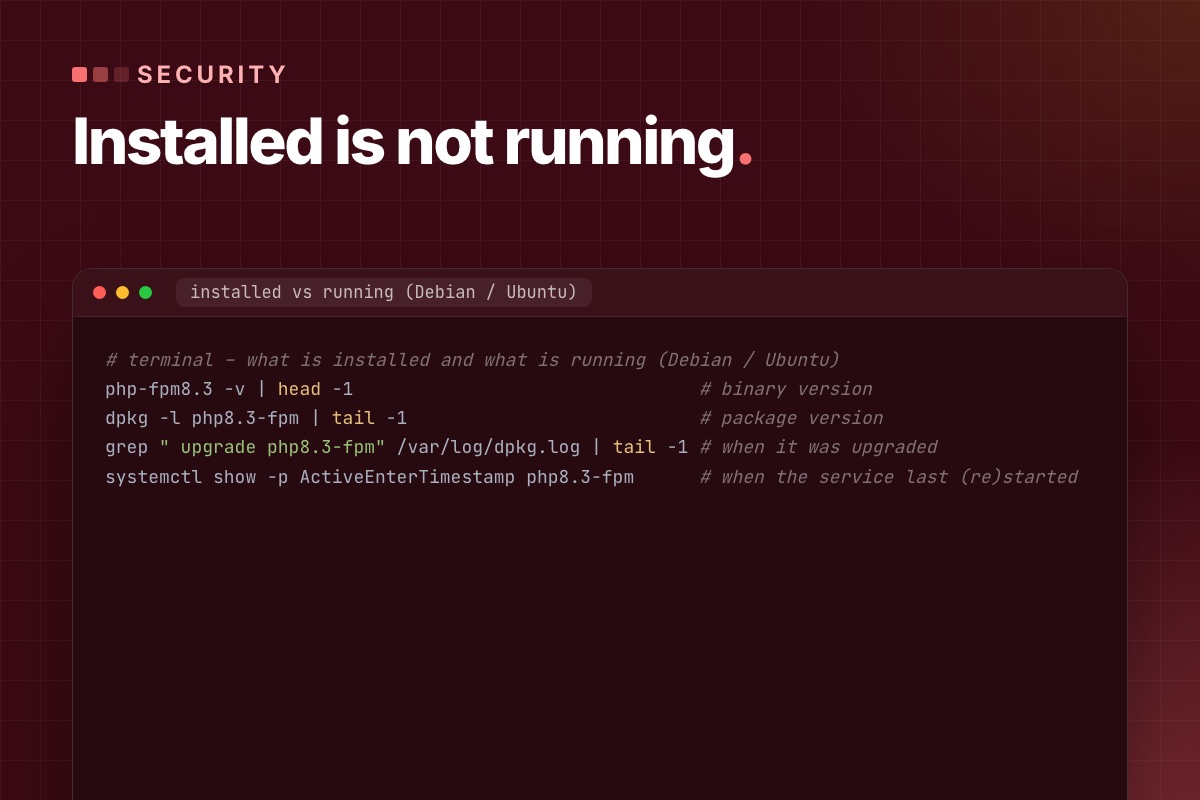
"Our servers are updated" is a reassuring email, but it doesn't say which PHP build serves your Joomla site. Hosts roll out patches server by server, panels keep several PHP versions side by side, and a patched package does nothing until the PHP workers restart. Here is how to check it yourself, on shared hosting and on your own server, and what to ask when you can't see far enough.
The versions to look for
The PHP project fixed CVE-2026-109618 and CVE-2026-109619 (unauthenticated remote code execution, "PHP2Shell") on 21 October 2026:
| Branch | Fixed from |
|---|---|
| PHP 8.5 | 8.5.12 |
| PHP 8.4 | 8.4.27 |
| PHP 8.3 | 8.3.36 |
| PHP 8.2 | 8.2.35 |
| PHP 8.1 and older | No release. php.net published source patches for 7.4–8.1; only a host or LTS vendor that applied them is fixed. |
On 23 October php.net added an informational advisory (CVE-2026-115560): keep session.upload_progress.enabled = 0 until the next regular release. It only matters for code that switches session.serialize_handler at runtime. Joomla 6.2 core doesn't – its session storage only passes on the options you configure – but an extension could, and Joomla core doesn't use upload progress, so turning it off costs nothing. Sources: php.net news archive, supported versions.
1. Shared hosting: read the version the site reports
In the Joomla admin, System → System Information:
- PHP Version – the full number.
8.3.36is fixed;8.3.35isn't, unless the host backported the fix (step 3). - The PHP Information tab, row "Server API" – FPM/FastCGI, Apache 2.0 Handler (mod_php, the highest-risk setup in the advisory) or LiteSpeed.
Check every domain and subdomain separately. cPanel's MultiPHP Manager, Plesk and similar panels set the version per domain, and a staging subdomain is often left on an old one. If a .htaccess was copied from another site, look for a pinned handler – it overrides what the panel shows:
# .htaccess – cPanel writes this block; ea-php82 pins the domain to PHP 8.2
# php -- BEGIN cPanel-generated handler, do not edit
<IfModule mime_module>
  AddHandler application/x-httpd-ea-php82 .php .php8 .phtml
</IfModule>
# php -- END cPanel-generated handler, do not edit
php -v over SSH on shared hosting shows the command-line PHP. It is useful for cron, but it is not proof of what serves the website.
2. Your own server: installed, and actually running
On a VPS you can see three things the host can only tell you: the binary version, the package, and when the service last restarted. Debian / Ubuntu, one PHP version shown – repeat for each one you run:
# terminal – what is installed and what is running (Debian / Ubuntu)
php-fpm8.3 -v | head -1                                # binary version
dpkg -l php8.3-fpm | tail -1                           # package version
grep " upgrade php8.3-fpm" /var/log/dpkg.log | tail -1 # when it was upgraded
systemctl show -p ActiveEnterTimestamp php8.3-fpm      # when the service last (re)started
If the service started before the package upgrade, the workers still run the old code in memory. Restart every FPM pool, and Apache if you use mod_php (apachectl -M | grep php shows it):
# terminal – restart every PHP-FPM service on the machine
systemctl list-units --type=service --no-legend 'php*-fpm*' | awk '{print $1}' | xargs -r systemctl restart
This is not theoretical. On our demo server the package manager installed the fixed builds by itself at 03:09 on 22 October, and the FPM services restarted two minutes later. On the main server we upgraded and restarted by hand. In both cases we checked the restart time, not just the package list.
3. An older version number can still be patched
Distributions and LTS vendors (Debian, Ubuntu, Red Hat, CloudLinux, TuxCare and others) often backport the fix and keep the old upstream version number. An older number from a distribution can be fixed; 8.2.34 from a panel’s own build without a backport isn’t. The package changelog decides:
# terminal – look for the CVE in the package changelog
apt changelog php8.2-fpm 2>/dev/null | grep -m3 "CVE-2026-10961"   # Debian / Ubuntu repositories
rpm -q --changelog php-fpm | grep -m3 "CVE-2026-10961"              # RHEL / AlmaLinux / CloudLinux
Third-party repositories don't always ship a changelog that apt changelog can read. Then the vendor's security advisory, naming both CVEs and the package version, is the evidence.
4. What to ask the host
A specific question gets a specific answer. Send it through the support ticket system – no passwords or keys needed:
For [domain], please confirm: (1) the PHP version and handler serving the site, (2) the exact package or build, (3) whether that build includes the fixes for CVE-2026-109618 and CVE-2026-109619 – if backported, a link to the advisory or changelog, and (4) that the PHP workers for this account were restarted after the update. Does cron on this account use the same PHP?
"Yes, we're patched" without a version or a build is not an answer to (2) and (3). Ask again, or ask when it will be done.
5. After the patch: undo the temporary limits
If you or the host applied the temporary measures from the advisory, remove the ones that hurt the site once PHP is fixed. We had set post_max_size = 32M on our servers on 21 October; that blocks large Akeeba or extension uploads. We removed it after the fixed builds were in. Keep the upload-progress setting off, though (see the 23 October note above).
; /etc/php/8.3/fpm/conf.d/99-local.ini – keep after patching (php.net, 23 Oct 2026)
session.upload_progress.enabled = 0
Then a short test: admin login, save an article, upload an image, send a form and check the email arrives. A site that runs is not proof that nobody got in before the patch. If you see new PHP files in images/ or tmp/, or unknown Super Users, preserve the logs and treat it as an incident, separately.
Write it down, per domain
| Domain | Runtime | Build / evidence | Restarted | Checked |
|---|---|---|---|---|
| example.org | PHP-FPM 8.3 | 8.3.36 (upstream) | 22 Oct, 09:40 | 24 Oct |
| shop.example.org | LiteSpeed 8.2 | vendor backport – advisory link | host confirmed | 24 Oct |
For an agency with many client sites, one row per domain is the only way to know which ones are still open. The background on the vulnerabilities and what attackers are doing with them is in PHP2Shell and Joomla.
Host not answering, or not sure what you're looking at? We check the PHP serving each of your Joomla sites, get the evidence from the host or patch your server, and test the sites afterwards.
Joomla PHP upgrade & patching →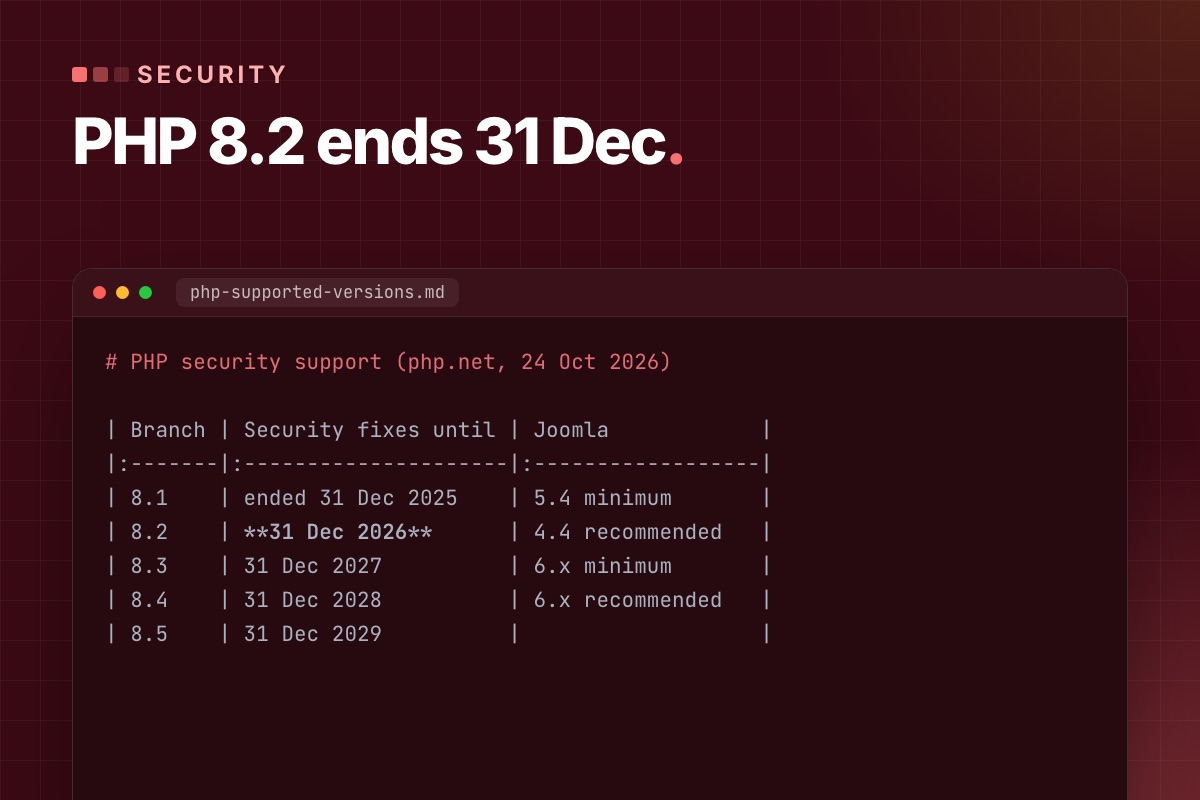
PHP 8.2 gets its last security fixes on 31 December 2026. Nothing stops working on 1 January – the patches stop. October showed what that means: when the PHP2Shell fixes came out on 21 October, branches 8.2 to 8.5 got a release the same day, and PHP 8.1 got none. A Joomla site still on 8.2 next time will be in the same place. Ten weeks is enough to move calmly, if you start with the extensions and not with the switch.
The dates
| PHP | Active support until | Security fixes until |
|---|---|---|
| 8.1 | ended | ended 31 Dec 2025 |
| 8.2 | ended | 31 Dec 2026 |
| 8.3 | ended | 31 Dec 2027 |
| 8.4 | 31 Dec 2026 | 31 Dec 2028 |
| 8.5 | 31 Dec 2027 | 31 Dec 2029 |
Source: php.net supported versions, checked 24 October 2026. Some hosts and LTS vendors sell extended support for old branches. That can bridge a few months; ask which package, which CVEs, until when and at what price.
Which PHP to move to depends on the Joomla version
| Joomla | PHP (Joomla's requirements) | Our target |
|---|---|---|
| 4.4 | minimum 7.2.5, recommended 8.2 | Upgrade Joomla first. Joomla 4 is end of life, and its recommended PHP is the one that's ending. |
| 5.4 | minimum 8.1, recommended 8.3 | 8.3 – security fixes to end of 2027, and it's the floor for Joomla 6, so the next step is smaller. |
| 6.x | minimum 8.3, recommended 8.4 | 8.4 – fixes to end of 2028. |
Source: Joomla technical requirements (pick the version). Don't jump to the newest branch because it's newest: 8.5 is fine for a lean Joomla 6 site, but commercial extensions usually certify a release later. The target is the newest branch that every extension on the site supports.
Step 1: list what's installed
The core is never the problem. The template framework, the page builder, the payment plugin and the one extension from 2017 are. Get the full list with versions and authors:
# terminal – third-party extensions with their versions (adjust the table prefix)
mysql -e "SELECT type, element, folder,
                 JSON_UNQUOTE(JSON_EXTRACT(manifest_cache, '$.version')) AS version,
                 JSON_UNQUOTE(JSON_EXTRACT(manifest_cache, '$.author'))  AS author
          FROM jos_extensions
          WHERE JSON_UNQUOTE(JSON_EXTRACT(manifest_cache, '$.author')) NOT IN ('Joomla! Project', 'Joomla! Projects')
          ORDER BY type, element;" mydb
For each row, note: is it business-critical, does the vendor list PHP 8.3/8.4 support, when was the last release. Anything without a release in two years goes on a "replace or own it" list now, not in December.
Step 2: scan the code against the target PHP
From 8.2 to 8.4 there are fewer removals than in the PHP 8.0 years, but plenty of deprecations that fill logs and break AJAX responses when displayed:
| Version | Deprecations we actually meet in Joomla extensions |
|---|---|
| 8.2 | dynamic properties, "${var}" in strings, utf8_encode() / utf8_decode() |
| 8.3 | get_class() / get_parent_class() without an argument, assert_options() |
| 8.4 | implicitly nullable parameters (Foo $x = null), E_STRICT, trigger_error() with E_USER_ERROR, mysqli_ping() |
If the site jumps from 8.2 to 8.4, it gets both lists – read the migration guides for 8.3 and 8.4. PHPCompatibility finds most of it statically:
# terminal – scan extensions and template against PHP 8.4 (installed outside the site)
vendor/bin/phpcs -p -s --standard=PHPCompatibility --runtime-set testVersion 8.4 \
  --extensions=php /path/to/site/templates/mytemplate /path/to/site/plugins/system/oldplugin
Installation and what it misses are in Joomla broken after a PHP upgrade. Most deprecations are warnings – the site keeps running – but they become removals in a later PHP, so fix them while you're in the code.
Step 3: staging on the target PHP
Copy the site, protect the copy with a password, and set the target PHP for that domain only. Before you open it:
- Outgoing mail off or caught (Global Configuration → Server → Send Mail = No, or a mail catcher).
- Payment plugins in sandbox mode, webhooks pointing nowhere live.
- Cron and Scheduled Tasks off on the copy, so it doesn't send newsletters or sync orders twice.
- No
.htaccesshandler line pinning the old PHP (cPanel writesAddHandler application/x-httpd-ea-php82into it).
Turn on Global Configuration → Logging → Log Deprecated API and PHP error logging with E_ALL on the copy, then click through the site.
Step 4: the test list
Write the list with the person who uses the site daily – they know which page matters. A typical one:
- Admin login, save an article with a custom field, upload an image.
- Every public form, and the email it sends.
- Shop: add to cart, sandbox checkout, order email, invoice PDF.
- Membership or CiviCRM: sign-up, renewal, a contribution, an event registration.
- Every cron job and scheduled task, run by hand with the new binary:
/usr/bin/php8.3 cli/joomla.php scheduler:run --all.
Read the PHP log and administrator/logs/deprecated.php after each group. A clean log after the full list is the green light.
Step 5: switch, watch, keep a way back
On shared hosting the switch is one select box per domain; on a server it's the FPM pool or the vhost handler. Switch in a quiet hour, run the critical part of the list again, watch the error log for a day. Until 31 December you can still switch back to a patched 8.2 if something was missed – after that, the way back is closed.
On Joomla 5.4 we do the PHP step first and let it run for a week before the Joomla 6 upgrade, so a broken extension is clearly a PHP problem or clearly a Joomla problem, never both. The rest of that route is in Joomla 5 vs Joomla 6.
A ten-week timeline
| When | What |
|---|---|
| Late October | Extension list, vendor check, order any paid updates |
| November | Code scan, staging on the target PHP, fixes and replacements |
| Early December | Test list signed off, live switch, one week of log watching |
| Before 31 December | Old PHP removed from the domain, cron binaries updated, next deadline in the calendar (8.3: end of 2027) |
If the October security fix is still missing on your server, don't wait for this project – check the patch first.
Still on PHP 8.2 with a list of extensions you're not sure about? We scan the site against the target PHP, fix or replace what breaks on a copy, and switch with you before the end of December.
Joomla PHP upgrade & patching →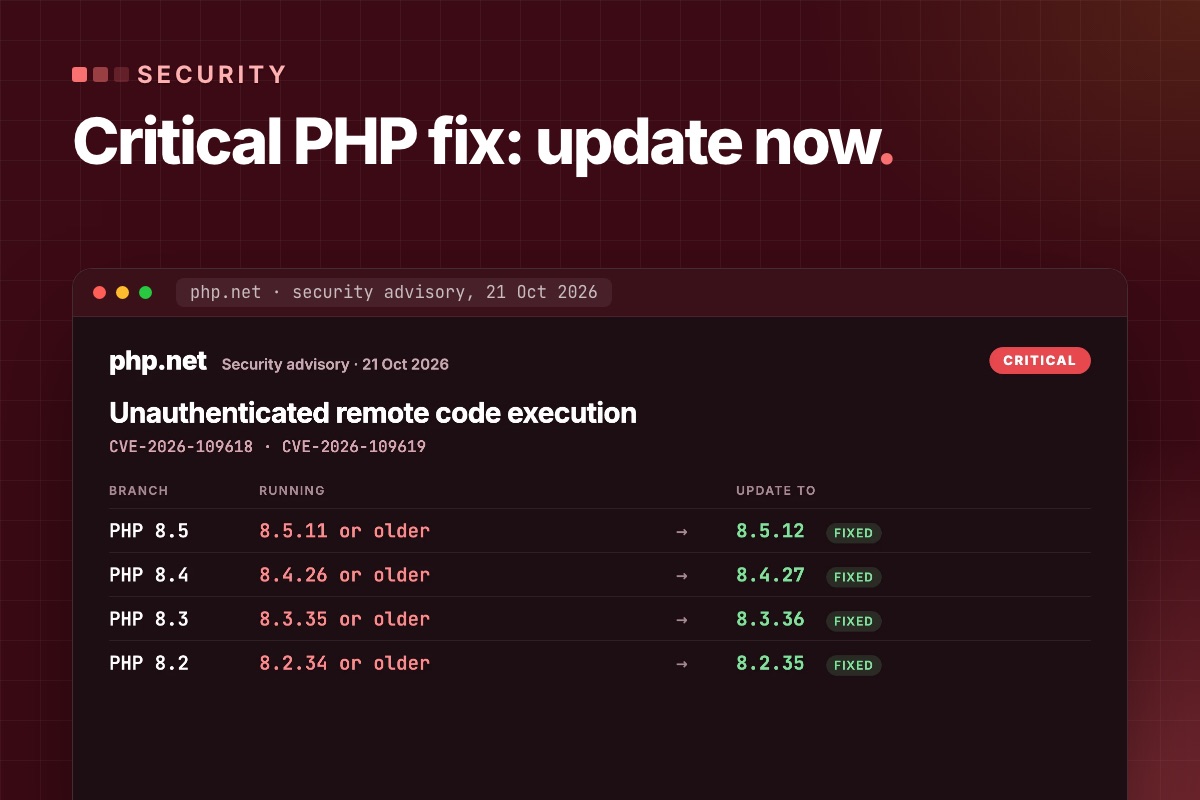
Updating Joomla does not patch PHP2Shell. The vulnerabilities are in the PHP engine beneath your website. Your next step is to identify the PHP runtime serving your domain, confirm its security patch with your host and test the site after the change. A recent Joomla release or a working homepage is not evidence that PHP is patched.
23 October update: from thousands to millions of attempts
PHP2Shell exploitation attempts escalated rapidly across Cloudflare’s network around the public announcement. By 22 October, the reported volume had reached millions of attempts:
These are approximate volumes reported across Cloudflare’s network, not Joomla-specific counts or numbers of successfully compromised websites. Exact totals and unique-target counts were not provided in the update. Source: Cloudflare CEO Matthew Prince, 22 October.
Separately, Cisco Talos observed attempts within hours of disclosure, predominantly scanning and uncoordinated payload delivery. The practical takeaway for Joomla owners: confirm the PHP patch now; a working website does not establish that its runtime is patched. Talos telemetry · 23 October news coverage.
1. Is my Joomla site affected by PHP2Shell?
CVE-2026-109618 concerns out-of-memory corruption; CVE-2026-109619 concerns stale internal state. Both are rated CVSS 9.2 and can allow unauthenticated remote code execution. PHP lists web-serving installations including PHP-FPM, Apache mod_php, php-cgi, FrankenPHP and LiteSpeed as at risk. Its advisory identifies mod_php as the highest risk, with a demonstrated path before application code runs. PHP security advisory. Technical details: OOM corruption advisory and stale-state advisory.
Wiz demonstrated pre-authentication code execution on Joomla container images as part of its research. This is not an extension-specific Joomla bug: secure application code does not remove an affected PHP runtime. Updating Joomla, changing an administrator password or installing a Joomla security plugin is not a substitute for the PHP fix. Wiz research and Joomla demonstration.
2. Which PHP release contains the fix?
The PHP project's 21 October releases contain the fixes below. These are upstream patch thresholds for these two CVEs, not a guarantee that a website is free of every vulnerability.
| PHP branch | First upstream release containing the fixes |
|---|---|
| 8.5 | 8.5.12 |
| 8.4 | 8.4.27 |
| 8.3 | 8.3.36 |
| 8.2 | 8.2.35 |
| 8.1 and older | No regular upstream security releases. Verify a vendor-maintained backport or plan a move to a supported branch. |
PHP also published minimal source backports for 7.4, 8.0 and 8.1 to assist maintainers. Their existence does not mean your host installed them. Ask for the package revision and vendor advisory covering both CVEs. Release and backport guidance.
24 October: php.net published an informational advisory on 23 October (CVE-2026-115560, full details with the next release): keep session.upload_progress.enabled = 0 until the next regular bugfix release. It only affects code that switches session.serialize_handler at runtime. Joomla 6.2 core doesn't, and core doesn't use upload progress either, so leaving it off is free. If you removed it after patching, put it back.
3. How do I verify the PHP my website actually uses?
- Check the web runtime. In Joomla administration, open System → System Information and record the PHP version. Confirm the PHP handler and package/build with your host. A shell command such as
php -vcan report a different CLI installation. - Match the patch to that runtime. Record the upstream release or vendor backport evidence for both CVEs. An older-looking version is not enough to declare a vendor build vulnerable; a hosting-panel version selection alone is not enough to prove it has been patched.
- Confirm the running workers. Ask the server administrator to confirm the updated packages are in use and all affected PHP workers have been restarted. Check other PHP services, cron jobs and subdomains separately where relevant.
- Record the result. Use “patch verified”, “vendor evidence pending” or “update required”, with the date, domain and evidence. Avoid a blanket “site safe” label.
On your own VPS or dedicated server, update the packages and restart every PHP worker – an upgraded package does nothing until the running workers are replaced:
# terminal – Debian / Ubuntu (package names depend on your repository)
apt update
apt list --upgradable 2>/dev/null | grep php
apt install --only-upgrade 'php8.3-*'                  # and php8.4-*, … for every version you run
systemctl restart php8.3-fpm                           # every FPM service; Apache too if it runs mod_php
systemctl show -p ActiveEnterTimestamp php8.3-fpm      # restart time must be after the upgrade
For a fuller checklist and a message you can send your provider, read how to verify your Joomla hosting has patched PHP.
4. My host says it is patched. What should I ask for?
Please confirm the PHP runtime and handler serving my domain, the installed package/build revision and the advisory showing fixes for CVE-2026-109618 and CVE-2026-109619. If this is a backport, please provide the vendor reference. Please also confirm that all affected workers have been restarted and are using the updated build.
If your hosting provider manages the packages, it controls the patch rollout. We can help interpret its response and test Joomla; we cannot replace missing server access or independently certify a proprietary build without evidence.
5. What if a PHP upgrade breaks Joomla?
A security patch within the same branch and a move to a newer PHP branch are different changes. First establish whether your current branch has a maintained patch. If you need a branch upgrade, inventory Joomla, extensions, template overrides and custom code; test an isolated staging copy; then agree the production window and rollback conditions.
For a blank page, HTTP 500 response or failing feature after a PHP change, follow our Joomla PHP upgrade diagnosis and recovery guide. For PHP 8.2, plan beyond the immediate patch: its upstream security support ends on 31 December 2026. See the PHP 8.2 end-of-life upgrade plan.
If you cannot patch immediately, have your host evaluate the temporary measures in the official advisory. PHP states that these reduce specific attack paths but do not provide complete protection. They must be set where PHP reads them before the request is parsed – php.ini, the FPM pool or the server configuration, not .user.ini or ini_set() – and every worker restarted:
; php.ini or FPM pool – temporary, until PHP is updated
session.upload_progress.enabled = 0   ; blocks the confirmed session path – keep it after patching too
post_max_size = 32M                   ; 8M if the site takes no uploads
upload_max_filesize = 30M             ; below post_max_size
fatal_error_backtraces = 0 ; PHP 8.5 only- Uploads in Joomla: 32M covers normal media uploads. Large extension packages and Akeeba archives go by SFTP while the limit is low.
memory_limit = -1is also in the advisory. On a server that hosts many sites, an unlimited PHP process can take the whole machine down – only with a container or cgroup memory limit around PHP.- A Joomla setting, a security extension or a firewall rule does not replace the patch.
6. We patched PHP. Could the site already have been compromised?
Patching closes the addressed vulnerability; it does not establish what happened before the update. Preserve available web, PHP, firewall and hosting logs. Note the exposure window and investigate unexpected files, administrator accounts, scheduled jobs or outbound activity with someone who can assess the server as well as Joomla.
A suspicious request is not proof of a successful intrusion, and a clean log search is not proof that none occurred. If you find suspicious activity, preserve the evidence and agree a separate investigation and recovery scope before deleting files or making broad changes. A patch-verification report is not a malware-cleanliness certificate.
What we did on our own servers
Our servers run PHP from the CloudPanel repository, which had no fixed builds on the day of the advisory: the newest packages were one release short (8.2.34, 8.3.35, 8.4.26, 8.5.11). We applied the temporary settings above to every PHP version on both servers and restarted all PHP-FPM services the same morning. On 22 October CloudPanel published 8.2.35, 8.3.36, 8.4.27 and 8.5.12. On the main server we installed them by hand and restarted every pool; the demo server had installed them by itself at 03:09 and restarted FPM at 03:11. We then removed the temporary limits for 8.2–8.5, and kept them for the old versions that get no fix.
Not sure which PHP your Joomla site runs, or your host is slow to answer? We check the runtime serving your domain, get the patch evidence from the host or update your server, and test the site afterwards. If you suspect an intrusion, tell us first – it's assessed separately.
Joomla PHP upgrade & patching →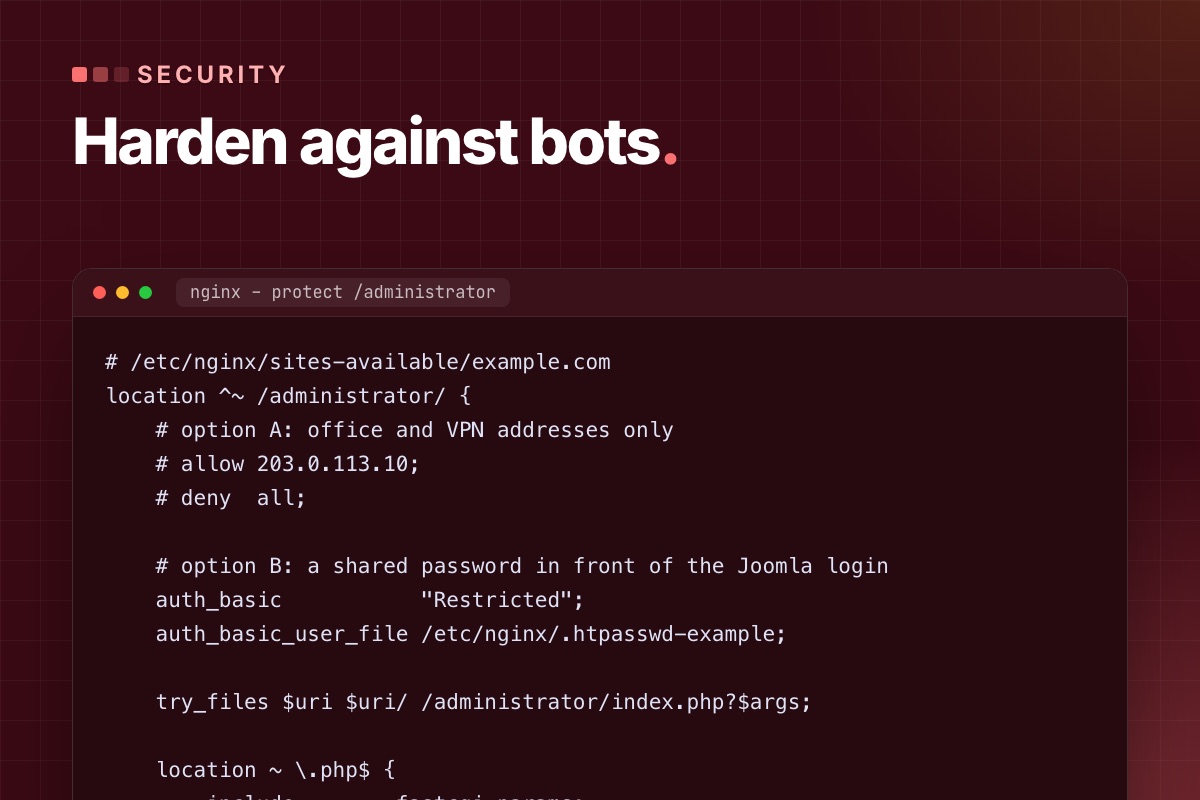
"AI bot attacks" sounds new. In the access logs of the Joomla sites we maintain, it mostly looks like the old attacks done faster and at scale: thousands of requests probing known paths, login forms tried with leaked passwords, registration forms filled with spam, and crawlers copying every page. The automation is better. The defences that work are still the boring, specific ones.
This is how we harden a Joomla 5 or 6 site against automated traffic, starting with the changes that remove the most risk per minute of work.
Start with your own logs
Before you change anything, look at what is actually hitting the site. One command on the access log shows the most requested paths that don't exist:
# terminal – top 404s in the last log (nginx/Apache combined format)
awk '$9 == 404 {print $7}' /var/log/nginx/example.com.access.log | sort | uniq -c | sort -rn | head -25
On a typical Joomla site the list includes:
/api/index.php/v1/config/application?public=true. This probes CVE-2023-23752, the Joomla 4.0.0–4.2.7 flaw that exposed the configuration, database password included, without login. It is still one of the most scanned Joomla URLs. On a patched site it returns 403 or 404, and the request is only noise./configuration.php.bak,/configuration.php~,/.git/config,/.env. Leftovers from editors, deploys and backups./administrator/with POST requests: password guessing./component/users/?view=registration: registration spam.
Each of these maps to one of the fixes below.
1. Keep code and secrets out of the web root: the public folder
Since Joomla 5.0, a site can serve only a public folder, which holds the entry points and the public media. configuration.php, libraries/, administrator/components/ and everything else stay one level up, where no URL can reach them. A leftover configuration.php.bak is then simply not downloadable.
# terminal – run once, then point the virtual host's document root at the new folder
php cli/joomla.php site:create-public-folder --public-folder=/var/www/example.com/public --live-site=https://example.com
Test it on staging first. Extensions that write files to their own folder and link to them by URL can break, because only the folders the public folder exposes are reachable. On new sites we use it from day one.
2. Put a second lock on /administrator
Joomla's own login is not the problem. Exposing it to the whole internet is. If the editors work from known places, allow only those addresses. If they don't, add HTTP authentication in front, so bots never reach Joomla's login form at all:
# /etc/nginx/sites-available/example.com
location ^~ /administrator/ {
    # option A: office and VPN addresses only
    # allow 203.0.113.10;
    # deny  all;

    # option B: a shared password in front of the Joomla login
    auth_basic           "Restricted";
    auth_basic_user_file /etc/nginx/.htpasswd-example;

    try_files $uri $uri/ /administrator/index.php?$args;

    location ~ \.php$ {
        include        fastcgi_params;
        fastcgi_param  SCRIPT_FILENAME $document_root$fastcgi_script_name;
        fastcgi_pass   unix:/run/php/php8.3-fpm.sock;
    }
}
Keep the PHP handler inside this block. A location ~ \.php$ elsewhere in the config matches /administrator/index.php first and skips the password, which is the most common mistake we find in "protected" admin folders.
3. Turn off what you don't use: Web Services and registration
- The API. If nothing talks to
/api/, disable the "API Authentication" plugins (Basic and Token) and the Web Services plugins, or deny/api/in the web server. If you do use it, use Token authentication for one dedicated user with the minimum permissions, never a Super User account. - User registration. If the site has no members area, set Users → Options → "Allow User Registration" to No. If it has one, add the proof-of-work CAPTCHA (Joomla 6.1+) to the registration form and require admin or email activation.
4. Make stolen passwords useless: enforce MFA
Joomla 4.2 and later include multi-factor authentication with passkeys (WebAuthn), TOTP apps, YubiKey, email codes and backup codes. The setting most sites miss is enforcement: Users → Options → Multi-factor Authentication → Enforce Multi-factor Authentication for the Super Users and Administrator groups. Without it, MFA is optional and the accounts that matter most often don't have it.
While you're there, audit who actually has Super User rights:
# terminal – every Super User, with the last visit (adjust the prefix)
mysql -e "SELECT u.id, u.username, u.email, u.block, u.lastvisitDate
          FROM jos_users u JOIN jos_user_usergroup_map m ON m.user_id = u.id
          WHERE m.group_id = 8 ORDER BY u.lastvisitDate DESC;" mydb
Accounts of former developers and agencies show up on almost every site we take over. Block them, don't just change their passwords.
5. Slow down password guessing
Bots rotate IP addresses, but most still send many POSTs from each one. A rate limit on login requests costs real users nothing:
# /etc/nginx/conf.d/limits.conf
limit_req_zone $binary_remote_addr zone=joomla_login:10m rate=10r/m;

# /etc/nginx/sites-available/example.com – inside location ^~ /administrator/
location = /administrator/index.php {
    limit_req zone=joomla_login burst=5 nodelay;
    limit_req_status 429;
    # … fastcgi lines as above
}
The same zone works for the front-end login (/component/users/ or your login menu item). Joomla's "Maximum MFA tries" and "MFA limit block time" options cover the second factor.
6. Make uploads harmless
Most real Joomla compromises we clean up started with a file upload: an old extension that accepted a PHP file disguised as an image. Two layers:
- Media options: keep "Restrict Uploads" and "Check MIME Types" on, and keep the allowed extensions to what editors need. The Joomla 6 defaults are sensible: images incl.
webpandavif, office files, PDF, audio, video. - The web server: never execute PHP in folders that hold uploads. Even if a PHP file gets in, it is served as text or blocked:
# /etc/nginx/sites-available/example.com – before the general PHP location
location ~* ^/(images|media|tmp|cache|logs)/.*\.(php|phtml|phar)$ {
    deny all;
}
7. Send security headers from Joomla
The core System – HTTP Headers plugin sets HSTS, X-Frame-Options, Referrer-Policy, Cross-Origin-Opener-Policy and a Content-Security-Policy, and it supports nonces and script hashes for the CSP. Turn the CSP on in report-only mode first and read the reports for a week. Third-party widgets and inline scripts in old modules will show up there. Enforcing a CSP blindly breaks pages.
8. Know when a file changes
An attacker who gets in drops a backdoor and leaves. You find out months later. The cheapest file-integrity check is version control on the server: commit a clean state and look at the difference.
# terminal – once, on a clean site (keep .git outside the public folder or deny it in the web server)
cd /var/www/example.com
git init -q && git add -A && git commit -qm "baseline $(date +%F)"

# daily, from cron: anything changed that wasn't an update you made?
git status --porcelain | grep -vE '^( M|\?\?) (cache|tmp|administrator/logs|images)/'
Without Git, compare against a clean package of the same Joomla version with diff -rq. A modified core file is either a hack someone made years ago or a backdoor, and you want to know which.
9. Patch on time, not "soon"
Automated attacks start within days of a public advisory. Subscribe to the Joomla Security Centre feed, and from Joomla 6.2 on, look at the security flag on extension updates: the dashboard highlights updates that their vendor marked as security releases, with a severity. A routine of "check updates every Monday, security updates the same day" beats any firewall rule.
10. AI crawlers: decide, then enforce
Crawlers that collect training data (GPTBot, ClaudeBot, CCBot, Google-Extended and others) are not attacks. Whether you allow them is a business decision: blocking them keeps your content out of training sets, and may also keep your site out of AI answers. The well-known ones respect robots.txt:
# robots.txt – opt out of AI training crawlers, keep search engines
User-agent: GPTBot
User-agent: ClaudeBot
User-agent: CCBot
User-agent: Google-Extended
Disallow: /
Scrapers that ignore robots.txt need rate limits or a bot-management rule at the CDN. They're a load problem more than a security one, and the page cache helps more than blocking.
If you are already compromised
- Take a full copy (files and database) before cleaning, as evidence and so you can compare later.
- Put the site offline (
php cli/joomla.php site:down) and change the database, FTP/SSH and hosting passwords. - Compare the files against a clean Joomla package and clean copies of each extension. Look in
images/andtmp/for PHP files. - Check
#__usersfor new Super Users and#__extensionsfor plugins you didn't install. - Find the way in (usually an outdated extension in the access log around the first changed file), patch it, then go back online.
Worried about your Joomla site? We run the checks in this post on a copy of your site and send you what we found, with the fixes in order of risk.
Maintenance & support →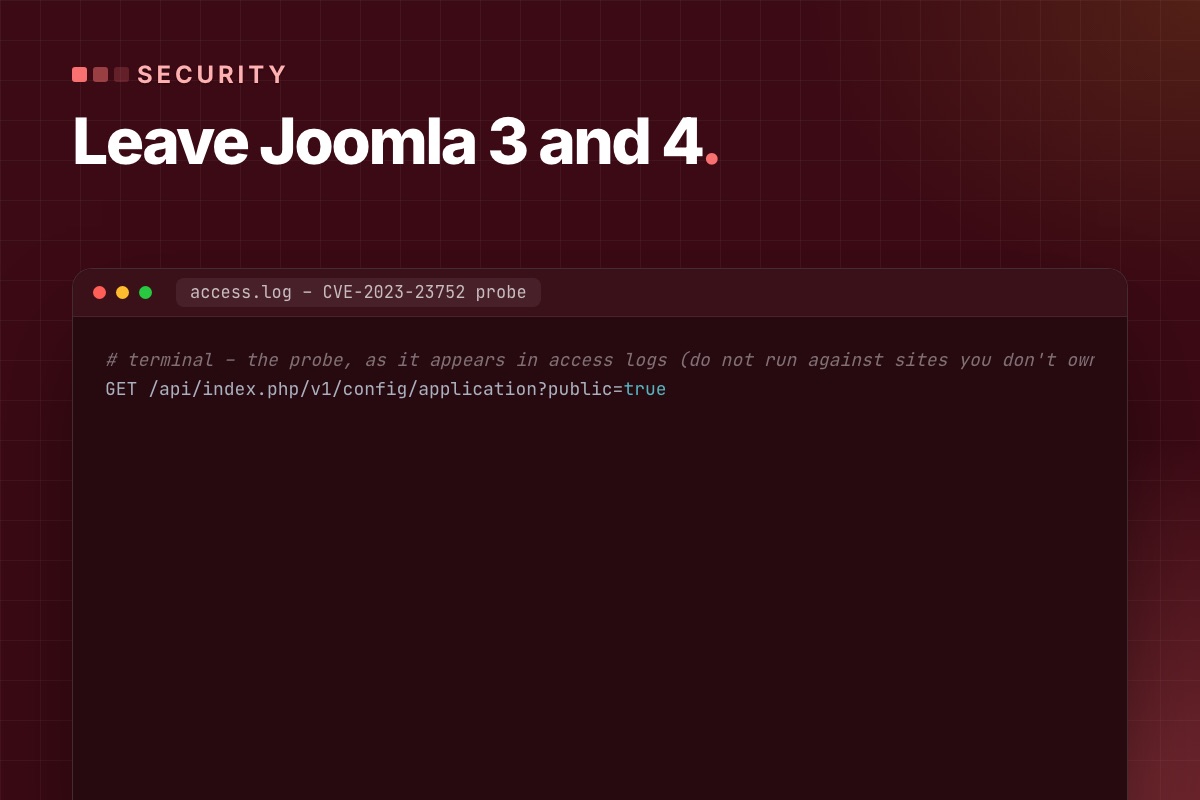
We wrote the first version of this post in 2024 to list Joomla 5's new features. Two years later the question has changed. Joomla 3 has been end-of-life since August 2023, Joomla 4 since October 2025. A site still on either isn't missing features, it is running unpatched software on an unpatched PHP version. This post is about what that means in practice, and how to get off it without breaking the site.
What "end of life" means on a real server
End of life isn't one risk, it's three that add up:
- Joomla core gets no security fixes. Vulnerabilities found after the end date stay open forever, and they are published, with details, for the supported versions.
- The PHP version is end-of-life too. Joomla 3 runs up to PHP 8.0. Joomla 4 up to 8.2 in practice. PHP 8.0 and 8.1 get no security fixes any more, so the hosting stack under the site has known holes as well.
- Extensions stop being maintained for that Joomla version, and in old Joomla sites the extensions are where most break-ins start.
Hosts push the second point for you sooner or later: when they remove PHP 7.4 or 8.0 from a server, a Joomla 3 site goes down, usually on a day nobody planned for.
The flaw that shows why patching matters
CVE-2023-23752 affected Joomla 4.0.0 to 4.2.7. One unauthenticated request to the Web Services API returned the site configuration, including the database user and password:
# terminal – the probe, as it appears in access logs (do not run against sites you don't own)
GET /api/index.php/v1/config/application?public=true
It was fixed in 4.2.8, within days, and automated scanners still request this URL on every Joomla site we look after, years later. The lesson isn't this specific bug. The scan for a published flaw starts within days, and it never stops. A site that got 4.2.8 the week it came out was fine. A site that stayed on 4.2.7 had its database password in the hands of anyone who asked.
Check your own log for it:
# terminal
grep -c "v1/config/application" /var/log/nginx/example.com.access.log
How to tell where a site stands
# terminal – Joomla version from the files (works even when the back end is broken)
grep -E "MAJOR_VERSION|MINOR_VERSION|PATCH_VERSION" libraries/src/Version.php          # Joomla 4, 5, 6
grep -E "RELEASE|DEV_LEVEL" libraries/cms/version/version.php libraries/src/Version.php 2>/dev/null   # Joomla 3

php -v # and the PHP version the web server uses: System → System Information| Site on | Risk today | Route |
|---|---|---|
| Joomla 3.x | high: no fixes since 2023, PHP ≤ 8.0 | 3.10 → 4.4 → 5.4 (→ 6), template rebuilt |
| Joomla 4.0–4.3 | high: known API flaw, no fixes | 4.4 → 5.4 (→ 6) |
| Joomla 4.4 | medium: end of life since Oct 2025 | 5.4 (→ 6) |
| Joomla 5.4 | low: security fixes until Oct 2027 | plan Joomla 6 |
Why Joomla 3 is the expensive step
Joomla 4 rewrote the core: namespaced classes, a new MVC, Bootstrap 5 and a new admin template. A Joomla 3 template can't be converted, it has to be rebuilt. Joomla 3 extensions need Joomla 4 versions, and many never got one. The database moves across with the official migration, and that's the easy part.
From Joomla 4.4 on, it gets much easier. 4.4 → 5.x and 5.4 → 6.x are mostly updates plus fixes for deprecated code, thanks to the backward-compatibility plugins Joomla ships for each major version. The step-by-step is in our Joomla 3/4 to 5.4 migration guide.
If you can't upgrade this month
Sometimes a budget or an abandoned extension blocks the upgrade. Until it happens, reduce what an attacker can reach:
- Joomla 4.0–4.2: update to 4.4.x now. It is a normal update in the back end, not a migration, and it closes the API flaw.
- Deny the API at the web server if nothing uses it (
location ^~ /api/ { deny all; }). - Password-protect
/administratorat the web server and enforce MFA (Joomla 4.2+). - Block PHP execution in
images/,media/andtmp/. - Remove every extension you don't use. Disabled isn't enough, the files are still reachable.
- Back up off-site, daily, and restore one backup once to make sure it works.
The details for each are in Joomla security against automated attacks. None of this replaces the upgrade. It buys the weeks you need to do it properly.
What you get on the other side
A site on Joomla 5.4 or 6 isn't just patched. It has a few things that make the next ten years cheaper: a template and code base that follow current Joomla APIs, so future updates are small; MFA and passkeys in core; a Scheduler for background jobs; automated core updates (Joomla 6); and PHP 8.3, which is noticeably faster than the PHP 7.4 most Joomla 3 sites run on.
Still on Joomla 3 or 4? Send us the URL. We check the version, PHP and extensions, and reply with the route and a fixed quote. The site stays online throughout.
Joomla migration →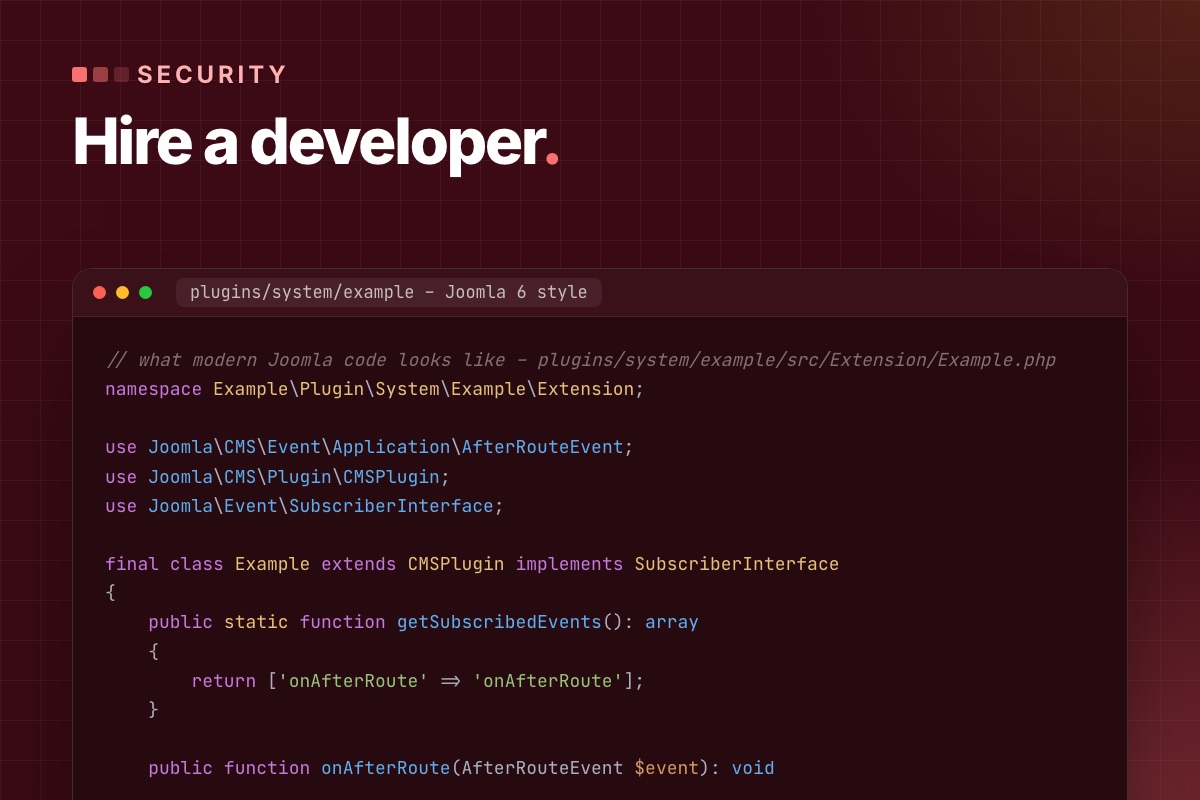

Portfolios and reviews tell you whether a Joomla developer finishes projects. They don't tell you whether the site will still be easy to update in three years. That depends on how the developer builds: overrides or core edits, child template or edited vendor template, a plugin or a hack in index.php.
These are the questions we'd ask if we were hiring a Joomla developer ourselves, with the answers that show real experience. You don't need to be technical to use them. Listen for specifics.
1. "How will you change how an article or module looks?"
Good answer: with a template override in templates/<template>/html/, made through System → Templates, ideally in a child template, so a template update can't overwrite it. They should mention that Joomla flags overrides when the core layout changes in an update.
Red flag: "I'll edit the file in components/com_content/". The next Joomla update wipes that change, or it blocks updates altogether.
2. "What would you do if an extension doesn't do exactly what we need?"
Good answer: it depends on the extension. First check its settings and its own extension points. Then a template override for its output, or a small plugin that listens to its events. Editing the vendor's code only as a last resort, in a documented patch that is re-applied on update.
A developer who reaches for a plugin knows that Joomla is event-driven. That is the single best sign of real Joomla experience, as opposed to general PHP experience.
3. "Which Joomla and PHP versions will the site run on, and why?"
Good answer, in 2026: Joomla 6.x on PHP 8.3 or 8.4 for a new site. Joomla 5.4 only if a required extension isn't ready for 6, with a plan to move before 5.4's support ends in October 2027. They should know that Joomla 6 needs PHP 8.3 and that old J* class names are off by default.
Red flag: not knowing the current version, or proposing Joomla 4 because "the template is for 4".
4. "How do you deploy changes to the live site?"
Good answer: code in Git; changes made and tested on a staging copy; deployed to live in a controlled way; a backup before every deploy. They can explain how database changes (new menu items, module settings) get to live, which is the hard part with Joomla, because much of a site's configuration lives in the database.
Red flag: "I work directly on the live site, it's faster."
5. "How do you keep the site secure after launch?"
Listen for specifics, not "we use a security extension":
- updates on a schedule, with security releases applied the same week;
- MFA enforced for administrators (Joomla has it in core since 4.2);
- off-site backups that are restored as a test now and then;
- no PHP execution in upload folders, and the admin area protected at the server level;
- a clean list of who has Super User access.
Our full list is in Joomla security against automated attacks.
6. "Show me code you wrote for Joomla."
Ask for a module, plugin or component from a recent project, or a public repository. Even without reading PHP, you can check a few things:
- a
src/folder with namespaced classes and aservices/provider.php: current Joomla structure since Joomla 4; use Joomla\CMS\…at the top of files, notJFactory::orJText::, which no longer load by default on Joomla 6;- language strings in
.inifiles, not English text in the PHP; - an update server in the manifest, so the extension can be updated from the back end.
// what modern Joomla code looks like – plugins/system/example/src/Extension/Example.php
namespace Example\Plugin\System\Example\Extension;

use Joomla\CMS\Event\Application\AfterRouteEvent;
use Joomla\CMS\Plugin\CMSPlugin;
use Joomla\Event\SubscriberInterface;

final class Example extends CMSPlugin implements SubscriberInterface
{
    public static function getSubscribedEvents(): array
    {
        return ['onAfterRoute' => 'onAfterRoute'];
    }

    public function onAfterRoute(AfterRouteEvent $event): void
    {
        // …
    }
}
7. "How do you estimate an upgrade or a takeover?"
Good answer: they look before they quote. A short paid audit, or at least a look at the extension list, the template and the overrides, and a check for modified core files, then a fixed quote with clear assumptions. Anyone who gives a fixed price for a Joomla 3 → 6 migration without seeing the site is guessing, and you'll pay for the guess one way or another. We describe our own takeover audit in taking over a Joomla site.
8. "What happens to the site if we stop working together?"
Good answer: you own everything: the code (in a repository you can access), the hosting and domain accounts, the extension licences, and a short document on how the site is built. No custom extension you can't update without them.
Freelancer, agency or in-house?
| Works well for | Watch out for | |
|---|---|---|
| Freelancer | small sites, clear scope, a direct line to the person who builds | holidays and illness; ask who covers urgent fixes |
| Joomla-focused team | upgrades, custom extensions, shops, long-term maintenance | make sure you know who actually does the work |
| General web agency | projects where Joomla is a small part | Joomla may be one CMS among many, so ask questions 1–3 above |
| In-house | constant changes, many internal integrations | knowledge leaves with the person; insist on Git and documentation |
Looking for a Joomla developer? We've built on Joomla since its first version. Ask us the questions above. We're happy to answer them before you hire anyone.
Our Joomla services →