
Performance & optimization

- Details
- Category: Performance & optimization
A Joomla page speed extension changes what the browser receives: it minifies CSS and JavaScript, defers stylesheets, lazy-loads images and sets cache headers. It cannot make Joomla build the page faster, shrink an image that is too big, or remove a third-party script. Which of those is your problem decides whether an extension helps at all.
We tested the options of one such extension, PX SEO, one at a time on a real page and measured what changed. The numbers are below, including two results we did not expect. PX SEO is not released yet, so read this as a test of what these options do, not as a download recommendation.
Which problem do you have?
Split the delay in two before you install anything. First, how long does Joomla take to answer? Time to first byte (TTFB) shows it:
# terminal
curl -o /dev/null -s -w "TTFB %{time_starttransfer}s  total %{time_total}s\n" https://example.com/
A high TTFB is server work (around 0.8 s or more on a normal page is worth chasing; the number includes DNS and TLS time, so run it twice): queries, plugins that run on every request, a missing page cache, a slow host. No front-end extension touches it. Start with our Joomla performance guide and the FAQ on which cache setting to use.
If TTFB is fine and the page still feels slow, the weight is in the front end: many CSS and JS files, images without sizes, a hero image that loads late. That is the part an extension can work on.
What an extension can change
- CSS and JavaScript files: minify them and put them in the page, so there are fewer requests.
- Render-blocking CSS: load a stylesheet after the first paint instead of before it.
- Images: add
widthandheightso the layout does not jump, and lazy-load the ones below the fold. - Response headers: tell the browser it may keep a page.
What we measured
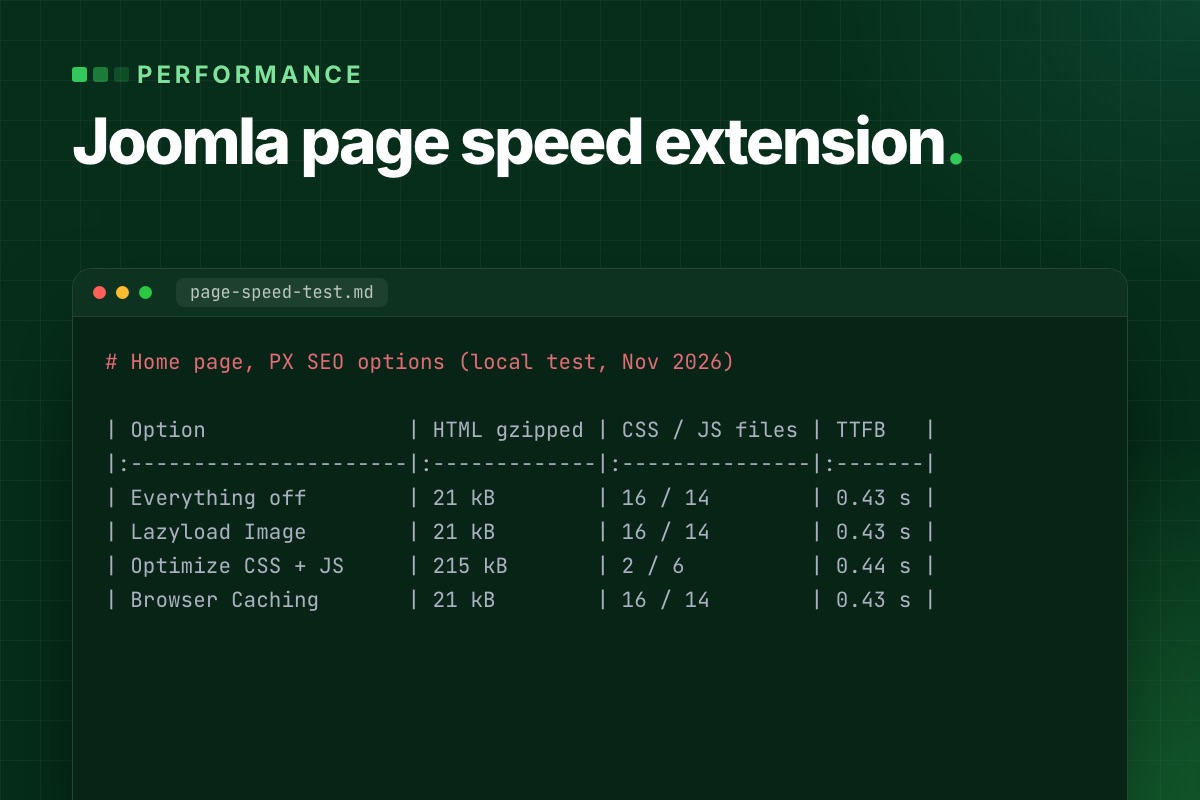
We used the home page of our own site on a local Joomla 6.2 install (T4 template, Apache, no page cache), and switched PX SEO's options on one at a time. Same page, same server, configuration restored afterwards. This is one page and one run per option, with no front-end timing, so your numbers will differ.
| PX SEO option | HTML (raw / gzipped) | CSS files / JS files | Images with width and height | Lazy-loaded images | TTFB (median of 5) |
|---|---|---|---|---|---|
| Everything off | 98 kB / 21 kB | 16 / 14 | 24 of 50 | 35 of 50 | 0.43 s |
| Lazyload Image | 99 kB / 21 kB | 16 / 14 | 47 of 50 | 45 of 50 | 0.43 s |
| Optimize CSS + Optimize JS | 1,192 kB / 215 kB | 2 / 6 | 24 of 50 | 35 of 50 | 0.44 s |
| Browser Caching | 98 kB / 21 kB | 16 / 14 | 24 of 50 | 35 of 50 | 0.43 s |
Gzipped sizes are the saved HTML compressed with gzip -9, not what a particular server sends.
Lazy-loading and image sizes: attributes added, one catch
The plugin reads each local image, adds its real width and height, and sets loading="lazy". On our page the number of images with dimensions went from 24 to 47 of 50, and lazy-loaded ones from 35 to 45 (our template already lazy-loaded 35). With dimensions the browser can reserve the space before an image arrives. We counted attributes; we did not measure layout shift or load time.
The catch is the first image on the page. A lazy-loaded hero is fetched later than it should be. PX SEO has an ignore list for exactly this: any image whose path contains a listed string, or that already has fetchpriority="high", stays eager and gets fetchpriority="high". Put your hero image there before you switch lazy-loading on, and write the path in lowercase.
Minify and inline: fewer requests, a much bigger page
With CSS and JS optimization on, our 16 stylesheets became 2 and the 14 script files became 6. Each file is minified and written into the HTML. That is the trade-off: the HTML grew from 98 kB to 1,192 kB, or from 21 kB to 215 kB gzipped. Every page now carries the full CSS again, and the browser can no longer keep it from one page to the next.
That can still be a good deal for a site where most visits are one page long. For a site where people click through, it may not be. Test both on your own pages. Things to know about how it works:
- It only touches files on your own domain. External files are left as they are (our page had one, a Google Fonts stylesheet). It also finds stylesheets by pattern, and one local stylesheet on our page was skipped because its
relcomes before itshref. - Scripts that already have
async,deferortype="module"are skipped. Scripts that only getdeferlater, as some of our template's did, are still inlined and then run in place without it. Test the page after switching JS optimization on; the plugin also has an exclude list for script files. - A stylesheet that uses
@importis deferred, not inlined. - It minifies each file; it does not merge them.
Browser caching: read the headers, not the label
Switching on Browser Caching removed Joomla's Cache-Control: no-store, no-cache and Pragma: no-cache headers and left an Expires header 15 minutes ahead. There was no Cache-Control or max-age, and you cannot change the 15 minutes from the plugin. It applies to the HTML page, so use it only on public, mostly static pages: a cached page with a form or a logged-in view is the wrong thing to keep. For long cache lifetimes on static files, set them in your web server or CDN.
Deferring CSS
The defer option takes a list of strings. Any stylesheet whose URL contains one of them is loaded with media="print" and switched to all when it has loaded, so it no longer blocks the first paint. There is no <noscript> fallback, so with JavaScript off the stylesheet never applies. Use it for CSS the first screen does not need, such as a font stylesheet or a slider. If you defer your main template CSS, the page flashes unstyled.
What an extension cannot fix
- Server time. TTFB was 0.43 to 0.44 s in all four runs, within noise. Nothing in the table moved it.
- Image weight. The plugin adds dimensions, it does not resize or convert anything. A 3 MB photo is still 3 MB. Resize before you upload, and serve
srcsetwhere the template supports it. - Third-party scripts. Chat widgets, tag managers and embeds come from other domains and are left alone.
- A heavy template. Sixteen stylesheets minified are still sixteen stylesheets of rules the page may not use.
A safe order to switch things on
- Measure first: TTFB with the command above, and the PageSpeed Insights report for your slowest template page. Write the numbers down.
- Fix server time first if TTFB is high.
- Add the hero image to the lazy-load ignore list, then switch on lazy-loading. Reload and check the layout.
- Defer one non-critical stylesheet and look at the page with the cache cleared.
- Switch on CSS optimization, then JS optimization, one at a time. After each, test menus, forms, search and login.
- Measure again. If a step made things worse, switch that option off; each can be turned off on its own. Leave Browser Caching for public pages only.
What to check in any speed extension
- Does it inline CSS or JS, and what does that do to your HTML size?
- Which headers does it change, and for how long?
- Can you exclude the hero image, a script or a stylesheet?
- Can you switch each feature off on its own?
PX SEO and what to do now
PX SEO is the plugin and component we use on ThePixel.dev. It is not released yet, so there is nothing to download today; the options above are what it does. The PX SEO page shows where it stands.
If your site is slow now and you would rather have someone measure it and fix the real cause, whether that is the server, the template or the images, that is our SEO and speed service.

- Details
- Category: Performance & optimization
Most Joomla speed guides start with hosting and end with "install a CDN". On the slow Joomla sites we are asked to fix, the server is rarely the problem. The time goes into the request itself: too many queries, modules that query in a loop, a page cache that is off or wrongly scoped, plugins that run on every request, and a hero image the browser is told to load last.
This is the order in which we profile a slow Joomla 5 or 6 site, with the tools Joomla already ships and the code fixes we apply most often.
1. Measure the request, not the PageSpeed score
A PageSpeed score mixes server time, front-end weight and third-party scripts into one number. Split it first. Time to first byte (TTFB) tells you how long Joomla takes to build the page:
# terminal
curl -o /dev/null -s -w 'TTFB %{time_starttransfer}s  total %{time_total}s\n' https://example.com/blog
# logged in: copy the session cookie from your browser's dev tools
curl -o /dev/null -s -w 'TTFB %{time_starttransfer}s  total %{time_total}s\n' -b "$COOKIE" https://example.com/blog
Run it several times, as a guest and with a session. A guest page that comes from the page cache should answer in well under 200 ms. If it doesn't, the cache isn't serving it. If guest pages are fast but logged-in pages are slow, the problem is in the code and the cache was only hiding it.
Then turn on Debug System (System → Global Configuration → System) on a staging copy, never on the live site. The debug console at the bottom of each page shows three things worth reading:
- Profile information. The time marks
afterInitialise,afterRoute,afterDispatchandafterRender. A big jump beforeafterDispatchpoints at the component. A big jump beforeafterRenderpoints at modules and the template, because modules render in that phase. - Database queries. The count, the time per query and the duplicates panel. Fifty queries is normal for a Joomla page. Two hundred, or the same query repeated thirty times, is a module or plugin doing work in a loop.
- Memory peak. A page that needs 60 MB or more usually loads a large data set it then throws away.
2. The database: where most Joomla time goes
Queries in a loop (N+1)
The most common pattern we remove from custom modules and template overrides is one query per item: load ten articles, then run a query for each one to get its custom field, author or image. The debug panel shows it as the same query with a different ID, ten or a hundred times. Before:
// modules/mod_featured_team/src/Helper/TeamHelper.php
foreach ($items as $item) {
    $query = $db->createQuery()
        ->select($db->quoteName('value'))
        ->from($db->quoteName('#__fields_values'))
        ->where($db->quoteName('field_id') . ' = :field')
        ->where($db->quoteName('item_id') . ' = :item')
        ->bind(':field', $fieldId, ParameterType::INTEGER)
        ->bind(':item', $item->id);   // one query per article

    $item->role = $db->setQuery($query)->loadResult();
}
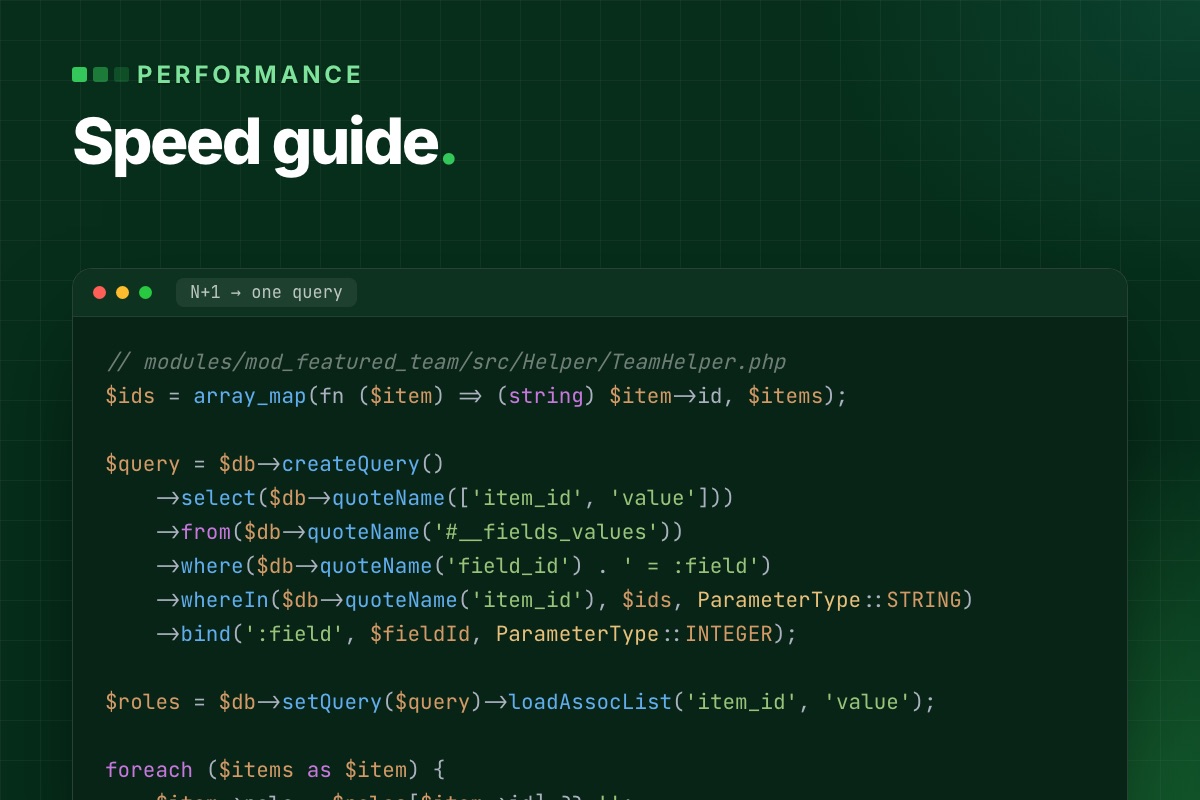
After: one query for all items, then a lookup in PHP.
// modules/mod_featured_team/src/Helper/TeamHelper.php
$ids = array_map(fn ($item) => (string) $item->id, $items);

$query = $db->createQuery()
    ->select($db->quoteName(['item_id', 'value']))
    ->from($db->quoteName('#__fields_values'))
    ->where($db->quoteName('field_id') . ' = :field')
    ->whereIn($db->quoteName('item_id'), $ids, ParameterType::STRING)
    ->bind(':field', $fieldId, ParameterType::INTEGER);

$roles = $db->setQuery($query)->loadAssocList('item_id', 'value');

foreach ($items as $item) {
    $item->role = $roles[$item->id] ?? '';
}
#__fields_values.item_id is a string column (it holds IDs from any context), so the IDs are bound as strings. Binding them as integers makes MySQL convert every row and skip the index.
Missing indexes in extension tables
Core tables are indexed well. Tables of custom and older third-party extensions often are not. Copy a slow query from the debug panel and run EXPLAIN on it:
# terminal
mysql -e "EXPLAIN SELECT * FROM jos_mycomp_bookings WHERE event_id = 42 AND state = 1 ORDER BY created DESC\G" mydb
type: ALL with a rows estimate close to the table size means a full table scan on every request. The fix belongs in the extension's update SQL, so it ships with the next version instead of living only on one server:
-- administrator/components/com_mycomp/sql/updates/mysql/2.4.0.sql
ALTER TABLE `#__mycomp_bookings` ADD INDEX `idx_event_state_created` (`event_id`, `state`, `created`);
Tables that only grow
Some core tables grow until they slow down every request that touches them. We check these on every audit:
| Table | Why it grows | What to do |
|---|---|---|
#__session | Database session handler; one row per visitor, bots included | Keep the session lifetime short, or switch the handler to Redis or the filesystem on busy sites |
#__action_logs | User Actions Log records every admin action | Add the scheduled task "Delete Action Logs" with "Days to delete action logs after" |
#__redirect_links | The Redirect plugin's "Collect URLs" stores every 404, including bot probes | Turn "Collect URLs" off once the redirects are done; empty the table |
#__finder_* | Smart Search index of every content type that has a finder plugin | Disable finder plugins for content you don't search; purge and re-index |
#__history | Content versions, unlimited when "Maximum Versions" is high | Lower "Maximum Versions" in the Articles options |
# terminal – the largest tables first
mysql -e "SELECT table_name, ROUND((data_length + index_length) / 1024 / 1024) AS mb, table_rows
          FROM information_schema.tables WHERE table_schema = 'mydb'
          ORDER BY (data_length + index_length) DESC LIMIT 15;"
3. Caching: what Joomla actually caches
Joomla has three cache layers, and they are often confused:
- System Cache in Global Configuration. It switches on caching for modules and for components that support it. Conservative caches each module separately, according to its own
cache_mode. Progressive caches module output per visitor state and fills the cache folder much faster. We use Conservative. - The module "Caching" option. It only works when System Cache is on, and it caches the module's HTML, not its data.
- System – Page Cache plugin. It stores the whole HTML of a page for guests and skips the component, the modules and the template on the next hit. This is the layer that takes TTFB from hundreds of milliseconds down to tens, and the one that breaks things if you don't scope it.
What breaks under the page cache
Anything personal or tied to a session is frozen into the cached HTML and served to the next visitor:
- Form tokens. A cached login or cart form carries the first visitor's CSRF token, and everyone after them gets "Invalid token". VirtueMart 4.8.0 hit exactly this with cached product modules, see add to cart fails with cached product modules.
- "Hello, Anna" and cart counters rendered on the server.
- Pages that vary by cookie, such as currency, language without a URL prefix, or consent state.
Exclude those menu items in the plugin's settings, or render the personal part in the browser and load it with a small AJAX request (com_ajax works well for this). The rest of the page stays cacheable.
Caching data in your own extension
The module cache stores HTML. When the expensive part is the data, for example an API call or a heavy aggregate query, cache the data with a callback controller and keep the rendering live:
// modules/mod_release_watch/src/Helper/ReleaseHelper.php
use Joomla\CMS\Cache\CacheControllerFactoryInterface;
use Joomla\CMS\Factory;

public function getReleases(string $repo): array
{
    $cache = Factory::getContainer()
        ->get(CacheControllerFactoryInterface::class)
        ->createCacheController('callback', [
            'defaultgroup' => 'mod_release_watch',
            'lifetime'     => 60,      // minutes
            'caching'      => true,    // cache even when System Cache is off
        ]);

    return $cache->get([$this, 'fetchReleases'], [$repo], md5('releases:' . $repo));
}
The third argument is the cache ID. Build it from everything the result depends on, or two different calls will share one entry.
4. Plugins that run on every request
A system plugin's onAfterInitialise or onAfterRoute runs on every request: front end, back end, AJAX and API. Two things we look for in custom and third-party plugins:
- Work without a guard. The plugin loads settings, queries the database or calls an API before it checks whether it is needed on this page.
- Legacy listeners. The plugin still relies on method-name matching instead of
SubscriberInterface. It works on Joomla 5 and 6 with the compatibility layer, but it can't declare which events it needs. See Joomla 6 plugin events explained.
// plugins/system/myplugin/src/Extension/MyPlugin.php
public static function getSubscribedEvents(): array
{
    return ['onAfterRoute' => 'onAfterRoute'];
}

public function onAfterRoute(AfterRouteEvent $event): void
{
    $app = $this->getApplication();

    // cheapest checks first – leave before touching the database
    if (!$app->isClient('site') || $app->getInput()->getCmd('option') !== 'com_content') {
        return;
    }

    // … the real work
}
The same applies to scheduled tasks. With the Lazy Scheduler on (Scheduled Tasks → Options), due tasks run inside a visitor's request, and that visitor waits for an index rebuild or a mail queue. On any site with real traffic, turn it off and run the scheduler from cron:
# /etc/cron.d/joomla-scheduler
*/5 * * * * www-data /usr/bin/php /var/www/example.com/cli/joomla.php scheduler:run --all >/dev/null 2>&1
5. Front end: the Web Asset Manager and the LCP image
Load assets through the Web Asset Manager
Hand-written <script> tags in a template or override can't be deduplicated, deferred or reordered. Registered assets can. Joomla resolves the dependencies, prints each file once, and you control defer per asset:
// templates/yourtemplate/html/com_content/article/default.php
$wa = $this->document->getWebAssetManager();
$wa->registerAndUseScript(
    'tpl.yourtemplate.code-blocks',
    'media/templates/site/yourtemplate/js/code-blocks.js',
    ['version' => 'auto'],
    ['defer' => true]
);
While you're in there, check whether anything still loads jQuery. Joomla's own front end hasn't needed it since Joomla 4. When it appears, an old extension or override asked for it, and that one call adds about 30 KB of render-blocking script to every page.
Don't lazy-load the image that matters
Joomla's image layout (joomla.html.image) adds loading="lazy" to every image whose width and height it knows. That includes the article's full-text image, which is usually the largest element in the first screen, the Largest Contentful Paint (LCP). A lazy LCP image starts downloading late, and LCP suffers. We override the layout for that one image:
// templates/yourtemplate/html/layouts/joomla/content/full_image.php
$layoutAttr = [
    'src'           => $images->image_fulltext,
    'alt'           => empty($images->image_fulltext_alt) && empty($images->image_fulltext_alt_empty) ? false : $images->image_fulltext_alt,
    'class'         => $imageClass,
    'loading'       => 'eager',   // the layout only adds "lazy" when loading is empty
    'fetchpriority' => 'high',
];
Do the same for the first one or two cards of a blog list. Leave every image below the fold lazy. If an optimization plugin adds lazy loading on its own, check that it respects fetchpriority="high". Ours had to be told to.
6. PHP settings that matter for Joomla
Joomla 5 with a typical set of extensions loads several thousand PHP files. The default OPcache limits are too small for that, so files fall out of the cache and are compiled again:
; /etc/php/8.3/fpm/conf.d/99-joomla.ini
opcache.enable=1
opcache.memory_consumption=256
opcache.interned_strings_buffer=32
opcache.max_accelerated_files=50000   ; default 10000
opcache.validate_timestamps=1
opcache.revalidate_freq=60            ; 0 on staging, where files change all the time
realpath_cache_size=4096K
realpath_cache_ttl=600
Check the result with opcache_get_status(). If cache_full is true or num_cached_scripts is at the limit, raise the limit. Keep the PHP version of cron (CLI) and of the web server (FPM) the same. A scheduler that runs on an older CLI PHP fails silently.
The checklist we run
| Check | Where | Healthy |
|---|---|---|
| Guest TTFB, cached page | curl -w %{time_starttransfer} | < 200 ms |
| Logged-in TTFB | same, with a session cookie | < 800 ms |
| Queries per page | Debug console | < 100, no repeated query |
| Largest tables | information_schema.tables | sessions, logs and 404 log under control |
| Page cache scope | System – Page Cache | on, with form and cart pages excluded |
| Lazy Scheduler | Scheduled Tasks → Options | off, with cron running scheduler:run |
| LCP image | page source | no loading="lazy", fetchpriority="high" |
| jQuery on the front end | page source | only if something really needs it |
| OPcache | opcache_get_status() | not full, file limit above the file count |
Fix in that order. The database and cache items usually remove most of the server time. The front-end items fix what PageSpeed reports. A faster server only helps once the request itself is lean.
Joomla site still slow? Send us the URL. We profile it the way this post describes and reply with what is slow, why, and a fixed quote to fix it.
SEO & speed optimization →