
PX File Pro adds folder profiles, protected core files, an activity log with notifications, share links, search and replace inside files and upload from a URL to PX File Manager. It is part of the Pro membership and installs next to the free PX File Manager.
Overview
PX File Pro is a package for Pro members. It does not replace PX File Manager: it plugs into it, so the file manager you know gets new buttons and rules, and Joomla gets a Components » PX File Pro menu for profiles, the activity log and share links.
- Folder profiles: a user group (or single users) gets its own root folder, allowed operations, upload size, file types, hidden and read-only paths.
- Protected files: core files are hidden or read-only for everyone but Super Users, who confirm before changing them.
- Activity log: who did what, where and when, with refused attempts, CSV export and Joomla's User Actions Log.
- Notifications: email, Slack, Microsoft Teams or Discord, right away or as a daily digest.
- Share links: a public download link for a file or folder, with expiry, password and download limit.
- Search and replace inside files, with a preview and a copy of every changed file in the trash.
- Uploads: whole folders, resume after a reload, upload from a URL.
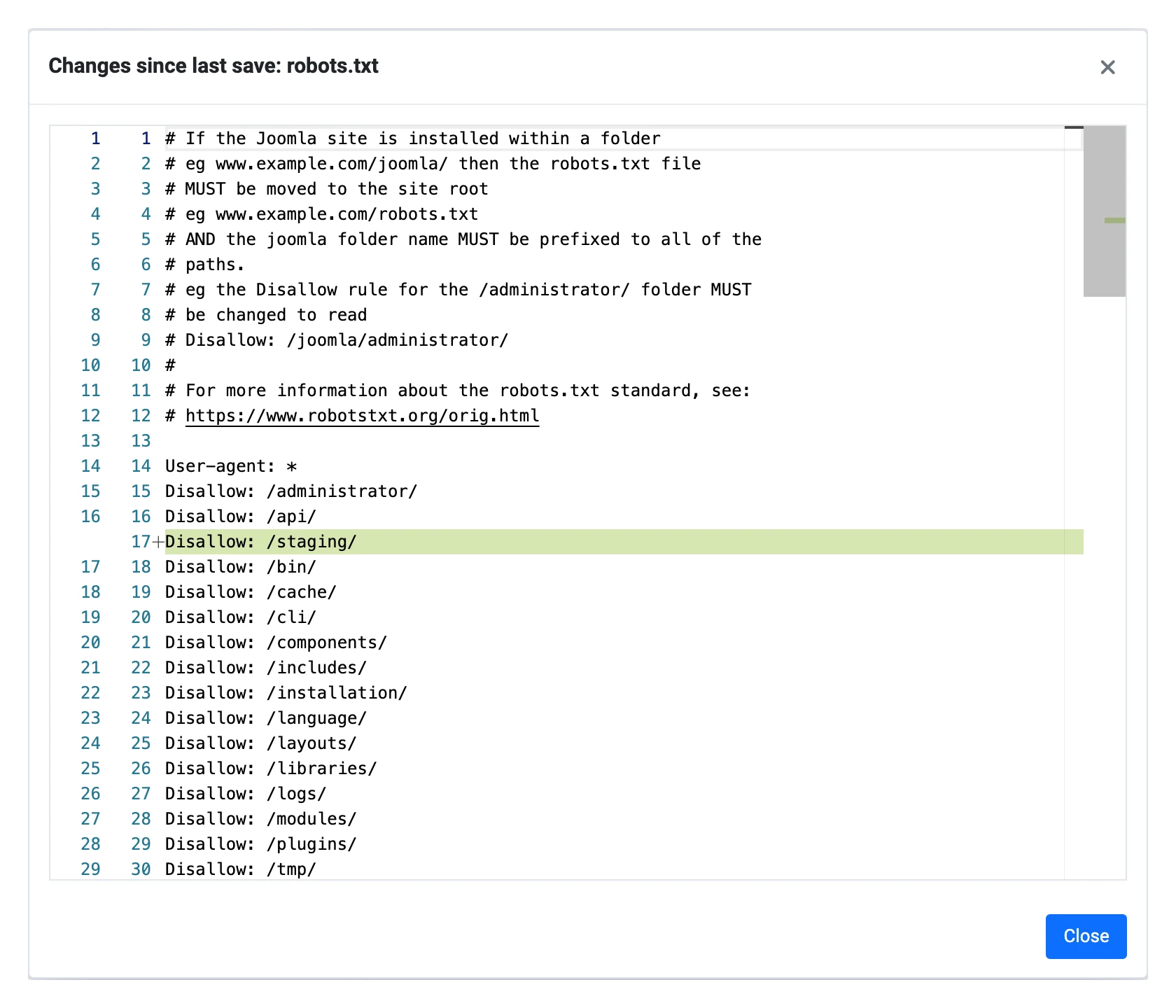
- Editor extras: compare with the saved file, full screen, minimap.

Installation
Requirements
- PX File Manager 1.1.0 or later (the installer stops if it is missing or older)
- Joomla 5.4 or later, or Joomla 6.x
- PHP 8.1 or later, with
curlfor Upload from URL - MySQL / MariaDB or PostgreSQL
Install the package
- Download
pkg_pxfilepro_vx.y.z.zipfrom your account (Downloads). - Install it in System » Install » Extensions, like any Joomla package.
- The package installs the PX File Pro component, the System - PX File Pro plugin (enabled) and the Task - PX File Pro plugin (enabled). Keep the system plugin enabled: it connects PX File Pro to PX File Manager.
- Create the two scheduled tasks described in Scheduled tasks.
Nothing changes for your users until you add a folder profile. Super Users see the whole site as before, with the new Pro tools.
Folder profiles
A profile decides what a group of users can see and do in PX File Manager. Go to Components » PX File Pro » Folder profiles and click New.
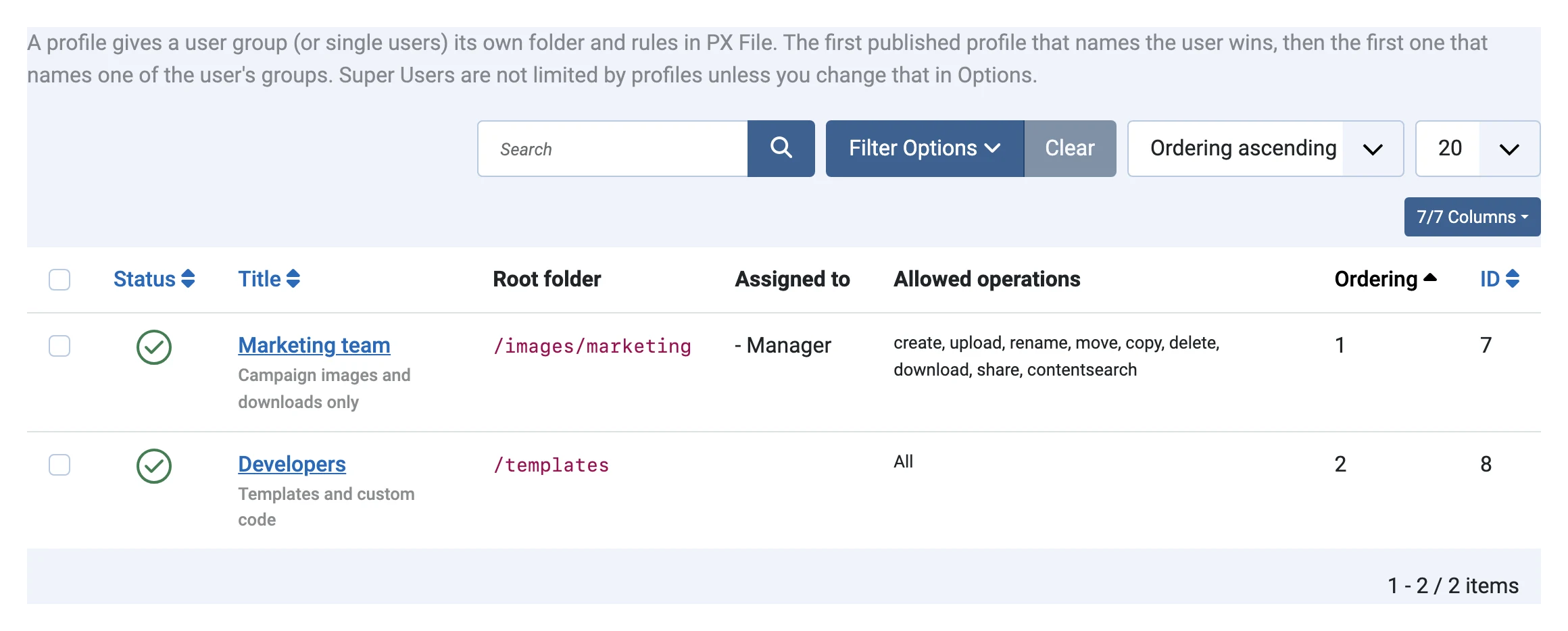
Who gets a profile
- User groups and User IDs on the Who tab. A profile that names the user wins; otherwise the first published profile, by Ordering, that names one of the user's groups.
- Super Users ignore profiles and always see the whole site, unless you turn off Super Users ignore profiles in Options.
- Users without a profile see the whole site (only PX File Manager's own permissions apply), or nothing at all if you choose so in Options.
- Joomla permissions still apply on top: a profile can only narrow what the PX File Manager permissions allow.
- Only users with Configure on PX File Pro (Super Users by default) can create or change profiles, so a group cannot widen its own profile.
- Only users with Configure on PX File Pro (Super Users by default) can create or change profiles, so a group cannot widen its own profile.
- Only users with Configure on PX File Pro (Super Users by default) can create or change profiles, so a group cannot widen its own profile.
Folder and rules
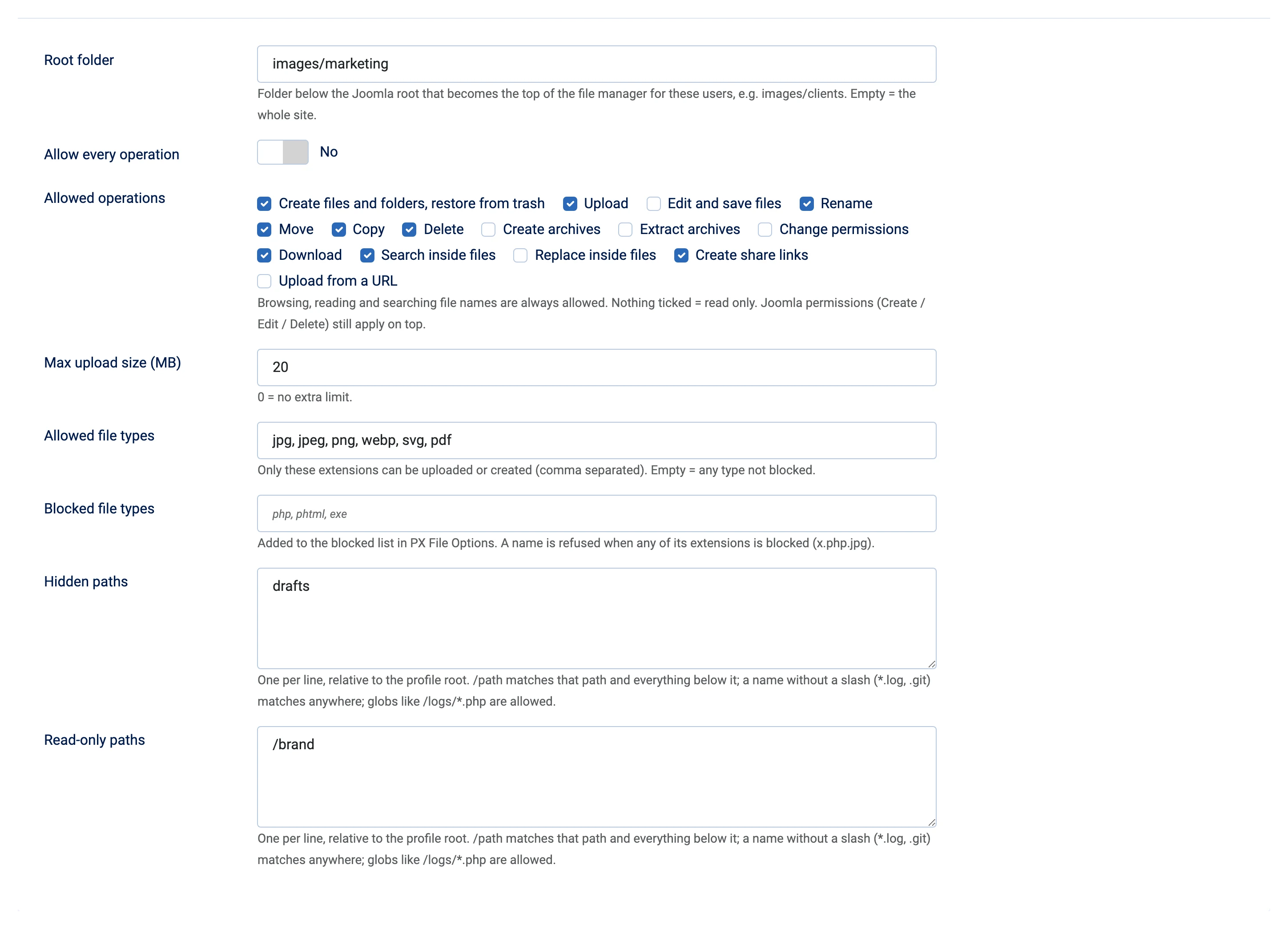
| Field | What it does |
|---|---|
| Root folder | Folder below the Joomla root that becomes the top of the file manager, e.g. images/marketing. Users cannot go above it, not even through symbolic links. Empty = the whole site. |
| Allow every operation | Yes, or tick the operations allowed: create, upload, edit, rename, move, copy, delete, archives, permissions, download, search inside files, replace, share links, upload from URL. Browsing, opening and searching file names are always allowed; nothing ticked = read only. |
| Max upload size (MB) | Largest file these users can upload (also for Upload from URL). 0 = no extra limit. |
| Allowed / Blocked file types | Same rules as in the PX File Manager Options, added to them. A name is refused when any of its extensions is blocked (x.php.jpg). |
| Hidden paths | Never listed, opened, searched, zipped or shared. One per line, relative to the profile root. |
| Read-only paths | Visible but cannot be changed, moved or deleted. |
Path patterns: /brand matches that folder and everything inside it, a name without a slash such as drafts, *.log or .git matches anywhere, and globs such as /exports/*.csv are allowed.
The Notifications tab is described in Notifications.
Protected files
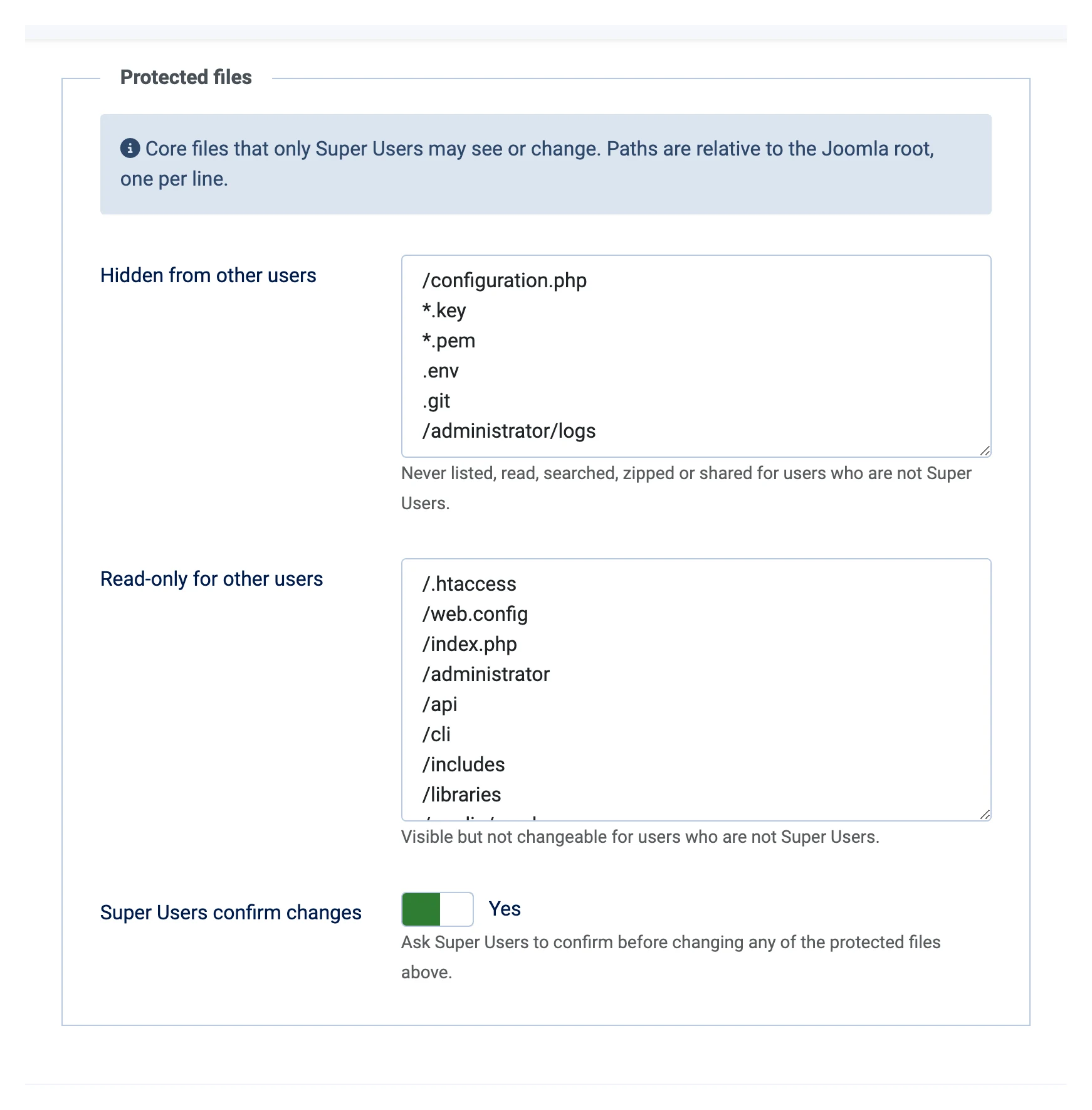
Some files can take a site down or give it away: configuration.php holds the database password, .htaccess changes how the server runs, /administrator and /libraries are Joomla itself. PX File Pro keeps them away from everyone but Super Users, with or without profiles.
| List (Options » Protected files) | Default | For users who are not Super Users |
|---|---|---|
| Hidden from other users | /configuration.php, *.key, *.pem, .env, .git, /administrator/logs | Never listed, opened, searched, downloaded, zipped or shared. |
| Read-only for other users | /.htaccess, /web.config, /index.php, /administrator, /api, /cli, /includes, /libraries, /media/vendor | Visible, but cannot be changed, moved or deleted. |
Paths are relative to the Joomla root. If a profile's root folder is inside a protected folder, those users get it read only (or not at all, for a hidden folder).
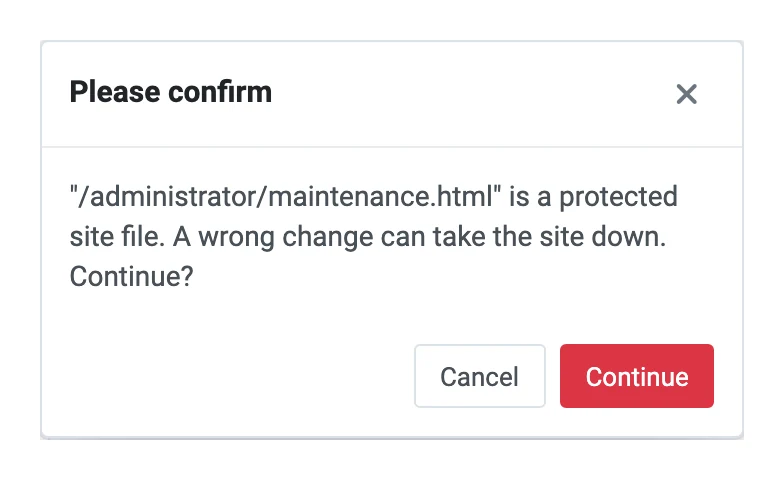
Super Users can change protected files, but PX File Manager asks them to confirm first. Turn this off with Super Users confirm changes in Options.
Search and replace in files
Click Search in files in the explorer toolbar. PX File Manager's own search finds file names; this one looks inside files.
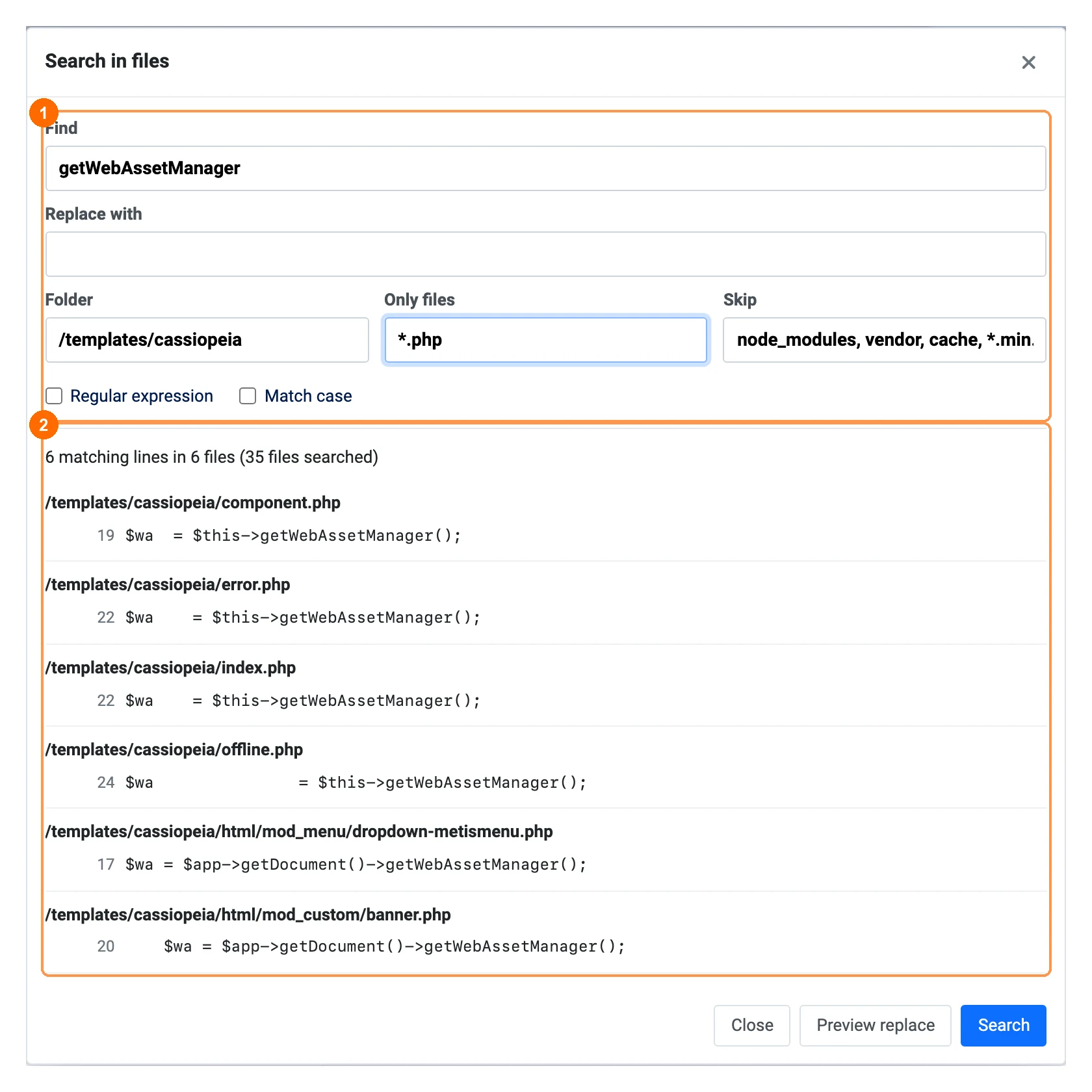
- Find: plain text, or a Regular expression (PCRE). Tick Match case for an exact match.
- Folder: where to start; the current folder by default.
- Only files / Skip: name patterns, e.g.
*.php, *.iniandnode_modules, vendor, cache. - Text files up to 2 MB are searched; binary files and files that are not UTF-8 are skipped. The search stops after 500 matching lines or about 10 seconds and says so: narrow the folder or the file filter. Limits are in Options » Features.
- Hidden and protected paths are never searched.
Replace
Type the new text in Replace with and click Preview replace. Each file shows the lines that would change. Untick the files you want to keep, then click Replace in n files.
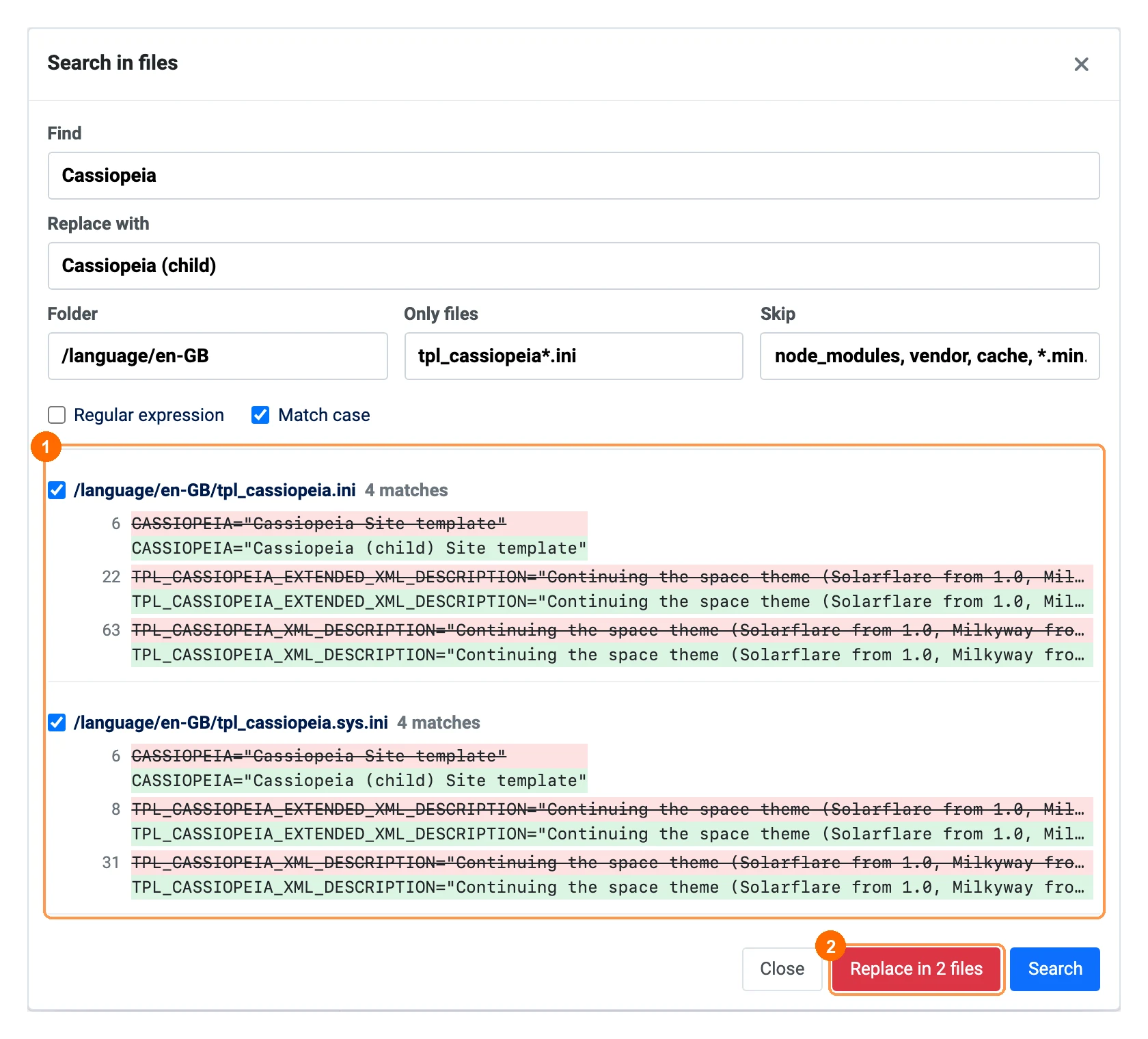
- A copy of every file is put in the Trash before it is changed, so a wrong replace can be undone file by file.
- With a regular expression,
$1,$2… in the replacement insert the matched groups; in plain mode the text is used as it is. - Read-only and protected files are refused (Super Users confirm protected ones).
- Replace needs the Joomla Edit permission and, with a profile, the Replace inside files operation.
Share links
Right-click a file or folder and choose Share link.
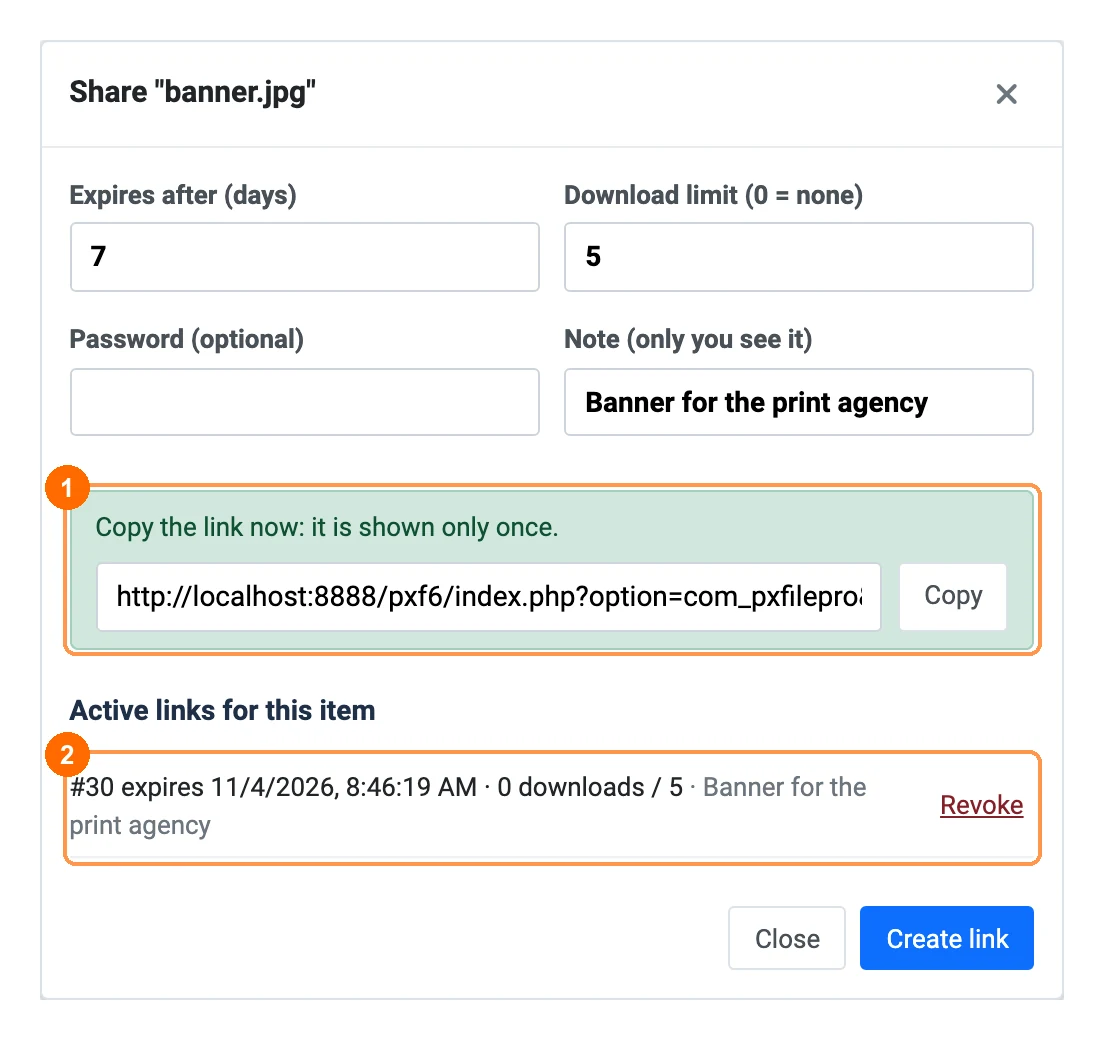
- Expires after (days): at most 30 days by default (Options » Features; 0 there allows links that never expire).
- Password (optional) and Download limit (0 = no limit). Note is only for you, to recognise the link later.
- Copy the link straight away: only a fingerprint of it is stored, so it cannot be shown again. Create a new one if you lose it.
- A folder is downloaded as a zip. Hidden and protected files and symbolic links inside it are left out.
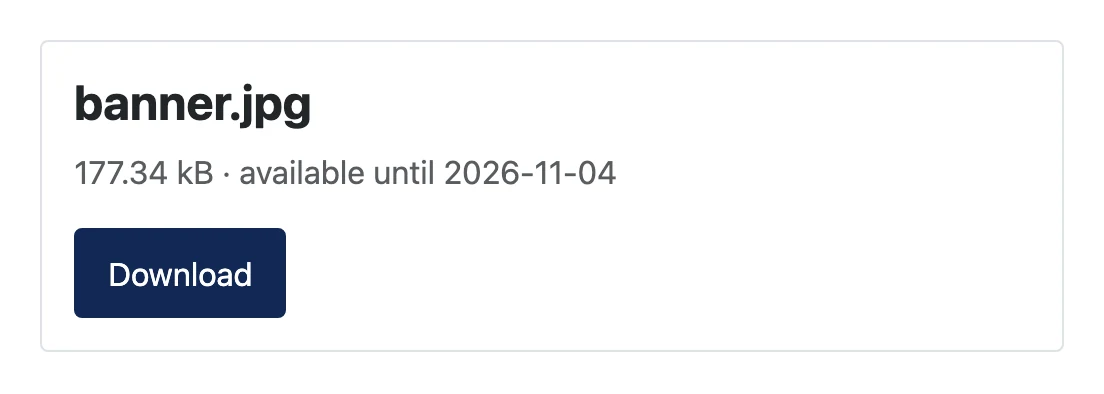
The person who opens the link sees the file name and size and a Download button (and a password field if you set one). The page is not indexed by search engines, and after 10 wrong passwords the link is locked for 15 minutes, for everyone who has it.
A link stops working when it expires, reaches its download limit, is revoked, or when the person who created it can no longer download that file (account blocked, profile changed). Every download is written to the activity log as sharedownload.
Manage links
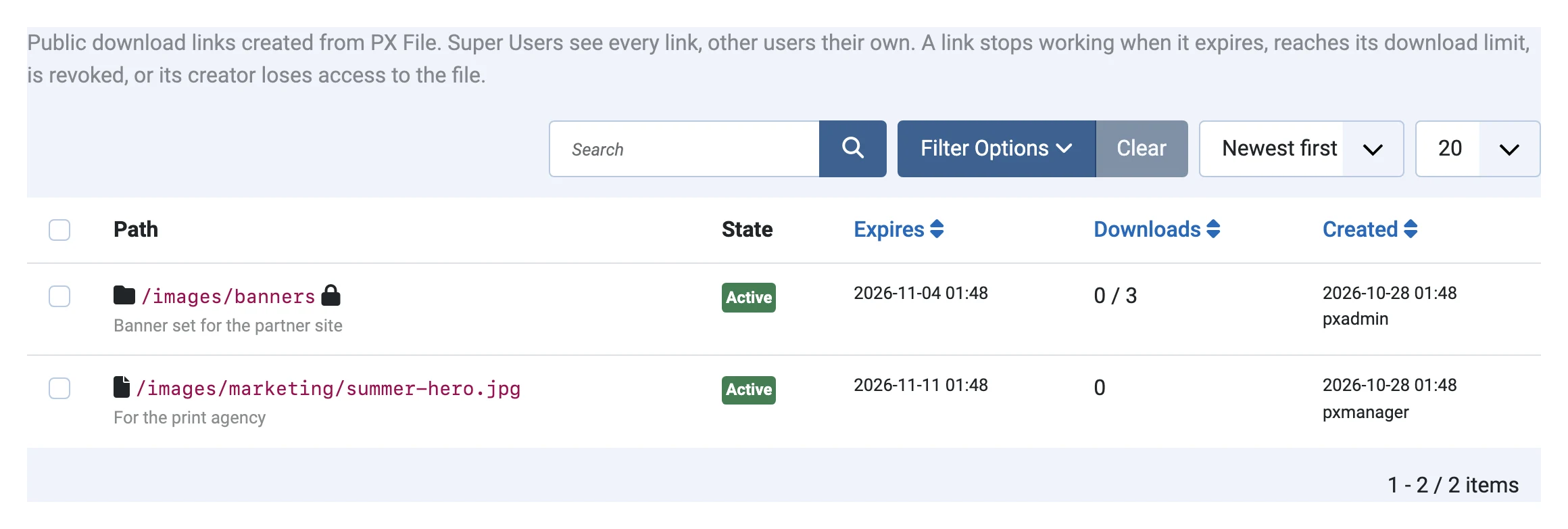
Revoke a link in the Share link dialog of the item, or in Components » PX File Pro » Share links. Super Users see every link; other users see their own.
Uploads
Upload folder
Upload folder in the toolbar opens your computer's folder picker; every file is uploaded into a folder of the same name below the current folder. (Dropping folders on the file list works in the free version too.)
Resume after a reload
Large files are sent in chunks. If the page is reloaded or the connection drops, upload the same file into the same folder again: PX File Pro asks the server how far it got and continues from there. Unfinished uploads are removed from the server after 24 hours.
Upload from URL
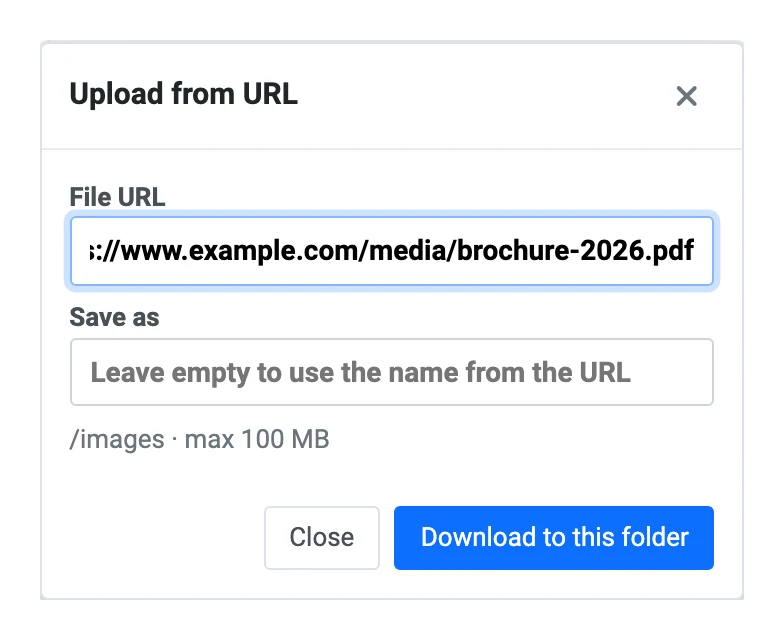
Upload from URL downloads a file from another website straight into the current folder, without passing through your computer.
- Only
http://andhttps://addresses on the usual web ports. Addresses on private or internal networks (localhost,10.x,192.168.x, cloud metadata addresses…) are refused, also after a redirect, so the feature cannot be used to reach your own server or network. - Leave Save as empty to use the name from the URL. File type rules and the confirmation for files the server can run apply as for normal uploads.
- Largest file: 100 MB by default (Options » Features), or the profile's upload limit.
Editor extras
PX File Pro adds three buttons to the small toolbar in the corner of the code editor:
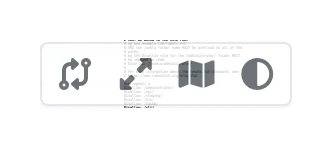
- Compare with saved: shows your unsaved changes next to the file on disk.
- Full screen: the editor fills the window; Esc or the button again to leave.
- Minimap: show or hide the code overview on the right; the choice is kept in this browser.
Activity log
Components » PX File Pro » Activity log lists every change made through PX File Manager: date, user, operation, path and target, size, SHA-256 of saved or uploaded files, and IP address. Refused attempts, such as a delete in a read-only folder or a blocked file type, are shown in red with the reason.
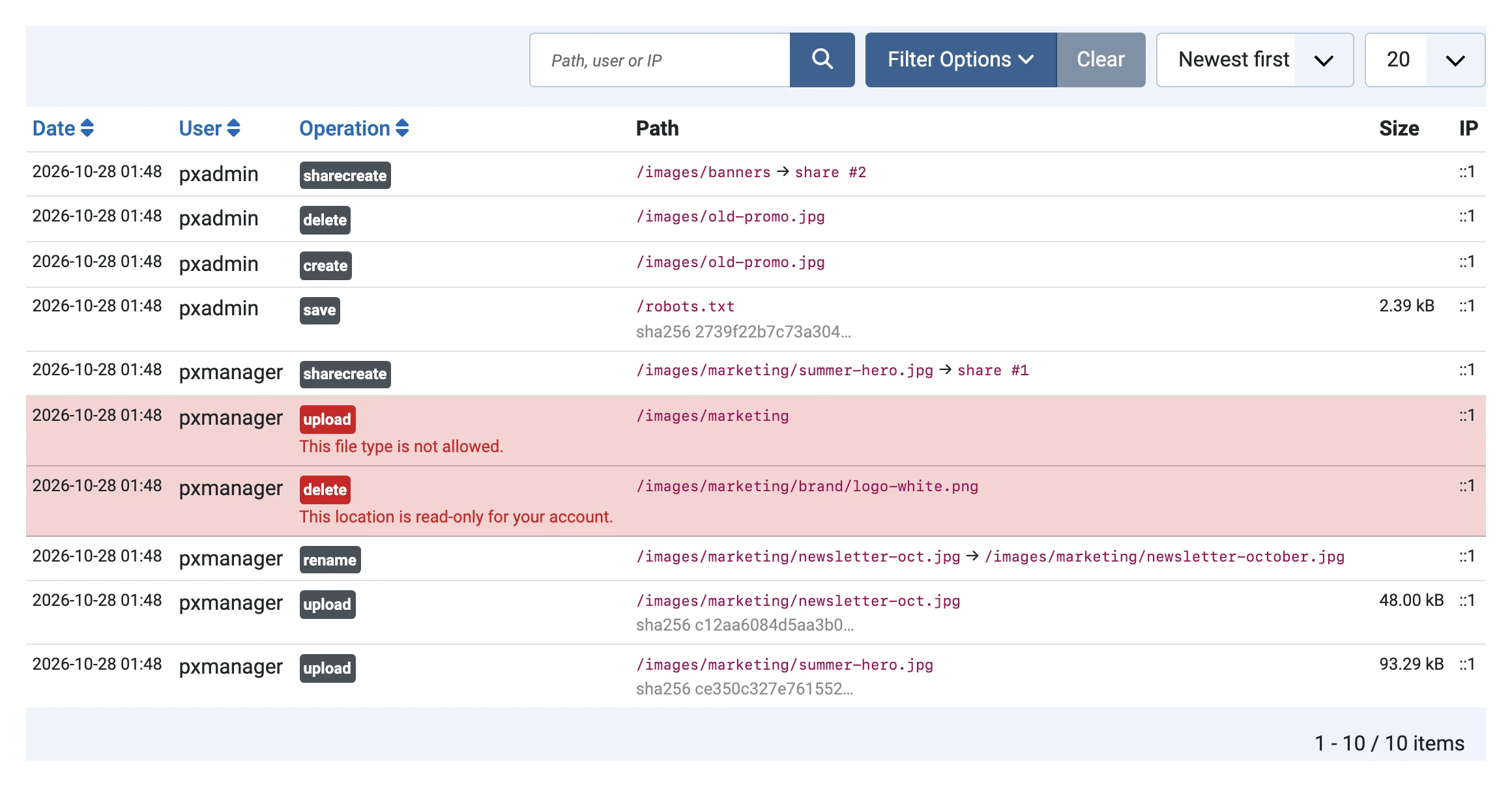
- Filter by text (path, user or IP), operation, result and dates; sort by date, user or operation.
- Export CSV downloads the filtered list (UTF-8, dates in UTC; opens in Excel and Google Sheets).
- Delete old entries removes entries older than Keep entries (days) (180 by default). The Clean up scheduled task does this every day.
- Downloads, opened files and content searches are logged too if you turn on Also log reads in Options.
- Entries also go to Joomla's Users » User Actions Log (turn off in the System - PX File Pro plugin).
- Share link URLs are never written to the log, only
share #id.
Notifications
Each profile has a Notifications tab; users without a profile (for example Super Users) use the same settings in Options » Notifications.
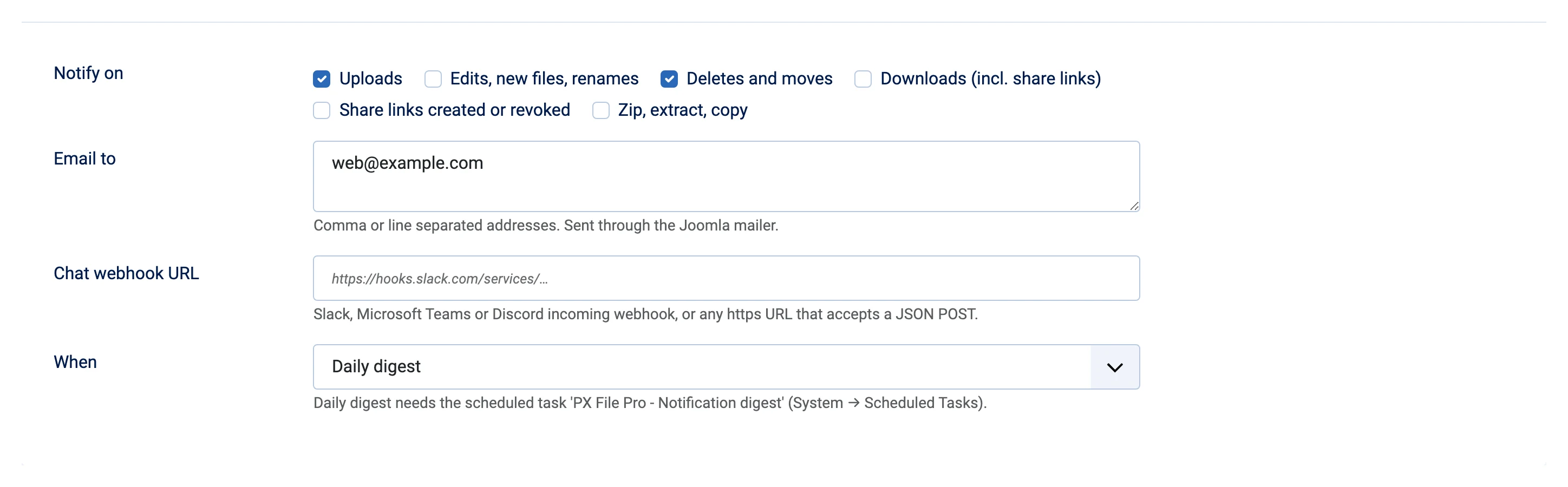
| Field | What it does |
|---|---|
| Notify on | Uploads; edits, new files and renames; deletes and moves; downloads (incl. share links); share links created or revoked; zip, extract and copy. |
| Email to | Addresses separated by commas or new lines. Sent with Joomla's mailer (System » Global Configuration » Server » Mail). |
| Chat webhook URL | An https:// incoming webhook of Slack, Microsoft Teams or Discord, or any URL that accepts a JSON POST ({"text": "…"}; Discord gets {"content": "…"}). |
| When | Right away: one message per action. Daily digest: one message with everything since the last digest, sent by the Notification digest scheduled task. |
When a profile is deleted or unpublished, its waiting digest entries are dropped, not sent to the site-wide addresses.
Scheduled tasks
Go to System » Scheduled Tasks » New and add:
| Task | What it does | Suggested schedule |
|---|---|---|
| PX File Pro - Clean up | Deletes activity log entries older than the retention, and share links that were revoked or expired more than 30 days ago. | Every day |
| PX File Pro - Notification digest | Sends the daily digest for profiles (and Options) set to Daily digest. | Every day, e.g. at 08:00 |
Joomla runs scheduled tasks on page visits ("lazy scheduler") or from a cron job with php cli/joomla.php scheduler:run; on quiet sites a cron job is more reliable.
Options
Components » PX File Pro » Options:
| Tab | Options |
|---|---|
| Profiles | Super Users ignore profiles (Yes); users without a profile see the whole site or nothing. |
| Protected files | Hidden and read-only lists, Super Users confirm changes (see Protected files). |
| Activity log | Also log reads (No); keep entries 180 days. |
| Notifications | Events, email, webhook and timing for users without a profile. |
| Features | Share links expire after at most 30 days; Upload from URL limit 100 MB; search: largest file 2048 KB, at most 500 matching lines. |
| Permissions | Who can open PX File Pro to see the log and their share links (Joomla ACL of PX File Pro). Profiles need Configure. |
Updates
New versions show up in System » Update » Extensions. As a Pro member, download the new package from your account and install it over the current one; your profiles, log, links and options are kept.
What's new
- 1.0.0: Initial release.