
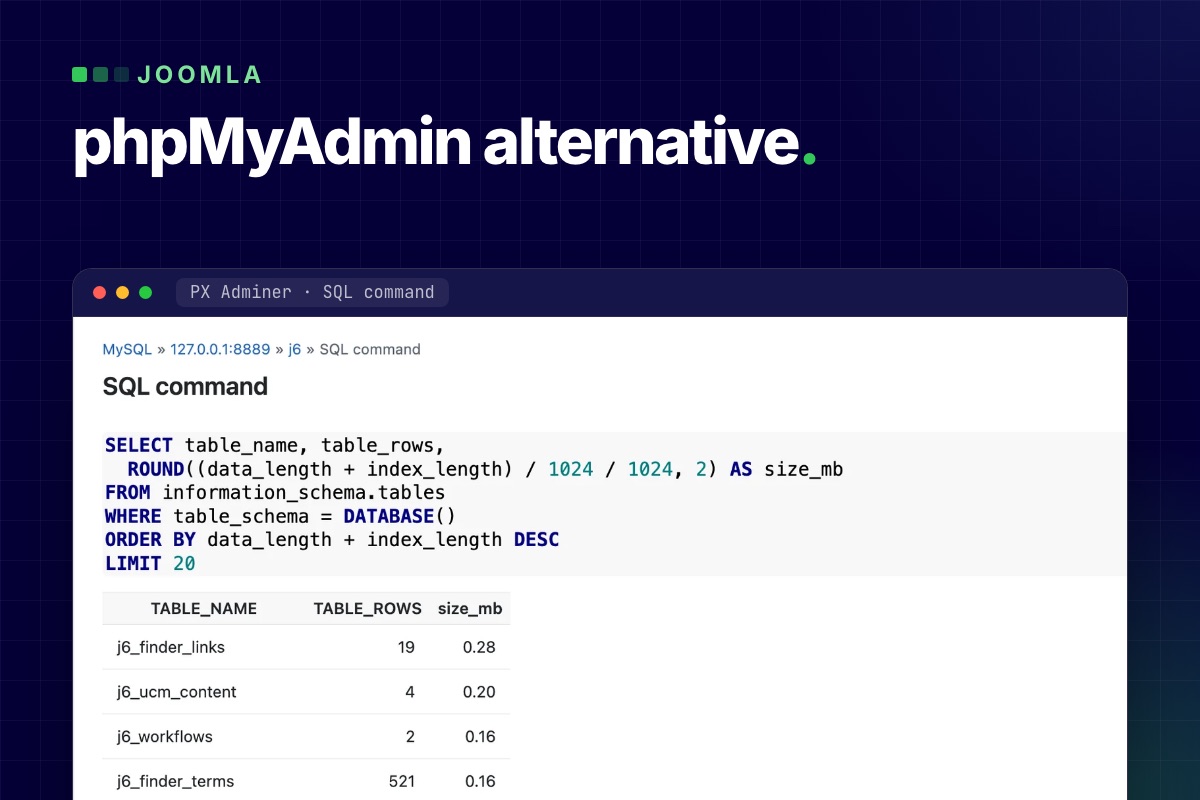

A phpMyAdmin alternative for Joomla can live inside the administrator itself. PX Adminer is a free component that opens your site's database under Components → PX Adminer: browse and edit tables, run SQL, export and import, and nothing to log in to, because it uses the database settings Joomla already has. It needs Joomla 5 or 6 and a MySQL or MariaDB database.
Why look for a phpMyAdmin alternative at all
Most Joomla problems that end in the database are small: an article that will not open because it is stuck as checked out, a module with a broken params value, a user you need to look up. Fixing them means getting to a database tool first, and that is where the time goes:
- phpMyAdmin is a separate application with its own login. If it lives behind the hosting panel, you need the panel login too, and that is not always at hand.
- A database tool is a high-value target. Any tool you add to a live site, this one included, needs to be locked down; see the security section below.
- Joomla's tables are named with a site-specific prefix, so copied queries need editing before they run.
If your host gives you phpMyAdmin and you are happy with it, nothing here forces a switch.
What PX Adminer does
PX Adminer is built on Adminer by Jakub Vrana, an open-source database manager written in PHP. Adminer alone also runs without a hosting panel, but you would upload it yourself and protect its login yourself. PX Adminer wraps it in a Joomla component and adds the Joomla parts:
- Tables and data. Filter the table list by name, then browse, search, sort and filter rows.
- Edit rows. Change, add, clone or delete rows in a form. Fields that hold JSON, such as a module's
paramsor an article'simages, get a Format button and a "Valid JSON" check, so you can read the value indented and see right away if your edit broke it. - SQL command. Run any SQL, or insert one of the ready-made Joomla queries. Choosing a query fills in your site's real table prefix; nothing runs until you click Execute.
- Export and import. Download tables or the whole database as SQL, CSV or TSV (optionally gzipped) with the size of every table shown first, and import an
.sqlor.sql.gzfile. - Structure. See and change columns, indexes and foreign keys.
Four common jobs
These use the queries from the SQL command's "Joomla queries" list. Open Components → PX Adminer, click SQL command, pick the query, read it, then Execute. In the examples #__ stands for your table prefix; PX Adminer writes the real one for you.
1. Release items that are stuck as checked out
An article, category, module or menu item that stays locked after a crashed session can be listed first:
-- Show checked-out items
SELECT 'content' AS source, id, title, checked_out, checked_out_time FROM `#__content` WHERE checked_out > 0
UNION ALL SELECT 'categories', id, title, checked_out, checked_out_time FROM `#__categories` WHERE checked_out > 0
UNION ALL SELECT 'modules', id, title, checked_out, checked_out_time FROM `#__modules` WHERE checked_out > 0
UNION ALL SELECT 'menu', id, title, checked_out, checked_out_time FROM `#__menu` WHERE checked_out > 0;
The "Check in all articles, categories, modules and menu items" query then clears them with UPDATE … SET checked_out = NULL, checked_out_time = NULL. It does the same kind of fix as System → Global Check-in, but only for those four tables; Global Check-in covers every table that has a checked-out column. Use Global Check-in when the admin works. The query changes data: read it before you click Execute.
2. List the members of the Super Users group
-- Super Users
SELECT u.id, u.name, u.username, u.email, u.block, u.lastvisitDate
FROM `#__users` u
JOIN `#__user_usergroup_map` m ON m.user_id = u.id
WHERE m.group_id = 8
ORDER BY u.id;
Group 8 is Joomla's default Super Users group. This lists its direct members only, blocked accounts included (check the block column), and it does not show a custom group that has been given Super User rights. An account nobody on the team recognises is a reason to act the same day.
3. Fix a broken JSON value
- Open the table (for example the modules table), click edit on the row and find the
paramsfield, which carries the JSON label. - Click Format to read it indented, make the change, and once you have changed the text, check that PX Adminer says Valid JSON.
- Compact folds it back. If you only formatted it to read it, the original text is saved unchanged. If you edited it, it is saved compact, as Joomla writes it.
- Save, then reload the page that uses the module.
4. Find the biggest tables, then export first
-- Largest tables
SELECT table_name, table_rows,
  ROUND((data_length + index_length) / 1024 / 1024, 2) AS size_mb
FROM information_schema.tables
WHERE table_schema = DATABASE()
ORDER BY data_length + index_length DESC
LIMIT 20;
table_rows is an estimate for InnoDB tables, but the order is what matters. On our own site the biggest were the action log and a Smart Search index table. Before you clean anything, or before a Joomla update, use Export: choose gzip and SQL, tick all tables with their data, and keep the file somewhere other than the web root. Import takes .sql and .sql.gz files up to your PHP upload limit; for bigger ones PX Adminer can run an adminer.sql file you put in its folder on the server.
Is it safe to open the database from the admin?
Full database access is enough to take over a site, so this is the part to check. From the PX Adminer source and its documentation:
- Super Users only. The component checks the global
core.adminpermission. Other groups, Administrator included, get a 403 even if you give them access in the component Options. - No password of its own. When you open the component, Joomla issues a one-time key that is valid for 60 seconds and works once, only in the browser that asked for it. Only a hash of it is stored.
- Tied to your Joomla login. Every request checks that your administrator session is still active and that the user is not blocked and is still a Super User. Log out of Joomla and PX Adminer closes. A session lasts two hours at most.
- Your site's database only. It connects with the host, user and database from
configuration.phpand has no login form for another server. - A log. When Joomla's logs folder exists and is writable, sign-ins and rejected keys that belong to a user are written to
pxadminer.phpthere with time, IP address and user ID.
It works with the privileges of your Joomla database user: if that user can see other databases on the same server, so can a SQL command here. The real protection is still a strong Super User login with two-factor authentication. Our Joomla hardening guide covers that side.
Limits you should know
- There is no undo. Changes go to the live database at once. Export first, and stay out of Joomla's own tables (users, assets, extensions) unless you know the effect.
- MySQL and MariaDB only. PostgreSQL is not supported, even though Adminer itself can talk to other databases.
- It needs a working administrator. If the admin is down, for example after a PHP upgrade, use your host's tools or SSH. See Joomla broken after a PHP upgrade.
- Session setting. In System → Global Configuration → System, Track Session Metadata must be Yes (the Joomla default).
- Requirements: PHP 8.1 or later with mysqli (Joomla 6 itself needs a newer PHP than that).
Get PX Adminer
PX Adminer is free with a free account on this site. Download it from the PX Adminer page, install it from System → Install → Extensions and open it under Components; the documentation walks through every screen.
Related: its sister tool PX File Manager does the same for files, and before a Joomla 5 or 6 upgrade a database export belongs in step one of our migration runbook. For production sites where you would rather not do it yourself, our maintenance and security service covers updates, backups and recovery.