
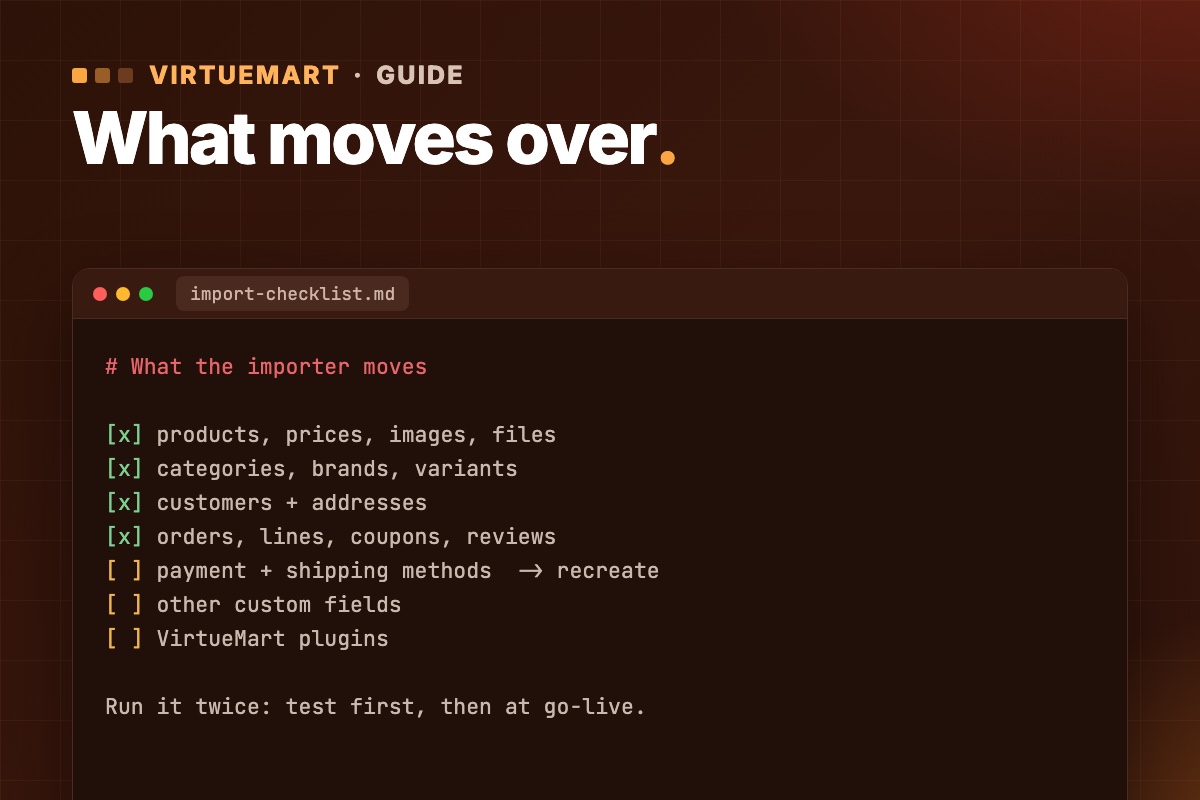

VirtueMart 4 does not run on Joomla 6, and VirtueMart 5 is still in beta. HikaShop supports Joomla 4, 5 and 6, and it ships with an importer written for VirtueMart shops. This guide shows how to migrate VirtueMart to HikaShop: what moves across, how to run the import step by step, and how to keep your product URLs and rankings.
Quick links: Short answer · What gets imported · Before you start · Import step by step · CSV method · Keep your URLs · After the import · FAQ
The short answer
- The built-in importer covers most of a shop. It reads VirtueMart 2, 3 and 4 and brings over products, categories, brands, customers, orders, coupons and reviews. VirtueMart 1 is not supported.
- Payment and shipping methods do not move. You set them up again in HikaShop. Old orders keep the names of the methods they used.
- Do it on a staging copy first. The import only adds data and never deletes anything, and you can run it again at go-live to pick up new orders.
- Switch on the redirect option. Old VirtueMart addresses then lead to the new pages, which protects the rankings your shop already has.
Why shop owners move from VirtueMart to HikaShop
The usual reason is Joomla 6. VirtueMart 4.8 is the current stable version and it runs on Joomla 3.10, 4 and 5. The Joomla 6 version, VirtueMart 5, is in beta. We cover the details in Does VirtueMart work on Joomla 6? and in the complete guide to VirtueMart on Joomla 6.
That leaves two honest options:
- Stay on VirtueMart. Move to Joomla 5.4 with VirtueMart 4.8 now, and go to Joomla 6 when VirtueMart 5 is stable. Joomla 5.4 gets security fixes until 12 October 2027, so there is no emergency. The route is in Upgrade VirtueMart 3 to 4.8 on Joomla 5.
- Switch to HikaShop. This suits you if you want the shop on Joomla 6 without waiting, or if you are already rebuilding the design and checkout anyway.
Be clear about what a switch is. It is a change of shop software, not an update. Your data comes across, but the storefront, checkout layout, template overrides and any VirtueMart add-ons do not. If your shop runs well today on VirtueMart and you rely on several VirtueMart-specific extensions, the staged upgrade is usually the cheaper path.
What HikaShop imports from VirtueMart, and what it doesn't
| Data | Imported? | Notes |
|---|---|---|
| Products | Yes | With prices, images and files |
| Categories | Yes | With images, plus product-to-category links |
| Manufacturers | Yes | Become brands in HikaShop |
| Variants | Yes | As variant characteristics |
| Customers and addresses | Yes | |
| Orders | Yes | With order lines and addresses; imported together with the customers and catalog they need |
| Coupons and discount codes | Yes | |
| Tax rules | Yes | |
| Downloadable files | Yes | |
| Reviews and ratings | Yes | |
| Payment and shipping methods | No | Recreate them in HikaShop |
| Custom fields | Partly | Only product-related fields |
| VirtueMart plugins and add-ons | No | Look for a HikaShop equivalent |
HikaShop's documentation does not describe exactly how variants and coupons are mapped, so open a few of each after the test import and compare them with the old shop.
Before you start: a short checklist
- Check your VirtueMart version. Versions 2, 3 and 4 are supported. On VirtueMart 1, upgrade first or use the CSV method below.
- Back up files and database, and restore the backup on staging. The import adds data only, but a restorable backup is the rule for any migration.
- Work on a full copy of the live site. The importer reads the VirtueMart tables from the Joomla database where HikaShop is installed, so the simplest setup is a staging copy with VirtueMart still in place. You do not need to uninstall VirtueMart first.
- Count your data on the old shop: products, categories, customers, orders. You will compare these numbers after the import.
- Write down your payment and shipping setup: methods, fees, countries, price ranges. You will rebuild all of it by hand. Check that HikaShop has a plugin for your payment gateway before you commit.
- Save your URL list from the XML sitemap or a crawl, plus your best landing pages from Google Search Console. More in Keep product and category URLs when upgrading VirtueMart.
- Check the server if the shop will end up on Joomla 6: it needs PHP 8.3 or higher and MySQL 8.0.13+ or MariaDB 10.4+.
Method 1: Migrate with HikaShop's built-in importer
This is the method we use for most shops. It moves the whole store, not only the catalog.
- Install HikaShop on the staging site and set the basics under Components → HikaShop → Configuration: currency, taxes, default language.
- In the HikaShop back office, go to Products → Import and choose Import from another shop.
- Select VirtueMart in the list of shops. If it is missing, HikaShop has not found the VirtueMart tables; check the table prefix.
- Under What to import, tick the data you need. Orders are imported together with the customers and the catalog they depend on.
- Fill in the settings (below) and click Start the import.
- Keep the page open until it shows The import is finished. If a step fails, the import stops. You can retry it with Try this step again or skip it.
The settings that matter:
- Languages. VirtueMart stores texts in one table per language, and the importer reads the language you pick. On a multilingual shop, check the texts in every language after the test import.
- Table prefix. Fill it in only if the VirtueMart tables use a different prefix from the Joomla site. Otherwise leave it empty.
- Redirect the old addresses. Joomla only. Tick it. We explain why in the URL section below.
You can run the import more than once. Only new items are added: products, customers and orders created on the old shop since the last run. Changes you made to items that were already imported are not copied. So test once, fix what you find, then run it again on go-live day.
Moving to Joomla 6 at the same time
If the target is Joomla 6, do it in this order. Import on the Joomla version your VirtueMart still runs on (Joomla 5.4 for VirtueMart 4.8), check the result, remove the VirtueMart component, and only then upgrade Joomla to 6. VirtueMart 4 does not run on Joomla 6, so it has to be gone before that step. The upgrade itself is the usual Joomla 6 migration, and you test the shop again after it.
Method 2: Migrate products with a CSV (RO CSVI)
If you only need the catalog, or you want to control the field mapping yourself, you can move products with the RO CSVI extension. Roland D's bridge template exports VirtueMart products straight into a HikaShop product import. It needs RO CSVI 7.15.0 or later and covers products only, not customers or orders.
- Update the available fields in RO CSVI.
- Create an import template: Action import, Component HikaShop, Operation Product.
- Create an export template: Action export, Component VirtueMart, Operation Product.
- On the export template's Source tab, set the destination to the HikaShop import template and save.
- Add the template fields.
product_skuis required and becomesproduct_codein HikaShop;manufacturer_namebecomesbrand;file_urlbecomesfile_path. - Map your custom fields by hand. RO CSVI cannot know which HikaShop field matches yours.
- For images, use
picture_urlso the export carries the full domain name, and set Save images on server to Yes on the Image tab of the import template.file_urldoes not work for images because it holds a local VirtueMart path. - On the RO CSVI Export page, select the VirtueMart template, click Continue, check the Import Preview, and run it.
Two limits to know: custom_title, custom_value and custom_params cannot be imported into HikaShop, and unmapped fields without a column header are reported as unsupported in the import log. The full procedure is in the RO CSVI documentation.
| Built-in importer | RO CSVI | |
|---|---|---|
| Covers | Catalog, customers, orders, coupons, reviews | Products only |
| Extra extension | No | Yes, RO CSVI 7.15.0+ |
| Redirects for old URLs | Built in | Set up yourself |
| Best for | Full shop move | Catalog only, custom mapping |
Keep your URLs and rankings
Your product and category pages carry years of search rankings and inbound links. HikaShop uses its own addresses, so without redirects those pages return a 404 and the rankings drain away.
With Redirect the old addresses ticked, the importer creates a permanent redirect in the Joomla Redirect component for every product and category, from the old VirtueMart address to the new HikaShop page. It also enables the System - Redirect plugin that uses them. You can see and edit every redirect under Components → Redirects.
One detail catches people out: a redirect only applies to an old address that no longer works. So the redirects take effect once the VirtueMart component is removed, not before. After that:
- Request your saved URL list on staging and sort the results into 200, 404 and redirect.
- Check that each redirect lands on the matching product, in one hop. Never send everything to the home page.
- Keep your XML sitemap current and re-submit it in Google Search Console after go-live.
The method for mapping and checking URLs is in Keep product and category URLs (and rankings) when upgrading VirtueMart.
After the import: set up and test
- Payment and shipping. Create them in the System menu under Payment methods and Shipping methods, using the notes you wrote earlier.
- Compare the counts of products, categories, customers and orders with the numbers from the old shop.
- Open a few records: several products (with variants), a category, a customer and an order. Check prices, images, taxes and addresses.
- Rebuild the storefront. VirtueMart template overrides do not carry over, so product pages, cart and checkout need styling in HikaShop.
- Place test orders with every payment and shipping method, and check the order emails. Our test-order checklist is written for VirtueMart, but the same cases apply.
- Remove the VirtueMart component once you are satisfied. This is also when the old-address redirects start working.
- Go live in a quiet hour. Run the import once more first, so orders and customers placed since you built staging come across.
Common problems
| Symptom | What to check |
|---|---|
| VirtueMart is missing from the list of shops | HikaShop only lists shops whose tables it finds in the database. Check the table prefix. |
| Images fail to copy | Check that the VirtueMart image folders exist and that the HikaShop upload folder (System → Configuration → Files) is writable, then click Try this step again. |
| A step stops with an error | Retry it with Try this step again, or skip it and come back to it. The import can be re-run safely. |
| Old links give a 404 | Confirm the redirect option was ticked, the VirtueMart component is removed and the System - Redirect plugin is enabled. |
Frequently asked questions
Can I migrate VirtueMart to HikaShop without losing orders?
Yes. Orders are imported with their lines and addresses, together with the customers they belong to. Old orders keep the names of the payment and shipping methods they used, even though you recreate the methods themselves.
Does HikaShop import from VirtueMart 1?
No. The import for VirtueMart 1 was removed. Upgrade to VirtueMart 2 or later first, or use the CSV method.
Do I have to uninstall VirtueMart before importing?
No. Keep it in place during the import and while you test. Remove it only once you are happy with the result.
Is it safe to run the import twice?
Yes. A second run adds only new items, such as products, customers and orders created since the last run. It does not copy changes made to items that were already imported.
Will I lose my SEO rankings?
Not if you plan for it. Tick Redirect the old addresses, remove VirtueMart so the redirects take effect, and check your URL list on staging. No migration comes with a ranking guarantee, so watch Google Search Console for a few weeks afterwards.
Can I move to HikaShop and Joomla 6 in one go?
You can, but we do it in two steps: import and test on the Joomla version VirtueMart still runs on, then remove VirtueMart and upgrade Joomla. Each step is easier to test and to roll back.
Can ThePixel do the migration for me?
Yes. We copy your shop to staging, run the import, compare every count, rebuild payment and shipping, set up the redirects and test real orders before go-live. See our VirtueMart migration and upgrade service.
Related guides
- VirtueMart on Joomla 6: The Complete Guide (2026)
- Does VirtueMart work on Joomla 6? Status for VirtueMart 4.8 and 5
- Keep Product and Category URLs (and Rankings) When Upgrading VirtueMart
- Check Payment and Shipping Plugins Before a VirtueMart Upgrade
- VirtueMart Test Orders Checklist
- Joomla 5 migration guide, step by step
Sources: the official HikaShop documentation for migrating from VirtueMart and the RO CSVI guide, checked on 9 November 2026.
Work with us
Want your VirtueMart shop on HikaShop, without the guesswork? We run the import on staging, compare the data after every step, keep your URLs and test real orders before go-live – the shop keeps selling.