
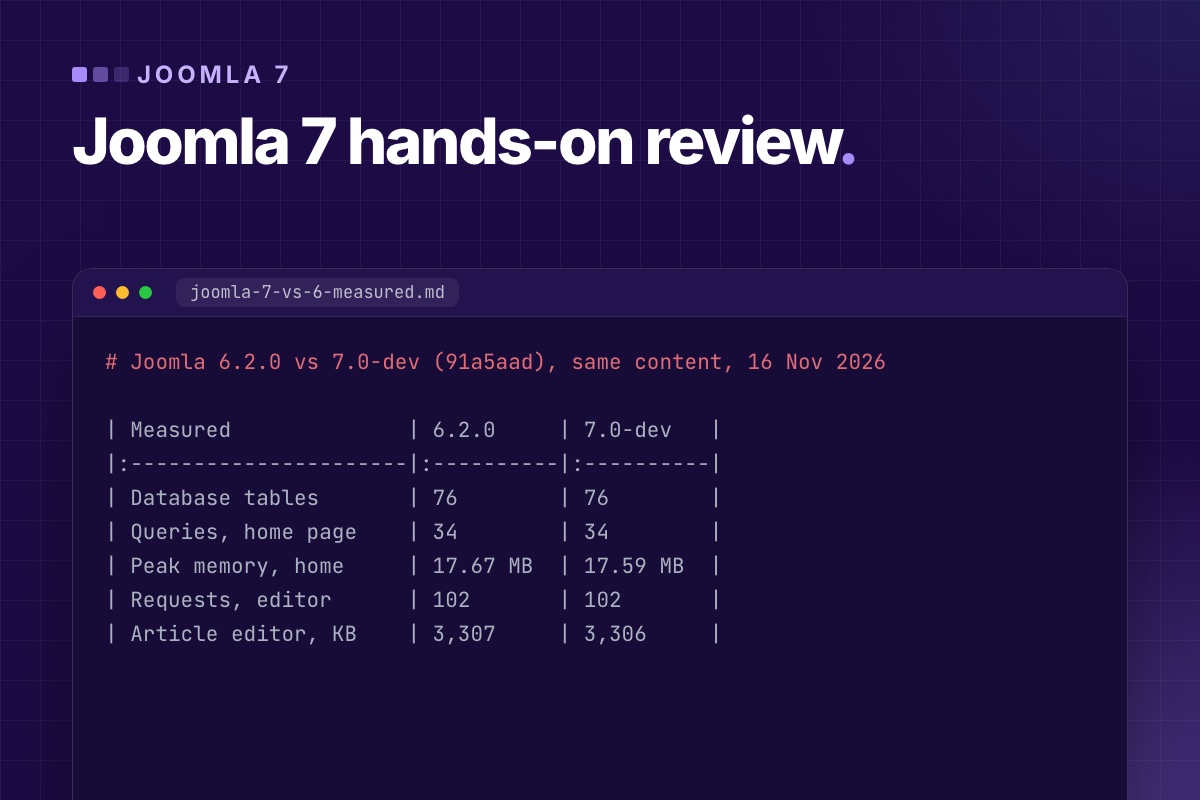

We built a Joomla 7 install package from the 7.0-dev branch, installed it next to a clean Joomla 6.2.0 on the same machine, and loaded the same sample content into both. Short version of this Joomla 7 review: on 7.0-dev as of 16 November 2026, you cannot tell them apart. The first screen of the administrator, the editor, the media manager and the Cassiopeia home page look the same pixel for pixel, apart from the version number. Both run the same database queries, make the same requests and respond at the same speed. What changed so far is underneath: 7.0-dev mostly removes old code, so today the risk sits in extensions, template overrides and custom code that still use those old APIs.
Joomla 7 review in one table
| Question | What we found (7.0-dev, 16 November 2026) |
|---|---|
| Is Joomla 7 out? | No, and there is no alpha yet. The branch reports itself as 7.0.0-alpha1-dev. The GitHub milestone for 7.0.0 is due 11 October 2027, and the version file plans the release for the next day. |
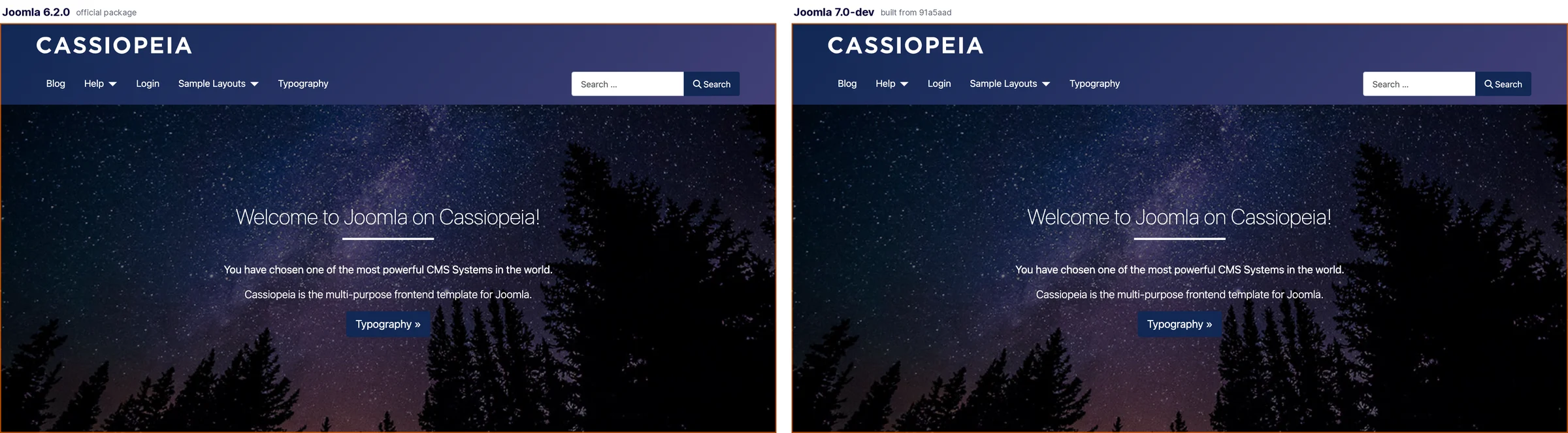
| Does it look different? | No. On the screens we compared, only the version string and the site name we gave each install differ. The first screen of the front end differs by zero pixels. |
| Is it faster? | Not measurably. Same query count on every page we tested, memory use about 0.5% lower, response times within measurement noise in two separate runs. |
| What did change? | Deprecated code is gone, or now needs the backward compatibility plugin. That plugin is called compat7 and is switched off by default. |
| New features? | None yet. The roadmap features (Ajax back end, automated workflows, filtering by custom fields, a new design system and others) are not in 7.0-dev. |
How we tested
- Joomla 6.2.0: the official full package,
Joomla_6.2.0-Stable-Full_Package.zip. - Joomla 7.0-dev: a full package built with the project's own
build/build.phpfrom the7.0-devbranch at commit 91a5aad of 7 November 2026. That commit was still the head of the branch when we checked on 16 November. A built package is closer to what you will download than a git checkout with development tools in it. Our Joomla 7 dev environment guide shows the checkout route. - Same everything else:
- One MacBook (Apple silicon), Apache with PHP 8.3.14 as FastCGI, MySQL 8.0, one database per site.
- Both installed from the command line with
installation/joomla.php install, then the core Blog Sample Data added to each. - Default settings: no caching, no debug, no compression.
- Measuring:
- Timing: 30 runs per page, alternating between the two sites, after 5 warm-up requests. The tables give medians. We repeated the whole run later the same day.
- Queries and peak memory: Joomla's own debug bar, switched on only for that pass.
- Page weight: a headless Chromium with the browser cache off.
- Screens: a 1440 × 900 viewport at 2x (2880 × 1800 = 5,184,000 pixels per screenshot), the first screen of each page, compared pixel by pixel.
OPcache is not loaded in this local PHP, so absolute times are higher than on a tuned server. Compare the two columns, not the numbers with your host.
One tip if you try this yourself: on a development build, the command-line installer leaves the installation/ folder in place (it only deletes it on stable versions), so remove it by hand.
What you see: nothing new
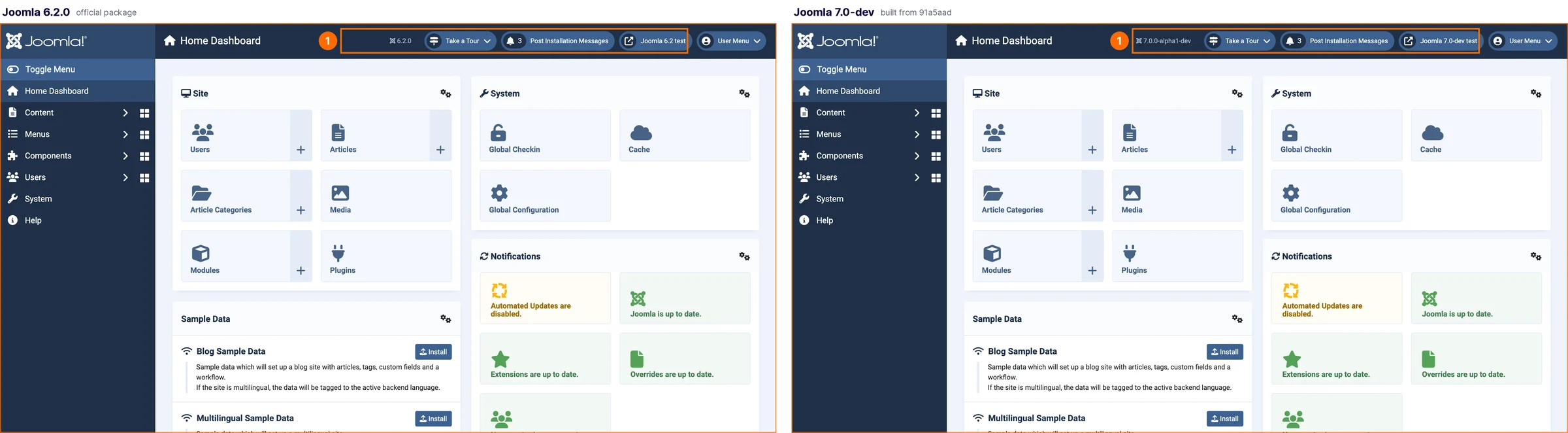
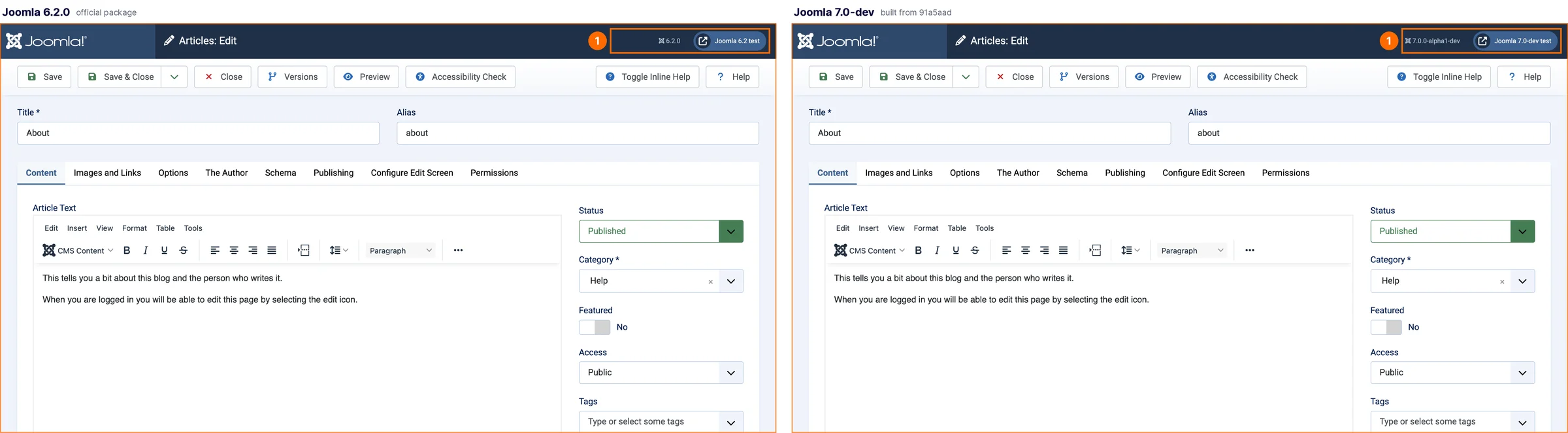
The administrator dashboard first. Left is 6.2.0, right is 7.0-dev. The only area that differs (1) is the top bar, which shows the version and the site name we gave each install.
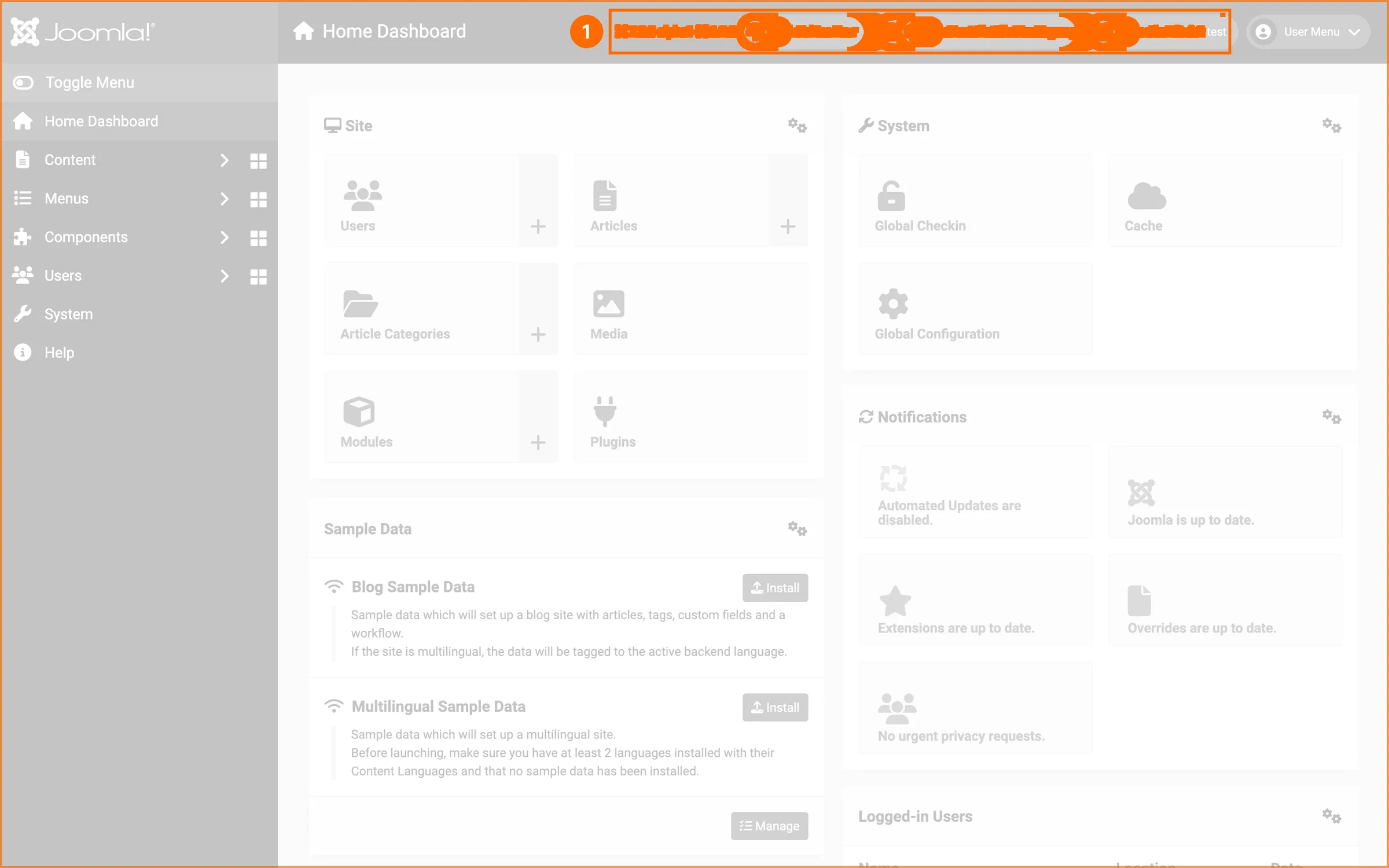
To make sure we weren't missing small changes, we compared the screenshots pixel by pixel. On the dashboard, about 28,000 of 5,184,000 pixels differ (0.54%), and every one of them is in the top bar. The map below fades the 7.0-dev screen and paints the differing pixels orange.
We did the same for the first screen of the other pages:
| Screen (first 1440 × 900) | Differing pixels | Where |
|---|---|---|
| Web installer, first step | 11,916 | Version in the header |
| Front end home page (Cassiopeia, Blog Sample Data) | 0 | – |
| Administrator dashboard | 27,964 | Top bar (version, site name) |
| Articles list | 27,962 | Top bar |
| Article editor (TinyMCE) | 8,397 | Site name in the header |
| Media manager | 27,964 | Top bar |
| System Information | 40,029 | Top bar and the version row |
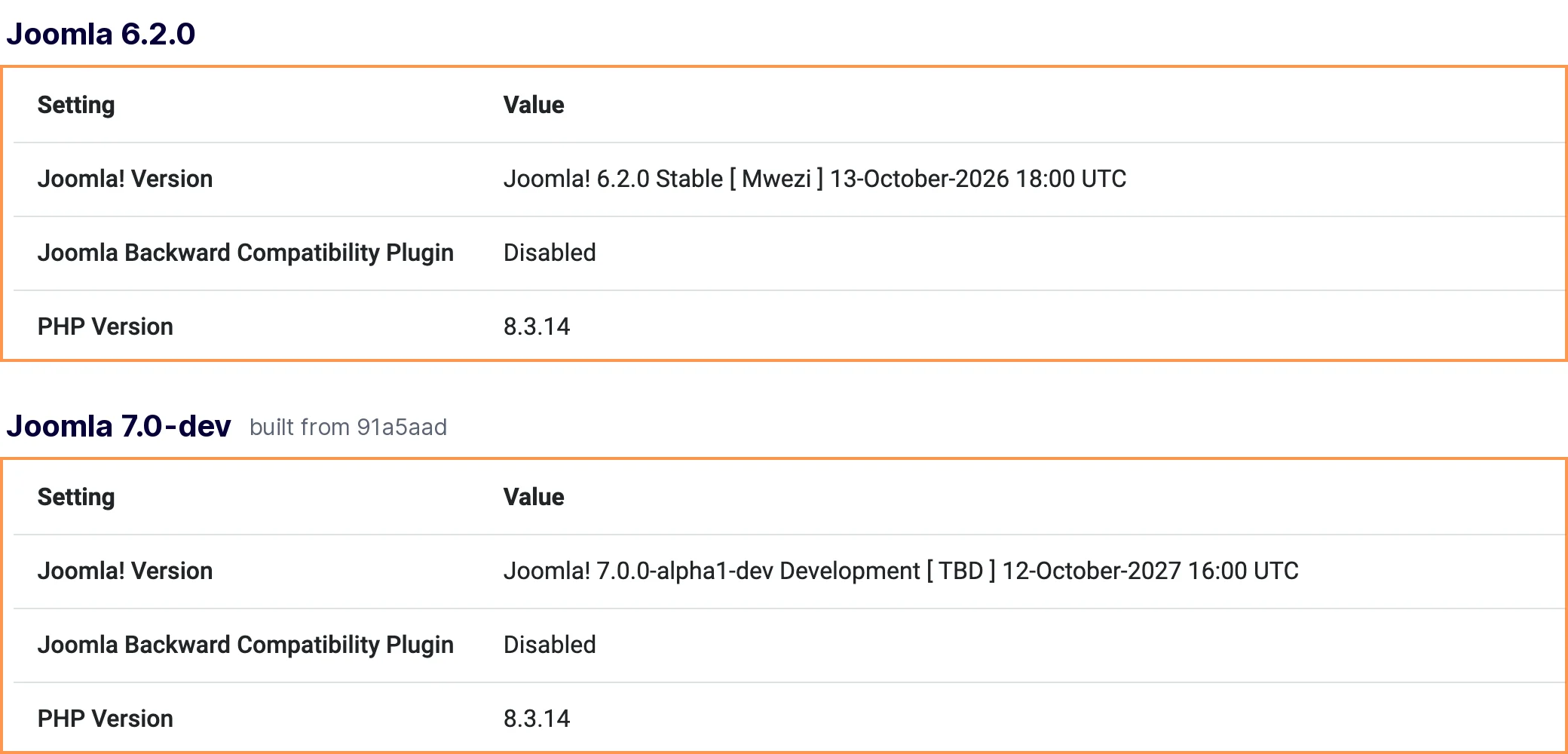
The one place 7.0-dev tells you what it is: System Information. It shows the development version with a placeholder code name and the planned release date. Both versions also show a row for the backward compatibility plugin, and on both it is disabled after a fresh install.
Measured: speed, queries, memory, page weight
| Page | Median response 6.2.0 → 7.0-dev, run 1 | Run 2 | Database queries (both) | Peak memory 6.2.0 → 7.0-dev |
|---|---|---|---|---|
| Home page (blog layout) | 191 → 183 ms | 172 → 170 ms | 34 | 17.67 → 17.59 MiB |
| Single article | 179 → 178 ms | 162 → 162 ms | 39 | 17.71 → 17.64 MiB |
| Administrator dashboard | 188 → 187 ms | 170 → 171 ms | 38 | 17.55 → 17.48 MiB |
| Articles list | 202 → 198 ms | 185 → 184 ms | 38 | 18.24 → 18.11 MiB |
The response-time spread of the two installs overlaps on every page in both runs. For the home page in run 1, the middle 80% of runs fell between 180 and 259 ms on 6.2.0 and between 173 and 206 ms on 7.0-dev. The second run moved both columns down together and left the gaps at 0 to 2 ms, sometimes in 6.2.0's favour. That is noise on a laptop. The query count is identical. Memory is 66 to 131 KiB lower on 7.0-dev, about 0.5%. That fits a code base that loads fewer legacy classes, but nobody will notice it.
| Page (cache off) | Requests | Transferred, 6.2.0 | Transferred, 7.0-dev |
|---|---|---|---|
| Front end home page | 30 | 1,226 KB | 1,225 KB |
| Single article | 24 | 631 KB | 631 KB |
| Administrator dashboard | 43 | 1,276 KB | 1,276 KB |
| Article editor | 102 | 3,307 KB | 3,306 KB |
The pages make the same requests to the same URLs, and the sizes match to within 1 KB. A few of those files did change, though, in the same direction as the PHP side:
media/system/js/core.jsno longer has theJoomla.JTextproxy.media/legacy/js/toolbar.jsno longer hasJoomla.popupWindow.calendar.jslost its backward-compatibility code.- Cassiopeia's
colors_standard.cssandcolors_alternative.cssno longer define--cassiopeia-color-link(#47883; the pull request names it differently). Core no longer reads it. If a child template oruser.cssusesvar(--cassiopeia-color-link), switch it to--link-color, which Cassiopeia still sets.
The install package
| Joomla 6.2.0 | Joomla 7.0-dev (91a5aad) | |
|---|---|---|
| Full package (.zip) | 34.9 MB | 35.1 MB |
| Files after unzipping | 9,808 | 9,727 |
| Size after unzipping | 90.6 MB | 91.0 MB |
| Database tables after install + Blog Sample Data | 76 | 76 |
| Extensions registered | 251 | 251 |
7.0-dev has fewer files but is 0.4 MB bigger. Almost all of that comes from one file that is not Joomla 7 code. The build refreshes the FIDO metadata used by passkey (WebAuthn) login, and plugins/system/webauthn/fido.jwt is 550 KB larger in our build. Without it, 7.0-dev is smaller. Comparing the two file lists explains the rest:
- 118 files are gone in 7.0-dev.
- 53 are the database update scripts of Joomla 6.0, 6.1 and 6.2 (#47785, #48642). An update to Joomla 7 starts from the last 6.x release, so those steps are no longer shipped.
- 22 are legacy helper stubs kept for old code, for example:
components/com_contact/helpers/route.php(ContactHelperRoute)components/com_content/helpers/icon.php(JHtmlIcon)- the global back-end helpers such as
ContentHelperinadministrator/components/com_content/helpers/content.php
- 30 are the Joomla 6 compatibility plugin, with its language files and asset list.
- The rest:
- The PHPass password-hash library and its handler.
- The Crypt classes, which moved into the compatibility plugin (#47899).
- The Mcrypt class, removed outright (#38713).
- The deprecated layouts
joomla.content.icons.createandjoomla.html.batch.user(#47884). - The basic radio field and its layout, now in the compatibility plugin (#47930).
- The banner helper (#47937).
- The TinyMCE upload-folders field (#47913).
- The action log "log creator" field (#47874).
- 37 files are new.
- 32 belong to the new Joomla 7 compatibility plugin, which takes over some of the removed classes.
- 3 are its two language files and its asset list.
- 2 are the 7.0 database update scripts, one for MySQL and one for PostgreSQL.
The database tells the same story. The only row that differs between the two extension tables is the compatibility plugin: compat6 on 6.2, compat7 on 7.0-dev. Both are installed disabled.
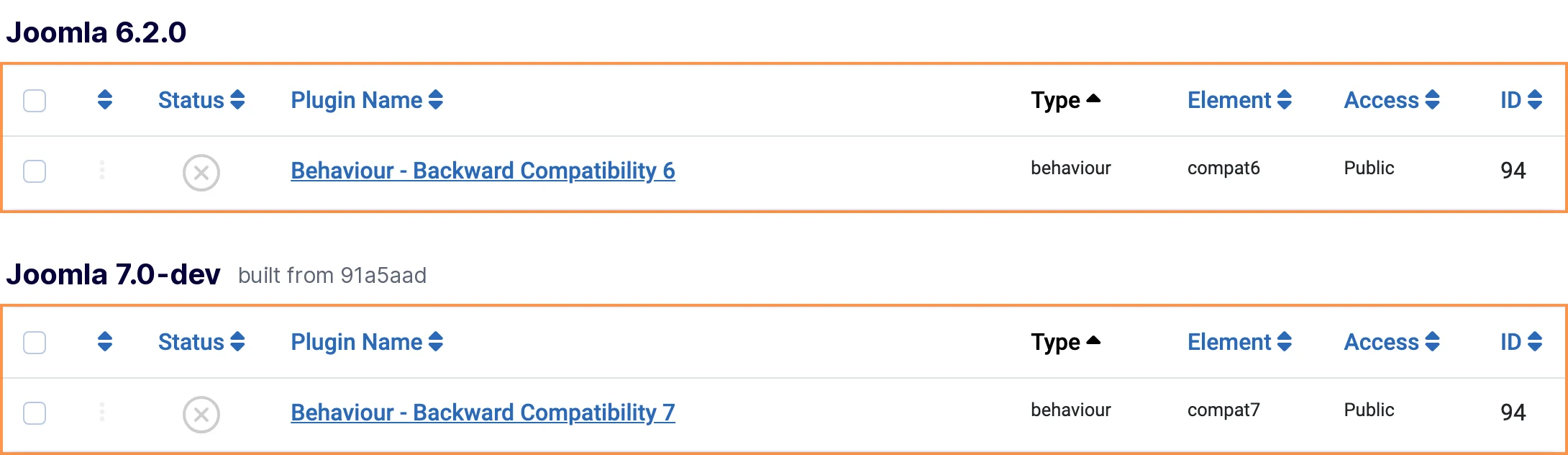
On a site that is updated, this swap matters more than on a fresh install. The 7.0 update script (script.php) uninstalls compat6 with no migration step. The 7.0 SQL update then inserts compat7 disabled, with its class aliases option off. If your Joomla 6 site runs with Backward Compatibility 6 switched on, that safety net is gone after the update until you switch on Backward Compatibility 7 yourself. So find out now whether your site depends on it. Our Joomla 7 vs Joomla 6 post shows how.
What did change under the hood
Up to 16 November 2026, 65 pull requests have been merged into 7.0-dev:
- 14 are upmerges that bring in the fixes from Joomla 6.
- 37 remove deprecated code or move it into the compatibility plugin.
- 3 refactor code to inject dependencies.
- 11 are build, test and housekeeping work, including the removal of the 6.x update scripts.
None adds a feature. The ones that matter most, all merged into 7.0-dev:
- Old getters throw errors without the compatibility plugin.
Factory::getConfig(),Factory::getSession()andFactory::getMailer()now throw aBadMethodCallException. They only run when the plugin is enabled. The same goes forUser::get(). The switch came with PR #47911. Other getters such asFactory::getUser()andFactory::getDbo()still work and log a deprecation. Our post on replacing the Factory getters shows the replacements. - Plugins no longer get
$this->appand$this->dbautomatically (#47881). In the same way,FieldsPluginloses its$appproperty andPrivacyPluginits$db(#47904, #47905). - Editor buttons:
onDisplayis removed in favour of agetButtonproperty (#47902). - JavaScript: these are removed (#47928, #47908, #47907):
- the
Joomla.JTextproxy Joomla.popupWindow- the backward-compatibility code in
calendar.js
- the
- LegacyPropertyManagementTrait (the
get()/set()/def()helpers) is gone from several classes (#44907, #44904, #44906):- the MVC classes
CategoryNodeUser, whereget()now only works with the compatibility plugin
Table, the installer and updater classes andCMSObjectstill use it. - Password hashes and two-factor code.
- Hashes in the PHPass format (
$P$…, written only by Joomla 3.2.0) no longer verify (#44237). Those users will need to reset their password. - MD5 hashes from older Joomla versions are still accepted and re-hashed on the next login.
- The legacy two-factor code that Joomla 4.2 replaced with multi-factor authentication is removed (#47457).
- Hashes in the PHPass format (
- Compatibility plugin:
compat6is replaced bycompat7(#47420, #47915), as described above.
The complete list, with what to search for in your code, is in our Joomla 7 breaking changes post.
What is not in 7.0-dev yet
If you came for new Joomla 7 features, they aren't here yet. The project's feature roadmap lists these for Joomla 7.x:
- An Ajax-driven back end
- Automated workflows
- Filtering by custom field values
- A rate-limiting framework
- Multisite
- A framework-agnostic design system with a new default template per major version
The roadmap's sections are planning buckets, not release promises. None of these is merged into 7.0-dev, and a few have open pull requests against Joomla 6.3. Our Joomla 8 roadmap post tracks each item and its status. A new design system and default template would change what Joomla 7 looks like, so treat this review as a snapshot of the branch today, not a preview of 7.0.
What to check on your site now
Our Joomla 7 vs Joomla 6 post has the general checks:
- whether the site leans on the compatibility plugin
- old APIs in the template
- the deprecation log
The three below add what 7.0-dev has changed since. The shell commands work in bash or zsh, run from the site root.
1. Accounts with PHPass password hashes
Run this in phpMyAdmin, PX Adminer or the MySQL client, with your own table prefix in place of jos_:
SELECT id, username, lastvisitDate
FROM jos_users
WHERE password LIKE '$P$%';
Usually this returns no rows. If it returns some, those accounts haven't logged in since Joomla 3.2.0 – over a decade. Block them, or tell them to use "Forgot your password?" after the upgrade. MD5 hashes don't need action: Joomla 7.0-dev still converts them on login.
2. Overrides of the two removed layouts
Search the site and administrator templates for the two layout IDs and for override files with those names:
grep -rnE "joomla\.content\.icons\.create|joomla\.html\.batch\.user" templates administrator/templates --include='*.php'
find templates administrator/templates -path '*/html/layouts/joomla/content/icons/create.php' -o -path '*/html/layouts/joomla/html/batch/user.php'
An override of a layout that core no longer uses is dead code. A call to one of these IDs from your own code needs a replacement.
3. Calls that break on 7.0-dev without the compatibility plugin
Search your template overrides, and add the folders of extensions you wrote yourself:
grep -rnE "(Contact|Finder|Newsfeeds|Tags)HelperRoute::|JHtmlIcon|(Banners|Categories|Contact|Content|Contenthistory|Fields|Installer|Menus|Modules|Newsfeeds|Plugins|Redirect|Template|Templates|Users)Helper::|Factory::get(Config|Session|Mailer)\(|(user|getIdentity\(\))->get\(|\bJ(Html|Text|Factory)::" templates/*/html --include='*.php'The pattern looks for:
- the removed site and back-end helper stubs
- the three Factory getters that now throw
$user->get(…)andgetIdentity()->get(…), which now need the compatibility plugin (a user object under another variable name needs its own search)- the old
Jclass aliases, which only the compatibility plugin provides, with its class aliases option on
A ContentHelper:: hit is fine if the file imports the namespaced class with a use statement. Leave Joomla's own folders out of the search: on Joomla 6.2 they still contain the old stub files themselves. Every real hit in an override or in your own extensions needs a change, or the compatibility plugin as a bridge. Hits in third-party extensions are for their developers. Our Joomla 7 upgrade checklist covers the rest of the preparation.
Coming next in this series
This is the first of three hands-on posts on Joomla 7.0-dev, all on the same test setup. Next: what exactly breaks when the Joomla 7 compatibility plugin is off, with the error each old call throws. After that: popular free templates installed on 7.0-dev and what happens to them. All three are collected on our Joomla 7 hub, which we keep up to date as the branch moves.
Sources
- GitHub, joomla/joomla-cms:
- 7.0-dev source:
libraries/src/Factory.phpandlibraries/src/User/User.php(theCOMPAT_JOOMLA_7check)libraries/src/Service/Provider/Authentication.php(password handlers)plugins/behaviour/compat7administrator/components/com_admin/script.phpinstallation/sql/mysql/base.sqlandadministrator/components/com_admin/sql/updates/mysql/7.0.0-2026-03-18.sqlinstallation/src/Console/InstallCommand.php
- Our own test installs and measurements, 16 November 2026, as described above
Planning the move
On 7.0-dev as it stands, the work for a site is in its code, not its look: which extensions, overrides and custom code still use the old APIs, and who fixes them. That can change before 7.0 if roadmap features land. If your site is still on Joomla 3, 4 or 5, our Joomla migration service moves it to Joomla 6 now, the version every route to Joomla 7 goes through. We audit every extension, override and custom file first, run the move on a staging copy and keep your URLs. For extension authors who want their code checked against 7.0-dev, see custom extension development.