

PX Image Optimizer is a free Joomla image optimizer for Joomla 6. Images you upload in the Media Manager are scaled down when they're oversized, stripped of camera and GPS data and recompressed, a WebP copy is saved next to each one, and your pages serve that WebP copy to browsers that support it. The images already on your site can be processed in bulk, and by default every original is kept so you can put it back.
What Joomla 6 already does with images
More than most people think (checked against Joomla 6.2). The Media Manager accepts WebP and AVIF uploads, and the core plugin Media Action - Resize can shrink every upload to a maximum width and height. Its two fields are empty on a fresh install, so it does nothing until you fill them in under System » Plugins. If oversized uploads are your only problem and they aren't phone photos, set those two numbers and stop here.
What core doesn't do:
- No compression. An upload that isn't resized is stored exactly as it came. A resized JPEG or WebP is saved again at quality 100, and a resized PNG with no compression at all.
- No metadata handling. Uploads that aren't resized keep their EXIF data, including the GPS position of a phone photo. Resized ones lose it together with the orientation flag, so a portrait phone photo can come out sideways.
- No WebP copies, and nothing that serves them. Joomla stores what you upload. Converting a library and serving the new files is template or server work – our post on AVIF and WebP in Joomla shows the manual route with
cwebpand nginx. - Nothing for the images you already have. The resize plugin only sees new uploads.
- No undo. A resized upload replaces the original; there's no copy to go back to.
What PX Image Optimizer adds
| Feature | What it does in 1.0 |
|---|---|
| Optimize on upload | JPEG, PNG and WebP files saved in the Media Manager are auto-oriented, stripped of EXIF/GPS, scaled down when larger than 2560 × 2560 px (you can change it) and recompressed before they reach the disk |
| WebP copy | A .webp file next to each JPEG and PNG: photo.jpg → photo.webp |
| WebP on your pages | Local <img> tags get a <picture> wrapper with the WebP source when the page is sent; articles and modules stay unchanged |
| Bulk optimize | Runs the same steps on an existing folder under images, files or media, up to 50 files per batch |
| Restore | With Keep originals on (the default), originals are kept in media/com_pxio/backups; one click puts a file back and deletes its WebP copy |
| Dashboard and system check | Totals saved, and whether your server has Imagick or GD with WebP support |
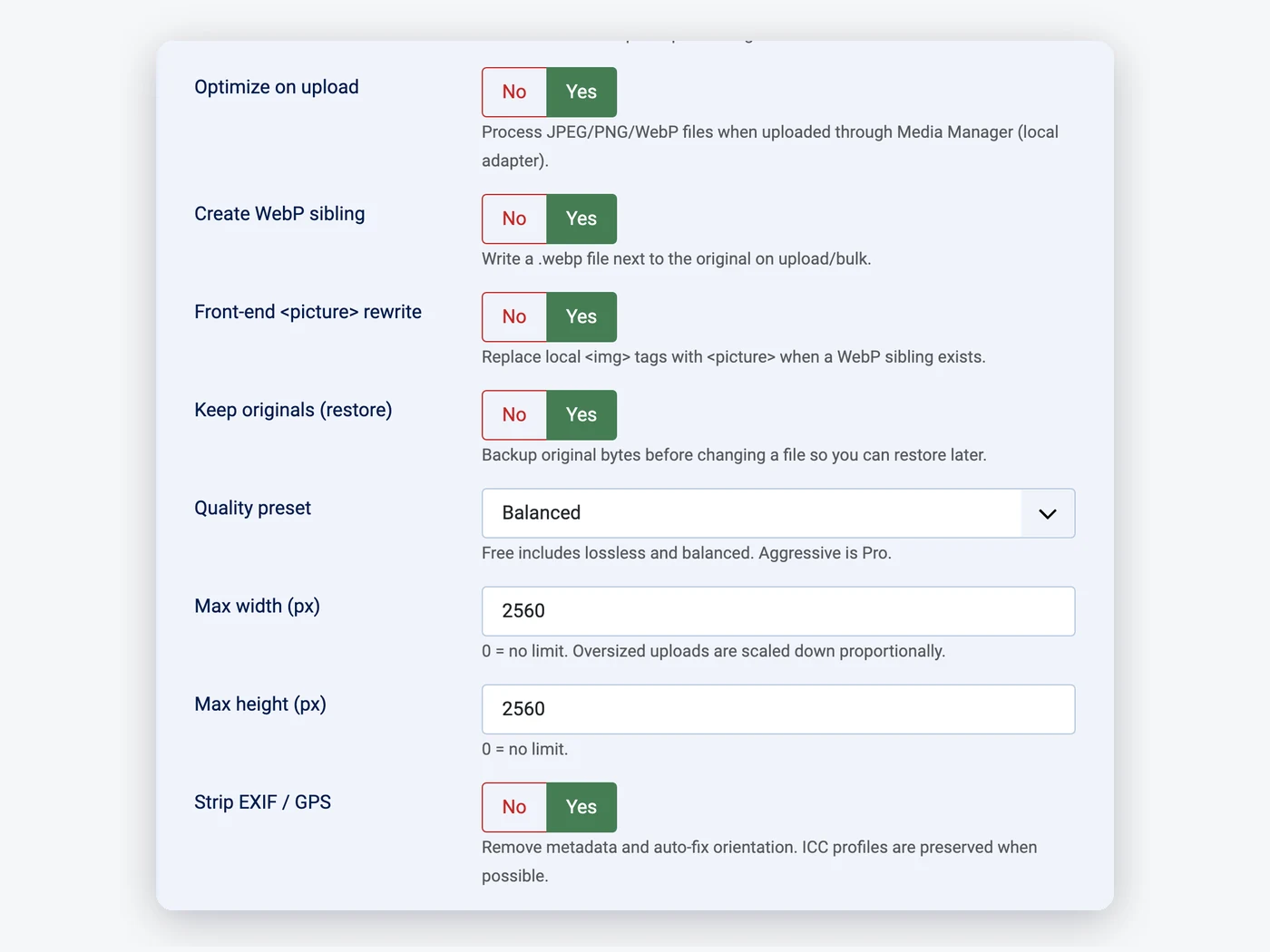
Two quality presets: Balanced saves JPEG at quality 82 and WebP at 80, Lossless uses 95 and 90. PNG files stay lossless in both. If an optimized JPEG or PNG comes out larger than the original, the original is kept; WebP files are always re-encoded. GIF and SVG files are left alone, and so are images on remote storage such as S3.
What it saved on our test site
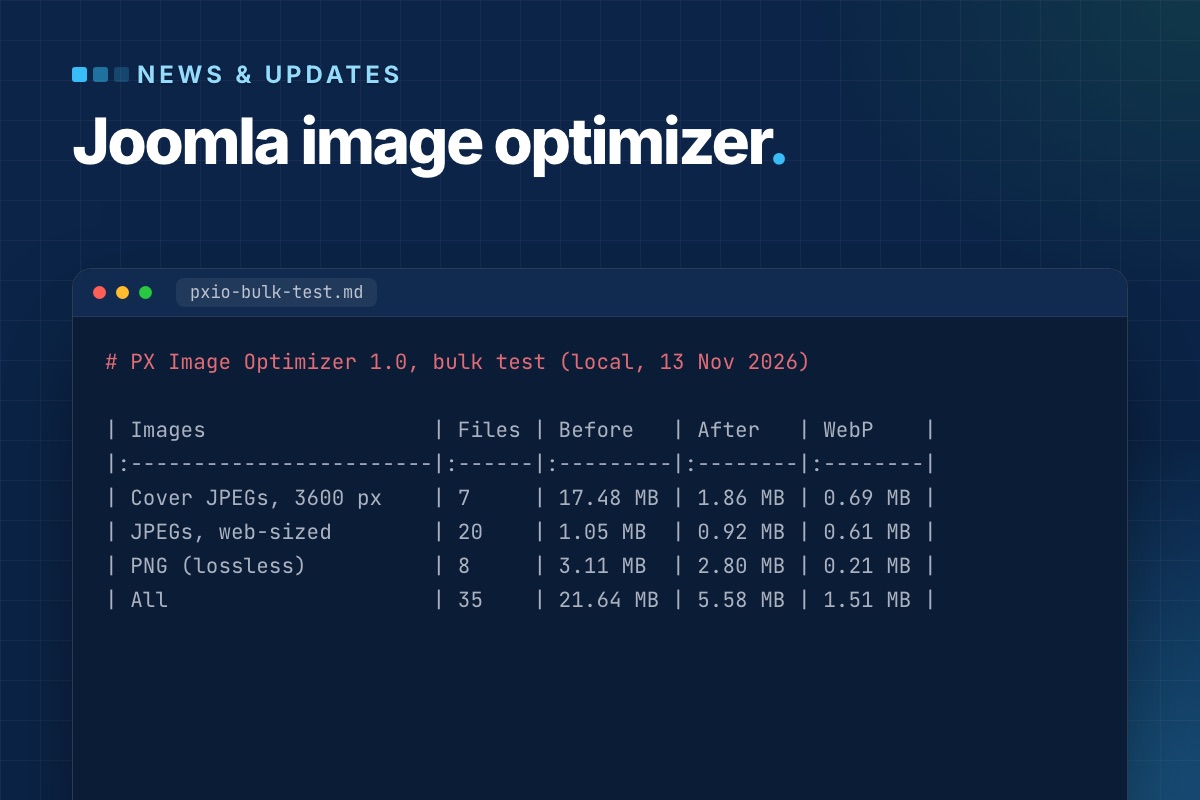
We installed 1.0.0 on a local Joomla 6.2 test site (PHP 8.3.14 with GD, no Imagick) and ran Bulk optimize on its images folder: 35 files, Balanced preset, the defaults otherwise.
| Images | Files | Before | After | WebP copies |
|---|---|---|---|---|
| Blog cover JPEGs, enlarged to 3600 × 2400 px | 7 | 17.48 MB | 1.86 MB | 0.69 MB |
| JPEGs already sized for the web (400–1200 px wide) | 20 | 1.05 MB | 0.92 MB | 0.61 MB |
| PNG: 3 illustrations at 2400 × 1600 px, 5 small logos and banners | 8 | 3.11 MB | 2.80 MB | 0.21 MB |
| All | 35 | 21.64 MB | 5.58 MB | 1.51 MB |
Read the rows separately, because the total hides where the savings come from:
- Oversized images are the whole story. The seven 3600 px JPEGs were scaled to 2560 px and recompressed: 17.48 MB down to 1.86 MB. One cover went from 4.86 MB to 433 KB, and its WebP copy is 200 KB. These are cover graphics enlarged for the test, which compress far better than camera photos – expect smaller percentages on real photos.
- Images that were already web-sized barely change as JPEGs (−12%). Their WebP copies are where the gain is.
- PNG stays lossless, so the PNG files themselves shrink little (−10%). The WebP copies are lossy (quality 80) and came to 0.21 MB for all eight. Browsers that support WebP – every current one – get those.
Your numbers depend on what's in your library: images uploaded at full size shrink the most, images that were exported for the web gain mostly from WebP. The same test with Imagick will give somewhat different sizes. This test didn't include phone photos, so it says nothing about EXIF removal.
How WebP reaches your pages
With Front-end <picture> rewrite on, every JPEG or PNG under images, media or files that has a WebP copy is sent like this on front-end pages:
<!-- page HTML as sent by Joomla -->
<picture>
  <source type="image/webp" srcset="/images/blog/photo.webp">
  <img src="/images/blog/photo.jpg" alt="…" data-pxio="1">
</picture>
The rewrite leaves alone images that already have a srcset or sit inside a <picture>, images from other domains, and anything inside scripts, styles and similar blocks. The data-pxio attribute marks images it has handled; add it yourself to an <img> to skip that image. Because the change happens when the page is sent, clear Joomla's page cache after you switch it on. Lazy-loading and width/height attributes are a separate job – see what a page speed extension can and can't fix.
Restore and uninstall
Components » PX Image Optimizer » Images lists every processed file with its size before and after. Restore copies the original back, deletes the WebP copy and removes the row, so you can run Bulk optimize again later with other settings. Uninstalling removes media/com_pxio, including the kept originals – restore what you want back first. The WebP copies next to your images stay on disk.
Install
- Requirements: Joomla 6.x on MySQL or MariaDB, PHP 8.3 or later with Imagick (preferred) or GD with WebP support, images on the local Media Manager adapter.
- Download
pkg_pxio-1.0.0.zipfrom the PX Image Optimizer page – a free thepixel.dev account is enough. - Upload it in System » Install » Extensions. The package installs the component and the plugin System - PX Image Optimizer and enables the plugin.
- Open Components » PX Image Optimizer » System check: the engine and WebP must show Yes.
- Leave the fields of the core Media Action - Resize plugin empty – PX Image Optimizer does the resizing, and a lower core limit would save its output again at quality 100.
- Run Bulk optimize on a small folder first, check a few pages, then do the rest of
images. Files that arrive another way – FTP, an editor's own file browser such as JCE's – are only picked up by Bulk optimize.
Every screen is covered in the PX Image Optimizer documentation. Images are one part of page weight; our Joomla performance guide covers the server side. Want someone to look at the whole site? Our SEO and speed optimization service starts with a measured audit.