
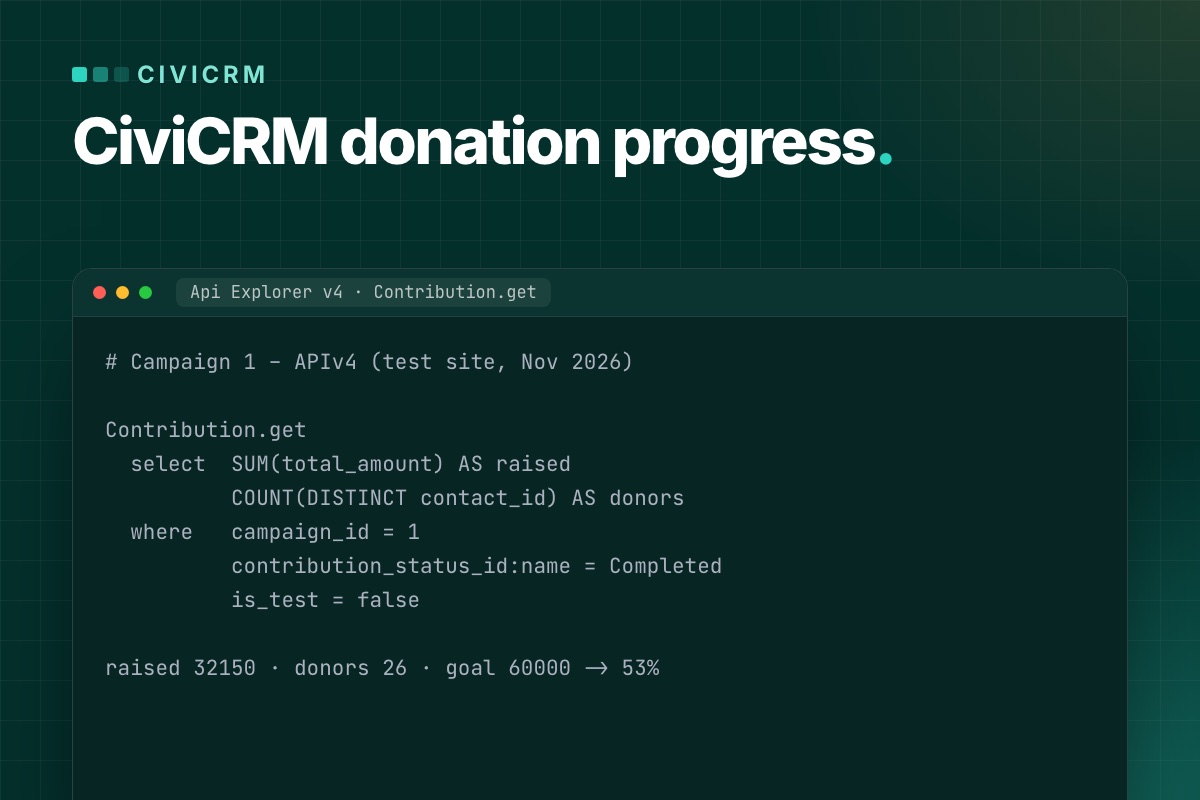

To show CiviCRM donation progress on a Joomla home page, give the campaign a revenue goal in CiviCampaign, add up its completed contributions with APIv4, and print the result from a Joomla module layout. The whole job is two API calls, a five-minute cache and a <progress> element. Below are the CiviCRM settings the numbers depend on, the queries, a layout override we ran on Joomla 6.2 with CiviCRM 6.19.2, and when CiviCRM's own contribution widget is enough.
Where the numbers live in CiviCRM
CiviCRM has two goals, and they count different things:
- Campaign goal: the Revenue Goal field of a campaign (
goal_revenuein the API). Contributions count toward it when theircampaign_idis that campaign, whichever page, import or staff member recorded them. - Contribution page goal: the Goal Amount on a contribution page's Title tab (
goal_amount). CiviCRM's built-in widget measures against this one, and only counts gifts made through that page.
For a home page bar, the campaign is the better unit. One appeal often has an online page, a mailing and checks entered by staff, and they all carry the same campaign. Online gifts get it automatically: in CiviCRM 6.19.2 the contribution form takes the campaign from the page (ContributionBase::getCampaignID()) unless the page has a campaign field in a profile. Gifts entered by hand need the campaign picked in the contribution form.
"Raised" in this post means the sum of contributions with status Completed that are not test contributions. Pending pay-later gifts don't count until they are marked completed, a refunded gift drops out when its status changes to Refunded, and each installment of a recurring gift is a new contribution that takes the campaign from the recurring record and counts once it completes.
Step 1: set up the campaign
- Enable the component under Administer → System Settings → Components: select CiviCampaign, Enable, Save. A Campaigns menu appears.
- Campaigns → New Campaign: title, type, start date, and the two fields the bar needs, Revenue Goal and End Date. Without an end date CiviCRM treats the campaign as ongoing, and the bar shows no "days left".
- Contributions → Manage Contribution Pages → Configure → Title tab: choose the campaign. From now on every gift on that page carries it.
The campaign ID is the id= in the edit link on Campaigns → Campaign Dashboard. Leave the page's Goal Amount empty unless you also use the widget described further down; two goals for one appeal will drift apart.
Step 2: check the numbers before writing any PHP
Open Support → Developer → Api Explorer v4, pick the Contribution entity and the get action, and build the query there. In APIv4 an aggregate goes in the select list with an alias, and :name lets you filter by a status name instead of its numeric ID. The same query with CiviCRM's command-line tool, cv:
# terminal – amount raised for campaign 1
cv api4 Contribution.get '{"select":["SUM(total_amount) AS raised","COUNT(id) AS gifts","COUNT(DISTINCT contact_id) AS donors"],"where":[["campaign_id","=",1],["contribution_status_id:name","=","Completed"],["is_test","=",false]]}'
On our test site, the Joomla 6.2 quickstart of PX Unity with its demo data, we ran these parameters through civicrm_api4(): campaign 1 returned raised 32150 from 26 gifts by 26 donors, against a revenue goal of 60000. That matched a plain SQL sum over civicrm_contribution. Note the difference between the two counts: COUNT(id) is gifts, COUNT(DISTINCT contact_id) is people. A monthly donor is one person and many gifts, so decide which one your page means by "donors".
To list every campaign at once, select campaign_id, campaign_id:label and the sum, add a campaign_id IS NOT NULL condition, and group by campaign_id.
Step 3: print it from a Joomla module layout
No new extension is needed. A Custom module with its own layout, the pattern from our post on Joomla content blocks without a page builder, does the job: the editor keeps the text and the donate button, the layout adds the numbers. This is the file we tested. Save it with <?php on its own first line, above the comment:
// templates/your_template/html/mod_custom/campaign-progress.php
defined('_JEXEC') or die;
use Joomla\CMS\Cache\CacheControllerFactoryInterface;
use Joomla\CMS\Factory;
// The module text starts with the campaign, e.g. "campaign: 3". The rest is printed below the numbers.
$plain = html_entity_decode(strip_tags($module->content), ENT_QUOTES | ENT_HTML5, 'UTF-8');
$campaignId = preg_match('/^[\s\x{a0}]*campaign:[\s\x{a0}]*(\d+)/iu', $plain, $m) ? (int) $m[1] : 0;
$text = preg_replace('#^\s*<p[^>]*>(?:\s| )*campaign:(?:\s| )*\d+(?:\s| )*</p>#iu', '', $module->content);
$load = static function (int $id): ?array {
// Front-end settings file, as CiviCRM's own pages use it; the administrator copy if it is missing
$settings = JPATH_SITE . '/components/com_civicrm/civicrm.settings.php';
$settings = is_file($settings) ? $settings : JPATH_ADMINISTRATOR . '/components/com_civicrm/civicrm.settings.php';
if ($id <= 0 || !is_file($settings)) {
return null;
}
// Bootstrap CiviCRM once (already done on CiviCRM's own pages)
if (!class_exists('CRM_Core_Config', false)) {
defined('CIVICRM_SETTINGS_PATH') || define('CIVICRM_SETTINGS_PATH', $settings);
require_once CIVICRM_SETTINGS_PATH;
require_once 'CRM/Core/Config.php';
}
\CRM_Core_Config::singleton();
// get(false): no permission check, so only totals leave this function
$campaign = \Civi\Api4\Campaign::get(false)
->addSelect('title', 'goal_revenue', 'end_date')
->addWhere('id', '=', $id)
->addWhere('is_active', '=', true)
->execute()
->first();
if (!$campaign || (float) $campaign['goal_revenue'] <= 0) {
return null;
}
$currency = \Civi::settings()->get('defaultCurrency');
$totals = \Civi\Api4\Contribution::get(false)
->addSelect('SUM(total_amount) AS raised', 'COUNT(DISTINCT contact_id) AS donors')
->addWhere('campaign_id', '=', $id)
->addWhere('contribution_status_id:name', '=', 'Completed')
->addWhere('is_test', '=', false)
->addWhere('currency', '=', $currency)
->execute()
->first();
$raised = (float) ($totals['raised'] ?? 0);
$goal = (float) $campaign['goal_revenue'];
return [
'title' => (string) $campaign['title'],
'percent' => (int) min(100, floor($raised / $goal * 100)),
'raised' => \CRM_Utils_Money::format($raised, $currency),
'goal' => \CRM_Utils_Money::format($goal, $currency),
'donors' => (int) ($totals['donors'] ?? 0),
'end' => $campaign['end_date'] ?: null,
];
};
// Cache for 5 minutes, even when the site cache is off. A failed load is cached too, as "none",
// so a wrong ID or a broken CiviCRM doesn't bootstrap CiviCRM on every page view.
$cache = Factory::getContainer()->get(CacheControllerFactoryInterface::class)
->createCacheController('output', ['defaultgroup' => 'civi_progress', 'caching' => true, 'lifetime' => 5]);
$key = 'campaign_' . $campaignId;
$data = json_decode((string) $cache->get($key), true);
if (!is_array($data)) {
try {
$data = $load($campaignId);
} catch (\Throwable $e) {
$data = null;
}
$data = $data ?: ['none' => true];
$cache->store(json_encode($data), $key);
}
if (!empty($data['none'])) {
echo $text;
return;
}
$e = static fn ($value) => htmlspecialchars((string) $value, ENT_QUOTES, 'UTF-8');
$daysLeft = $data['end'] ? max(0, (int) ceil((strtotime($data['end']) - time()) / 86400)) : null;
$labelId = 'campaign-progress-' . $module->id;
?>
<div class="campaign-progress">
<p id="<?php echo $labelId; ?>" class="campaign-progress__title"><?php echo $e($data['title']); ?></p>
<progress max="100" value="<?php echo $data['percent']; ?>" aria-labelledby="<?php echo $labelId; ?>"><?php echo $data['percent']; ?>%</progress>
<p class="campaign-progress__numbers">
<strong><?php echo $e($data['raised']); ?></strong> raised of <?php echo $e($data['goal']); ?> (<?php echo $data['percent']; ?>%)
· <?php echo $data['donors']; ?> donors
<?php if ($daysLeft !== null) : ?>· <?php echo $daysLeft; ?> days left<?php endif; ?>
</p>
<?php echo $text; ?>
</div>Then create the module under Content → Site Modules → New → Custom:
- Text: a first paragraph
campaign: 1with your campaign ID, then whatever the editor wants under the numbers, usually one sentence and a Donate button linked to the contribution page's menu item. The ID has to be the first thing in the text, so "Our campaign: 2026 goals" further down is never read as campaign 2026. - Advanced → Layout:
campaign-progress. Pick a position and the pages under Menu Assignment as for any module.
On the test site the module printed the campaign title, a bar at 53%, "$ 32,150.00 raised of $ 60,000.00 (53%) · 26 donors · 48 days left" and the editor's button. The money format comes from CiviCRM's own settings, so it matches the receipts. With a wrong ID, or with CiviCRM uninstalled, it prints only the editor's text, and the page still works. We also ran it with campaign: 2, which is what TinyMCE saves when the space gets converted, and it found campaign 2.
Four decisions in that file
get(false) skips CiviCRM's permission check. APIv4 checks the permissions of the logged-in user by default, and a guest is not allowed to read contributions. With get() our guest visitor got no numbers at all. Turning the check off is fine here because the function returns only a title, two totals and a count, never a row about a person. Don't reuse the pattern for anything that lists contacts.
The cache is forced on. 'caching' => true caches the numbers for five minutes even when Joomla's System Cache is off, so a busy home page doesn't run two CiviCRM queries per visitor. A failed load is cached too, as {"none":true}, so a wrong ID doesn't bootstrap CiviCRM on every page view either; after a fix, the bar appears within five minutes, or at once if you clear the civi_progress cache. The same goes for a short database error: the bar stays hidden for up to five minutes. If you switch System Cache on, the Custom module's own caching (Advanced → Caching, 900 seconds by default) comes on top; set it to No caching for this module if fifteen minutes is too slow for your appeal. To see a new gift at once, clear the civi_progress group under System → Maintenance → Clear Cache.
One currency. SUM() adds numbers, not money. If the site takes gifts in more than one currency, the filter on the default currency keeps the total honest; group by currency instead if you want a total per currency.
No CiviCRM code on a cache hit. The cache holds formatted strings, so only one page view in five minutes bootstraps CiviCRM; the others read a small JSON string. The layout loads the front-end civicrm.settings.php, the file CiviCRM's own front-end pages use, and falls back to the administrator copy.
Make the bar readable for everyone
A native <progress> element already has the progressbar role and its value; aria-labelledby gives it a name, which is what WCAG 2.2 success criterion 4.1.2 asks for. The amount and the percentage are also in the text, so the bar is never the only way to read the result (1.4.1 Use of Color). When you style it, keep the filled part at 3:1 or more against the track and the page (1.4.11 Non-text Contrast). These colors give 3.5:1 against the track and 5.2:1 against white:
/* your template's custom CSS file (Cassiopeia: media/templates/site/cassiopeia/css/user.css) */
.campaign-progress progress {
  width: 100%;
  height: 0.75rem;
  appearance: none;
  border: 0;
  border-radius: 999px;
  background: #d1d5db;
  overflow: hidden;
}
.campaign-progress progress::-webkit-progress-bar { background: #d1d5db; }
.campaign-progress progress::-webkit-progress-value { background: #0a7d4f; }
.campaign-progress progress::-moz-progress-bar { background: #0a7d4f; }
When CiviCRM's own widget is enough
Each contribution page has a Widgets tab. Enable it and CiviCRM gives you a block of HTML and a script tag to paste into any web page, with the page's title, amount raised, a progress bar against its Goal Amount and a contribute button. It reads the numbers in CiviCRM's CRM_Contribute_BAO_Widget: by default completed, non-test contributions made through that page, against the page goal, not the campaign goal. Its donor figure is a count of contributions, not of people.
On a Joomla site the snag is the script tag. Joomla's text filters remove <script> from editor content for every group except Super Users on a default install, so the widget breaks the first time an Administrator saves that module. Use the widget for a one-page appeal or for a partner's site that isn't Joomla; use the layout above when the campaign takes gifts from more than one place, or when the bar has to look like the rest of your site.
Before you show the bar to the public
- Make one test gift with the payment processor in test mode and one real small gift, then check that only the real one moved the bar, after the five minutes.
- Refund a test gift in CiviCRM and watch the total go down.
- Check offline entry: a check entered without a campaign will never reach the bar. If staff import gifts, map the campaign column.
- Decide what happens at 100%. The layout caps the bar at 100 and keeps counting the amount, which is usually what a "we did it" message needs.
Or use the block that already does it
The campaign block in PX Unity, our Joomla CiviCRM template for nonprofits and councils, runs the same kind of campaign and contribution queries. You give it a campaign ID and, optionally, a contribution page ID, and it shows the amount raised, the goal, donors and days left, with the numbers cached for a few minutes. Without CiviCRM it shows the figures typed in its own fields. The other PX Unity blocks read events with places left, membership prices and petition signatures the same way; the PX Unity documentation lists their settings, the launch post shows them on the demo, and our CiviCRM Joomla theme post covers the CiviCRM pages the donate button leads to. Still on CiviCRM with Joomla 3 or 4? The CiviCRM Joomla 6 upgrade service moves the site first.