
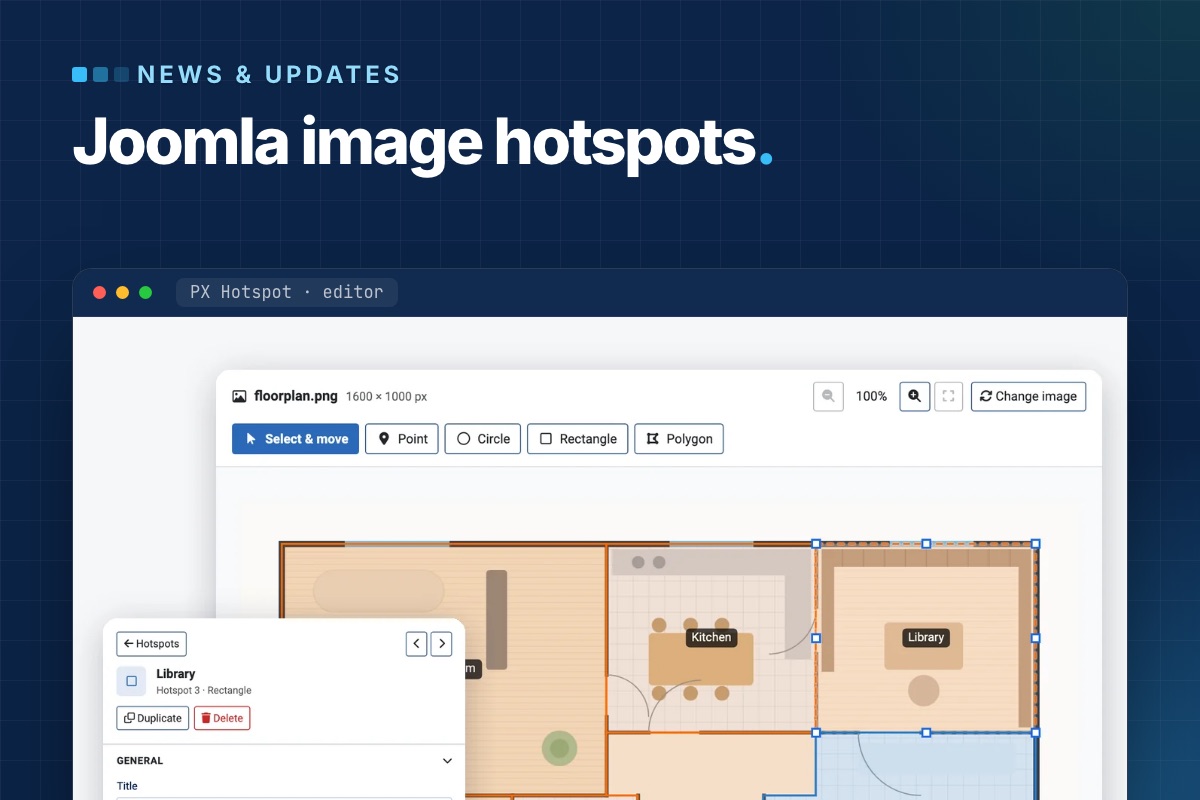

PX Hotspot is a free Joomla image hotspot extension for Joomla 5.4 and 6. You draw points, circles, rectangles and polygons on a picture – a floor plan, a product photo, a map – and each one opens text, an image, a gallery, a video or a Joomla article in a tooltip, a modal or a side panel. The image goes on the page with a module, or inside an article with {loadmoduleid}.
Why not a plain HTML image map?
Joomla has no hotspot tool of its own. The hand-made route is an HTML image map in the article source:
<!-- article HTML, edited in the editor's code view -->
<img src="/images/floorplan.png" usemap="#plan" alt="Floor plan" width="1600" height="1000">
<map name="plan">
  <area shape="rect" coords="1100,80,1520,440" href="/rooms/library" alt="Library">
</map>
That works until the page gets responsive. The coords are fixed pixels, measured on the full-size image, and the browser never scales them. When your template shrinks the picture to fit a phone, the areas stay where they were and point at the wrong room. An area is also only a link – no styled tooltip, no panel, no gallery – and nobody wants to measure coordinates by hand.
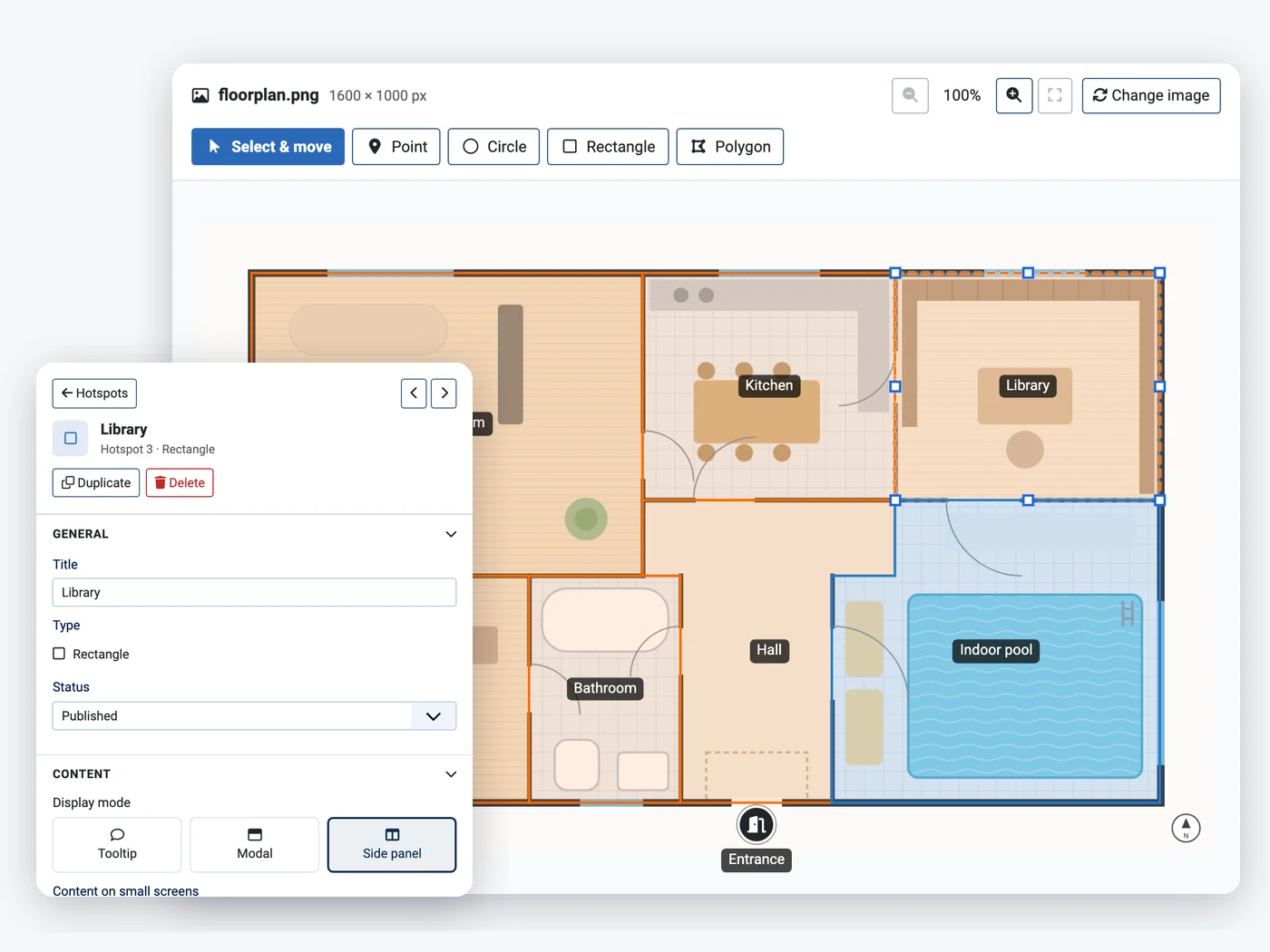
PX Hotspot stores every shape as fractions of the image. The same Library room in our demo floor plan is x 0.6875, y 0.08, width 0.2625, height 0.36, so it covers the same part of the picture at every width – and you draw it on the picture rather than typing numbers.
What you get in 1.0
| Part | What it does |
|---|---|
| Shapes | Points, circles, rectangles and polygons (3 to 100 corners), up to 200 hotspots per image |
| Markers | Six built-in icons, about 2,000 Font Awesome 6 Free icons or your own picture; colour, size and pulse / bounce / glow / heartbeat animations (off for visitors who prefer reduced motion) |
| Content | Heading, rich text, image and a button; a Joomla article (intro or full text, with its access level, language and publish dates respected); a gallery of up to 20 pictures; a YouTube, Vimeo or MP4 / WebM video |
| Display | Tooltip, modal or side panel per hotspot, opened on click or hover; on phones a bottom sheet, a modal or the same as desktop |
| Image options | Labels on the image with a hide button, zoom (buttons, pinch, Ctrl + wheel), smaller markers on phones, lazy loading |
| Editor | Draw, drag and resize on the image, edit polygon corners, zoom and pan, duplicate, keyboard shortcuts, replace the background, Preview |
Background pictures are JPG, PNG or WebP (no SVG). YouTube and Vimeo load only when the visitor presses Play – YouTube from its no-cookie address – and every hotspot is a real button that works with the keyboard and screen readers.
Which display for which job
How a hotspot opens decides whether visitors read it or close it, and it is set per hotspot. These are the seven pages of our live demo, each built for a different case:
| Use | Setup | Why |
|---|---|---|
| City walking map | Font Awesome pins and areas; tooltips (some on hover), modals for the full card; labels on; zoom | Many places close together: a quick tooltip to scan, a modal when there is more to read |
| Floor plan | Rectangle and polygon rooms, side panel | The plan stays visible while the visitor reads about the room |
| Restaurant menu | Circle areas that open on hover | Short content (a dish and its price) – hovering is faster than clicking; phones tap |
| Market stall | Areas and a free polygon, bottom sheet on phones, half-size marker | On a small screen a tooltip would cover the photo |
| Bookshop tour | Built-in icons with animations, one hotspot shows a Joomla article | Text you already maintain as an article isn't copied into the hotspot |
| Stadium guide | Areas on a night photo, video in a left side panel, zoom on phones only | Video needs room; zoom only where the picture gets small |
| Video and slider | MP4 with a poster, YouTube, Vimeo, sliders in a modal, a panel and a tooltip | Every media type side by side |
A rule of thumb from building these: hover only for short content (a line or two, maybe a photo), a side panel when the visitor compares several hotspots, a modal for galleries and long text. Don't crowd point markers: on a phone they keep their full size by default, so points that sit close together overlap. Use areas there, or set the markers to 75% or 50% on small screens.
Put it on a page or inside an article
An interactive image is shown by the PX Hotspot module. In Content » Site Modules » New » PX Hotspot, select the image (or create one in the popup), pick a position and publish. To place it in the middle of an article, give the module no position, keep it published and assigned to the pages where the article shows, and write:
<!-- in the article text; 123 is the module ID -->
{loadmoduleid 123}
That is Joomla's own Content - Load Modules plugin (it must be enabled, or the tag shows as plain text), so PX Hotspot needs no plugin of its own. Several images on one page work independently, and the scripts and styles load only on pages that show one. Interactive images have Joomla's access levels, languages and publishing state, and the component uses Joomla's create / edit / edit own / edit state / delete permissions.
For developers and AI agents
Every save is checked on the server: shapes must lie inside the picture, rich text goes through Joomla's text filters and javascript: links are refused. The package also ships administrator/components/com_pxhotspot/AI.md, a guide that tells an AI agent – or you – how to create, copy and delete interactive images, hotspots and modules from a PHP script using PX Hotspot's own classes, with the same checks as the editor. It has two complete examples, so a long list of points can be scripted instead of drawn.
If what you need is a real map with layers rather than points on a picture, that is PX Atlas, our free maps extension for OpenStreetMap and Google Maps.
Install
- Requirements: Joomla 5.4 or 6, PHP 8.1 or later (Joomla 6 itself needs PHP 8.3), MySQL or MariaDB.
- Download
pkg_pxhotspot-1.0.0.zipfrom the PX Hotspot page – a free thepixel.dev account is enough. - Upload it in System » Install » Extensions. The package installs the component and the module.
- Go to Components » PX Hotspot, click New, choose a background picture, draw your first hotspot, Save and Preview.
- Show it with the module or
{loadmoduleid}as above.
Every screen is covered in the PX Hotspot documentation. Need something the module doesn't do – hotspots fed from your own data, say? That's our custom extension development work. For page sections around the image, see Joomla content blocks without a page builder; for a whole Joomla 6 site built from modules like this one, the free PX Base starter template.